Introduction
Ever felt stuck waiting for your phone’s GPS to find you in a new city or remote area? Meet gpsOneXTRA Assistance—a clever tech hack by Qualcomm that boosts GPS speed without needing fancy A-GPS systems. Let’s break down how it works (and why you’ll love it).
What is gpsOneXTRA Assistance?
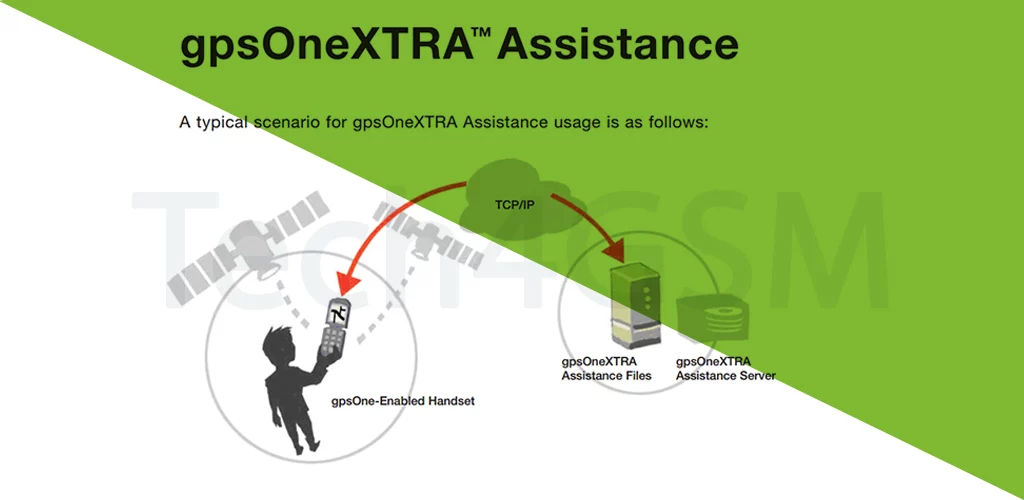
Think of it as a GPS “cheat sheet” for your phone. Developed by Qualcomm, this technology lets your device download a tiny assistance file via a quick internet connection (like Wi-Fi or mobile data). This file contains crucial details about satellite positions, cutting GPS lock times from minutes to seconds!
Why It’s a Game-Changer
- No A-GPS? No Problem: Most carriers need A-GPS infrastructure to speed up GPS. But with gpsOneXTRA, even smaller networks can offer fast, accurate GPS by simply letting users download that small file.
- Works Anywhere: Hiking in the mountains? Road-tripping abroad? A quick internet sip (to grab the file) is all your phone needs to lock your location faster.
- Data-Friendly: The assistance file is super small—no buffering or heavy downloads.
How gpsOneXTRA Works in 3 Steps
- Quick Download: Your phone grabs a compact satellite data file (via Wi-Fi or cellular data).
- Smarter GPS: The file tells your phone where to look for satellites, skipping the lengthy “cold start” search.
- Instant Lock: GPS locks your location in 5–15 seconds, even without A-GPS support from your carrier!
Real-Life Benefits
- Travelers: Get maps working fast in areas with patchy network coverage.
- Budget Carriers: Smaller mobile providers can compete with big players by offering speedy GPS.
- Battery Savings: Less time searching = less battery drain!
gpsOneXTRA vs. Traditional A-GPS
| Feature | A-GPS | gpsOneXTRA |
|---|---|---|
| Carrier Setup | Needs A-GPS servers | No extra infrastructure |
| Internet Use | Frequent data updates | One-time tiny download |
| Remote Areas | Struggles without signal | Works after one file download |
| Cost | Expensive for carriers | Affordable & efficient |
How to Use gpsOneXTRA
- Enable Location Services: Turn on GPS in your phone settings.
- Connect Briefly: Use Wi-Fi or mobile data for a few seconds to download the file.
- Go Explore: Your GPS now works faster, even offline!
Pro Tip: Download the assistance file at home or hotel Wi-Fi to save mobile data.
Why Your Phone Might Still Lag
- No Internet Access: The file can’t download without a quick connection.
- Outdated Hardware: Older phones may not support gpsOneXTRA.
- Software Glitches: Keep your OS updated for best performance.
Final Thoughts
Qualcomm’s gpsOneXTRA is like giving your phone a GPS head start—making it smarter, faster, and more reliable, even without costly carrier upgrades. Whether you’re a traveler or just hate waiting for maps to load, this tech is a quiet hero in your pocket.
Key Takeaways:
- gpsOneXTRA uses a small internet-downloaded file to speed up GPS locks.
- Perfect for travelers and carriers without A-GPS infrastructure.
- Saves battery and data while boosting accuracy.
- Ensure your phone has brief internet access to unlock its benefits.