Introduction
When shopping for smartphones, tablets, or laptops, display size is one of the first specs you notice. But what does it really mean? Let’s break down how screen sizes are measured, what screen-to-body ratio means, and why these details impact your device experience—all in simple terms!
1. How Is Display Size Measured?
- Industry Standard: Inches
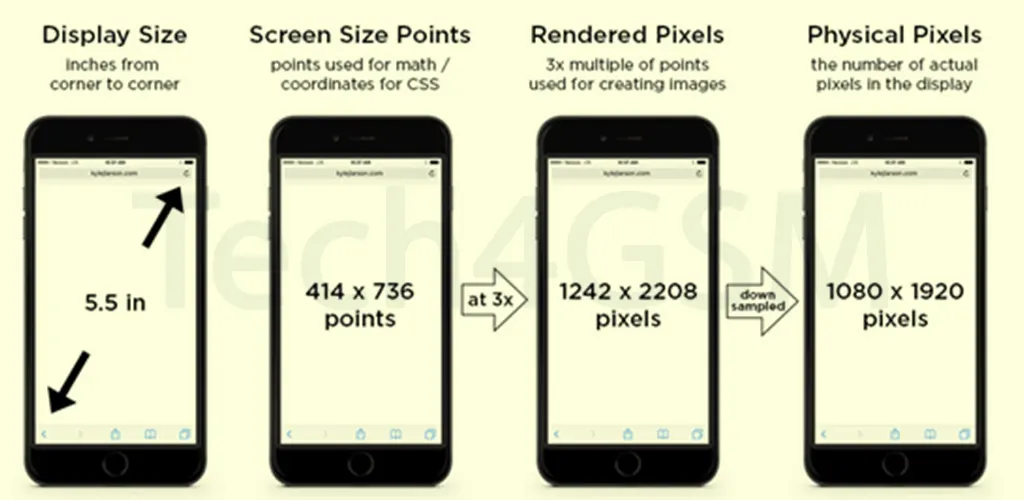
Display sizes are measured diagonally in inches (from one corner to the opposite corner). For example, a 6.5-inch screen means the diagonal length is 6.5 inches. This method is universal, making it easy to compare devices. - Not Just Bigger = Better
A larger screen doesn’t always mean a better experience. The actual usability depends on factors like resolution, bezel size, and how the device fits in your hand.
2. What Is Screen-to-Body Ratio?
- The Bezel vs. Screen Battle
The screen-to-body ratio tells you how much of the device’s front is occupied by the display versus the bezels (the borders around the screen). A higher ratio (e.g., 90%) means smaller bezels and more screen space. - Why It Matters
- Immersive Viewing: Less bezel = more content, fewer distractions (think edge-to-edge screens in modern smartphones).
- Compact Design: Devices can have larger displays without becoming bulky. For example, a phone with a 6.7-inch screen and high screen-to-body ratio feels sleeker than one with thick bezels.
3. Bezel Size: The Hidden Game-Changer
- From Chunky to Chic
Older devices had thick bezels, but today’s gadgets aim for “all-screen” designs. Smaller bezels mean manufacturers can pack bigger displays into smaller bodies. - Functional Benefits
- Better Grip: Slim bezels reduce accidental touches while holding the device.
- Aesthetic Appeal: Minimalist bezels give devices a modern, premium look.
4. Choosing the Right Device
When picking a device:
- Prioritize Screen-to-Body Ratio if you want a larger display in a compact size.
- Check Ergonomics: A 6.5-inch screen with slim bezels might feel better than a 6-inch screen with bulky borders.
- Balance Size and Portability: A tablet with a 10-inch display and high ratio is great for media, but ensure it’s still easy to carry.
Final Takeaway
Display size in inches gives a basic idea, but the screen-to-body ratio reveals how efficiently the screen uses the device’s front. Smaller bezels mean more screen real estate without adding bulk. Next time you’re device shopping, look beyond the inches—check the ratio too!