Introduction
A Uniform Resource Locator (URL) is like a digital street address for everything on the internet. Whether it’s a website, image, video, or document, every online resource has a unique URL. Think of it as the GPS coordinates that help your browser find exactly what you’re looking for. Let’s break down how URLs work and why they matter in 2025!
What Is a URL?
A URL is a web address that identifies and locates resources online. For example, typing https://tech4gsm.com in your browser takes you directly to that website. URLs are essential for navigating the internet, linking pages, and sharing content.
Structure of a URL: Breaking It Down
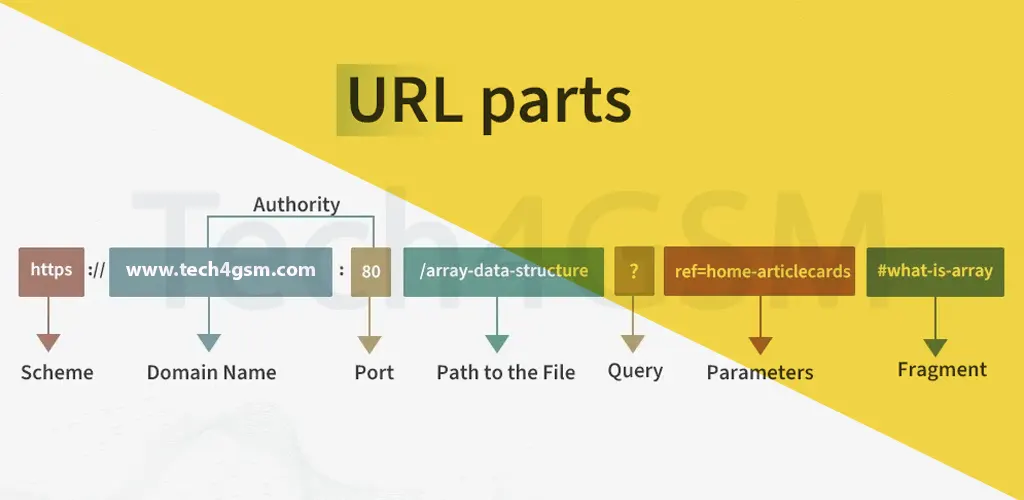
A URL is made up of several parts, each with a specific role. Let’s dissect this example:
https://tech4gsm.com/articles/seo-tips#best-practices
- Protocol (Scheme):
- The first part of a URL (e.g.,
https://orhttp://). - It defines how data is transferred between your browser and the server.
- Common protocols:
- HTTP: Standard for websites (not secure).
- HTTPS: Secure version of HTTP (encrypted).
- FTP: For file transfers.
- mailto: Opens email clients.
- The first part of a URL (e.g.,
- Domain Name (Host):
- The website’s name (e.g.,
tech4gsm.com). - Acts like a “phonebook entry” that directs users to the site’s IP address.
- The website’s name (e.g.,
- Port:
- Usually hidden, the port follows the domain (e.g.,
:80for HTTP). - Default ports like
:443for HTTPS are automatically used by browsers.
- Usually hidden, the port follows the domain (e.g.,
- Path:
- Specifies the exact page or file on the website.
- Example:
/articles/seo-tipspoints to a specific article.
- Query Parameters:
- Added after a
?, these customize content (e.g.,?search=android). - Multiple parameters use
&(e.g.,?category=tech&page=2).
- Added after a
- Fragment:
- Starts with a
#and links to a specific section on a page (e.g.,#best-practices).
- Starts with a
Why Do URLs Matter?
- Navigation: URLs let you jump between pages, sites, and resources.
- SEO: Search engines use URLs to understand webpage content. Clean URLs rank better!
- Sharing: A clear URL is easy to remember and share (e.g.,
tech4gsm.com/contact).
How to Create a User-Friendly URL
- Keep It Short: Avoid unnecessary words or numbers.
- Use Hyphens: Replace spaces with hyphens (
-) for readability. - Include Keywords: Add relevant words (e.g.,
/2025-tech-trends). - Avoid Special Characters: Stick to letters, numbers, hyphens, and underscores.
URL vs. URI: What’s the Difference?
- URL: A specific address to access a resource (e.g.,
https://tech4gsm.com). - URI (Uniform Resource Identifier): A broader term that includes URLs and URNs (names for resources).
Common URL Protocols in 2025
| Protocol | Use Case |
|---|---|
| HTTP | Basic websites (non-sensitive data). |
| HTTPS | Secure websites (e.g., banking, login pages). |
| FTP | Uploading/downloading large files. |
| mailto | Direct links to email addresses. |
Fun Facts About URLs
- The first URL was created in 1991 by Tim Berners-Lee.
- Over 60% of websites now use HTTPS for security.
- URLs can include emojis! Try
http://🌐.com(yes, it works!).
FAQ: Quick Answers About URLs
1. What does “URL” stand for?
- Uniform Resource Locator – the official “address” of online content.
2. Can URLs have spaces?
- No! Use
%20or hyphens (-) instead.
3. What characters are allowed in URLs?
- Letters (A-Z), numbers (0-9), and symbols like
-,_,., and~.
4. Why do some URLs have “www” and others don’t?
- “www” is a subdomain. Modern sites often drop it for shorter URLs (e.g.,
tech4gsm.comvs.www.tech4gsm.com).
5. How do URLs affect SEO?
- Clear, keyword-rich URLs help search engines rank your site higher.
Conclusion
URLs are the backbone of the internet, guiding users to billions of resources daily. In 2025, as technology evolves, understanding URLs will remain crucial for browsing.