ANWhatsApp Download 2025 Anti-Ban: Elevate Your Messaging!
Tired of the same old WhatsApp limitations? Craving more control, privacy, and flair? Your search ends here! ANWhatsApp, a powerful modified version of WhatsApp, packs incredible features banned from the official app. Forget restrictions – download ANWhatsApp today and transform your chats! This guide covers everything: standout features, safe installation, and why its anti-ban protection makes it a top choice in 2025. Let’s dive in!
1. Why ANWhatsApp? Your Feature-Packed Alternative
Simply put, ANWhatsApp unlocks what WhatsApp won’t. Developed by Ammar, it retains WhatsApp’s core (messaging, calls, statuses) but adds game-changing extras:
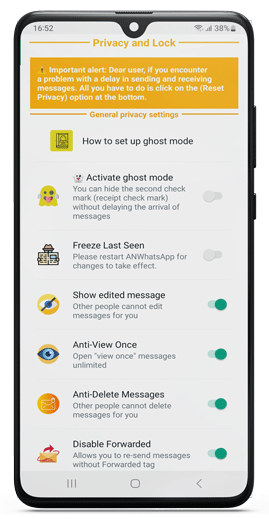
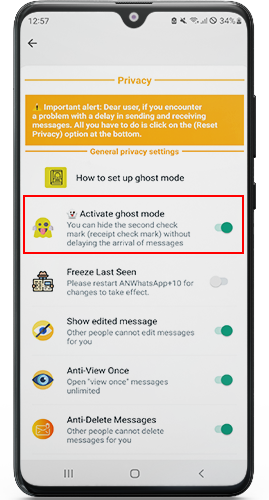
- Unrivaled Privacy: Hide “Last Seen,” blue ticks, typing indicators, and even your online status selectively.
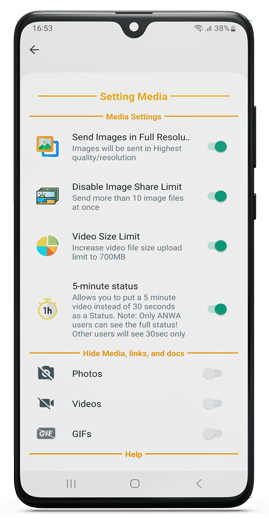
- Enhanced Media: Send files up to 700MB and high-quality images/videos without compression.
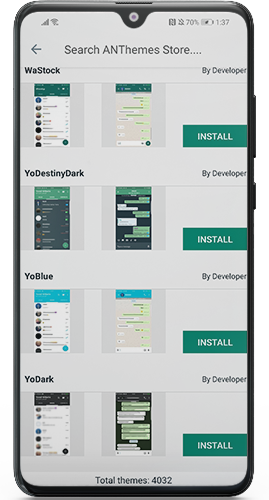
- Customization Heaven: Apply themes (like the popular Golden Theme), change fonts, colors, and chat layouts.
- Status Superpowers: Download others’ statuses (photo/video/text), view them stealthily, and post longer (120 sec) or collaged statuses.
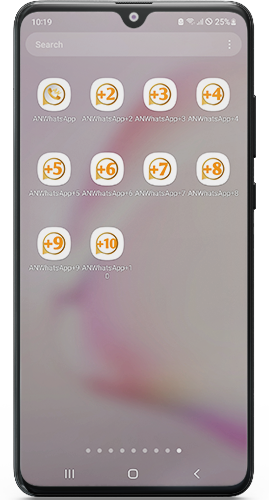
- Dual Accounts: Run two WhatsApp numbers on one phone effortlessly.
- Anti-Ban Protection: Use advanced features without constant fear of official WhatsApp bans (more on this later).
- Automation & Tools: Schedule messages, auto-reply, freeze “Last Seen,” lock chats/apps, and reject calls automatically.
2. ANWhatsApp APK: What’s New & Hot in 2025?
The May 2025 release isn’t just an update; it’s a powerhouse upgrade. Here’s the breakdown:
- 🆕 Blocked Number Support: Activates up to 90% of numbers previously blocked by WhatsApp.
- 🌐 Fresh Foundation: Updated to base version 2.25.15.73 for stability and compatibility.
- 📢 Smarter Notifications: Replaced basic “toasts” with sleek top-of-screen alerts.
✨ Status Revolution:
- Attach audio clips to your statuses.
- Use status filters for creative flair.
- Create status collages (multiple images/videos in one).
- 🤖 AI Integration: Generate images directly within the app using AI tools.
- 📸 Instagram Linking: Seamlessly connect your Instagram profile.
- 📎 Modern Attachments: Enjoy a cleaner, redesigned menu for sending files.
🔒 Enhanced Privacy & Experience:
- Hide the “Quick Chat” button.
- Improved message read receipts.
- Significantly better media quality when sending photos/videos.
🛠️ Critical Fixes: Resolved connection issues, call privacy glitches, chat lock problems, and general bugs for smoother use.
3. Downloading ANWhatsApp 2025: Safe & Simple Steps
Important: ANWhatsApp is not on the Google Play Store due to policy conflicts. Download only from trusted sources like the developer’s official site or reputable tech hubs like Tech4GSM. Follow these steps carefully:
- Backup Chats: Backup your official WhatsApp chats (Settings > Chats > Chat Backup).
- Uninstall Official WhatsApp: ANWhatsApp cannot coexist with the official app. Remove it.
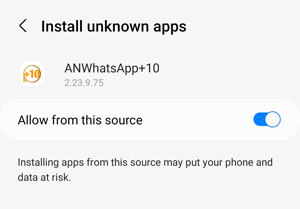
- Enable Unknown Sources: Go to Phone Settings > Security > Enable “Install Unknown Apps” or “Unknown Sources” for your browser/file manager.
- Download APK: Visit a trusted site (e.g., the official ANWhatsApp site or Tech4GSM) and download the ANWhatsApp APK.
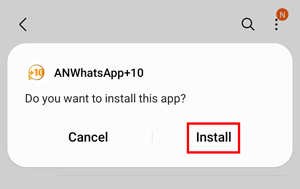
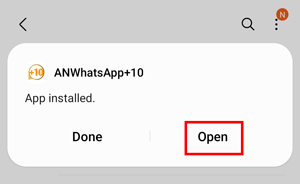
- Install: Locate the downloaded file (usually in
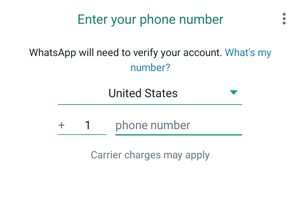
Downloads) and tap to install. Grant requested permissions (contacts, storage, microphone for calls). - Verify Number: Open ANWhatsApp, enter your phone number, and verify via SMS/call (like standard WhatsApp).
- Restore Backup: During setup, the app should detect your local backup. Allow it to restore your chats/media.
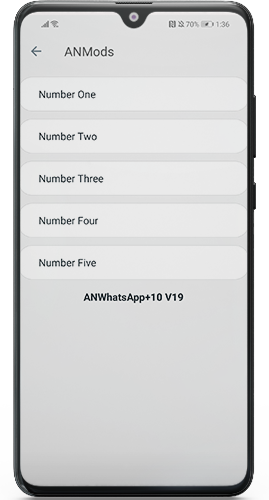
- Explore & Customize: Dive into the “AN Settings” or “Plus Settings” menu to unleash the app’s full potential!
4. The Anti-Ban Shield: Can You Really Trust It?
This is the golden question! ANWhatsApp developers explicitly build anti-ban measures into their mod. Here’s what it means:
- Purpose-Built Protection: The app’s code is modified to mimic official app behavior, making detection harder for WhatsApp servers.
- Reduced Ban Risk: While no mod is 100% ban-proof, ANWhatsApp has a strong track record. Users report significantly fewer bans compared to other mods, especially when not misusing spammy features.
- Key Safeguards: Features like hiding online status or “Last Seen” are designed to operate without triggering WhatsApp’s usual ban flags.
- Developer Vigilance: Ammar actively updates the app to counter new detection methods WhatsApp implements.
Important Caveat: Excessive automation (e.g., mass broadcasting), using banned numbers, or very frequent version changes can still increase risk. Use responsibly!
5. ANWhatsApp vs. Official WhatsApp: Why Switch?
Still on the fence? Here’s the clear advantage breakdown:
| Feature | ANWhatsApp | Official WhatsApp |
|---|---|---|
| Dark Theme | ✔️ Supported | ✔️ Supported |
| Edit Sent Messages | ✔️ Yes | ✔️ Yes |
| Auto-Reply Messages | ✔️ Built-in tool | ❌ Not available |
| Custom Themes & Backgrounds | ✔️ Fully customizable | ❌ Limited options |
| Send Larger Files | ✔️ Up to 700 MB | ❌ Max 100 MB |
| Download Others’ Statuses | ✔️ One-click save | ❌ Restricted |
| Hide Blue Ticks (Read Receipts) | ✔️ Optional | ❌ Always visible |
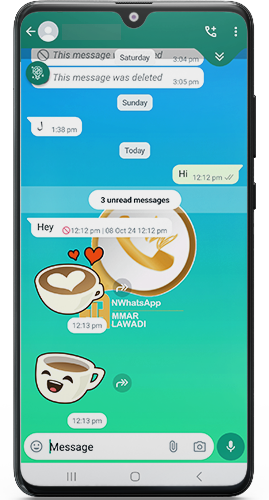
| View Deleted Messages | ✔️ Enabled | ❌ Impossible |
| Hide “Forwarded” Label | ✔️ Configurable | ❌ Always shown |
| Lock Chats with Password/Fingerprint | ✔️ Secure access | ❌ No native lock |
| Hide Specific Chats from Main Screen | ✔️ Archive invisibly | ❌ Basic archive only |
Key Takeaways
- ANWhatsApp extends beyond the official app with 10+ exclusive features, focusing on privacy control (e.g., hiding blue ticks), customization (themes), and tools (auto-reply).
- Official WhatsApp prioritizes simplicity and compliance with global privacy policies, lacking advanced customization.
- Safety Note: ANWhatsApp’s “Anti-Ban” feature aims to prevent account suspension, but installing unofficial APKs carries risks. Always download from trusted sources like tech4gsm.com.
6. Beyond the Hype: Safety & Security Considerations
Using any unofficial mod carries inherent risks. Stay informed:
- Source Matters: Only download APKs from the developer’s official site or highly trusted tech sites like Tech4GSM. Avoid random forums or links.
- Permissions: Grant only necessary permissions (Contacts, Storage, Microphone). Be wary if it asks for unusual access.
- Data Privacy: Unofficial apps don’t undergo the same scrutiny as the Play Store. While ANWhatsApp isn’t known for major leaks, understand your data isn’t verified by a third party.
- Updates: Regularly update ANWhatsApp only from your trusted source to get security patches and new features.
- Backup Regularly: Use the in-app backup feature frequently. Local backups are your safety net.
- Ban Risk Acknowledgement: Understand that while anti-ban features exist, the risk isn’t zero. Avoid spammy behavior.
7. Troubleshooting Common ANWhatsApp Issues
Hit a snag? Try these fixes:
- Installation Failed: Ensure “Unknown Sources” is truly enabled. Redownload the APK – the file might be corrupt.
- Verification Problems: Check your network connection. Ensure you uninstalled the official app. Wait for the SMS; request a voice call if needed.
- Restore Backup Failed: Double-check your official WhatsApp backup exists locally (
Phone Storage > WhatsApp > Databases). Ensure dates match. Sometimes a restart helps. - Connection Issues (Post-Install): Update (fixes connection bugs). Check internet permissions. Restart phone/router.
- Notifications Not Working: Check ANWhatsApp’s notification settings (App Settings > Notifications). Ensure battery optimization is OFF for ANWhatsApp. Re-enable notifications within ANWhatsApp settings.
- Feature Not Working: Ensure you enabled it! Many advanced features need activation in “AN Settings” or “Plus Settings”.
Still stuck? Reputable download sources like the official site or Tech4GSM often have dedicated support forums or comment sections where the developer or community helps.
8. The Verdict: Is ANWhatsApp 2025 Worth It?
Absolutely, for users who value:
- Unmatched Control: Over privacy and how you appear online.
- Creative Freedom: To personalize your app’s look and feel deeply.
- Enhanced Functionality: Features like dual accounts, status downloads, and massive file sharing are game-changers.
- Innovation: AI integration and new status formats keep it ahead of the curve.
Proceed with caution if:
- Absolute data privacy guaranteed by app stores is your top priority.
- You frequently engage in mass messaging or activities that might trigger bans even with anti-ban measures.
- You prefer the simplicity of the official app without extra settings.
9. Ready to Transform Your Chats? Get ANWhatsApp Now!
The power to break free from WhatsApp’s limitations is at your fingertips. ANWhatsApp delivers an unparalleled, customizable, and feature-rich messaging experience with a strong focus on anti-ban protection in 2025.
ANWhatsApp Anti-Ban securely today from the official source or trusted platforms like Tech4GSM and rediscover messaging freedom! Remember to back up, install carefully, customize responsibly, and enjoy the revolution.