Introduction
Imagine your smartphone, laptop, or tablet as a busy city. The operating system (OS) is like the mayor—managing traffic, resources, and ensuring everything runs smoothly. Let’s break down what an OS does, why it matters, and how it shapes your tech experience—all in simple terms!
1. What Is an Operating System?
- The Ultimate Manager
The OS is the core software that controls your device’s basic functions: powering on, connecting to Wi-Fi, running apps, and more. - App Enabler
Without an OS, you couldn’t install apps like Instagram or Spotify. It’s the bridge between your taps and the device’s hardware.
2. Popular Operating Systems: Computers vs. Mobile
- Computers:
- Windows (Microsoft): Powers most PCs. Known for flexibility and gaming.
- macOS (Apple): Sleek, user-friendly, and built for MacBooks/iMacs.
- Linux: Free, open-source, loved by developers.
- Mobile Devices:
3. The Rise and Fall of Mobile OS Giants
- Symbian’s Glory Days
Before touchscreens, Symbian ruled phones like Nokia’s iconic devices. But it failed to adapt to touch-friendly interfaces, leading to its downfall. - Windows Mobile’s Legacy
Microsoft pioneered touchscreen smartphones with PocketPCs but lost ground to Android/iOS. By 2017, they stopped adding new features.
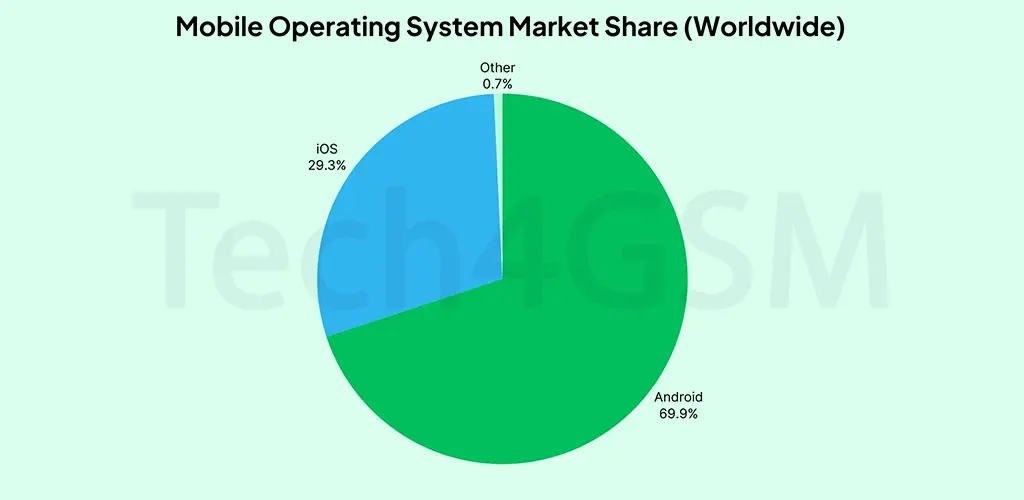
4. Why Android & iOS Dominate Today
- App Ecosystems
Millions of apps (games, social media, productivity tools) are available, thanks to their developer-friendly platforms. - Consistency + Customization
- Consistency: All Android/iOS devices share a familiar interface.
- Customization: Brands like Samsung add their own “skin” (One UI) over Android for unique features.
5. Forgotten OS Heroes (and Why They Failed)
- Palm’s webOS: Ahead of its time with multitasking but lacked app support.
- Firefox OS: Web-based OS for budget phones—discontinued in 2016.
- Tizen: Samsung’s backup OS for smartwatches and TVs.
6. How to Choose the Right OS for You
- For Simplicity: iOS (if you love Apple’s ecosystem).
- For Flexibility: Android (customize everything!).
- For Work: Windows/macOS (depends on software needs).
Final Takeaway
Your device’s OS is its brain—deciding what it can do and how smoothly it runs. While Android and iOS lead today, tech history is full of ambitious OS projects that couldn’t keep up.