Introduction
Everyone wants a high-paying job, and web development has topped the list for years—and will stay there! If you’re entering this field, you’ll often hear the term API (Application Programming Interface). Let’s break it down in plain language.
What is an API? Think of a Restaurant Waiter!
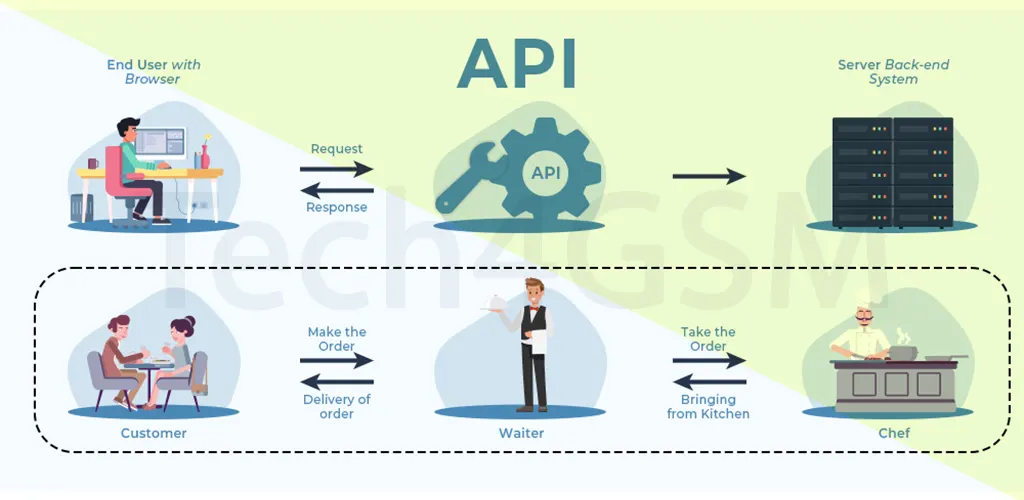
Imagine sitting in a restaurant. You tell the waiter your order, they relay it to the chef, and bring your food. An API works like that waiter. It takes your request, sends it to a system (like a database), and brings back the response.
Example:
Search for a “Data Structures Course” on a website. The API sends your request to the server, checks availability, and returns the results. No API? You’d have to manually dig through the database—slow and inefficient!
API Explained
API stands for Application Programming Interface. It’s a set of rules and tools that let different software communicate. Think of it as a bridge:
- Client (you) sends a request.
- API passes it to the server (backend).
- Server processes it and sends a response via the API.
Why use APIs?
- Save time: No need to write complex code from scratch.
- Boost functionality: Add features like payment gateways or maps.
- Improve security: APIs control data access, reducing risks.
How Do APIs Work?
- Request: You click “Search” on a website (client).
- API Call: The API sends your request to the server.
- Processing: The server checks its database.
- Response: The API brings back the results (e.g., course list).
APIs use REST or SOAP architectures. Most modern apps prefer REST (flexible, faster) over SOAP (strict, XML-based).
API vs. Web Application: What’s the Difference?
- API: Lets two software systems talk (e.g., app and server).
- Web App: A tool users interact with via browsers (e.g., online shopping site).
Fun Fact: All web apps use APIs, but not all APIs are web apps!
Types of APIs
- Web APIs (Most Common): Use HTTP protocols (e.g., weather data APIs).
- Local APIs: Work on your device (e.g., .NET for Windows).
- Program APIs: Connect remote systems (e.g., SOAP).
Other Popular Types:
- REST API: Uses HTTP methods (GET, POST, DELETE).
- SOAP API: XML-based, highly secure.
- JSON-RPC: Lightweight, uses JSON data.
Why REST APIs Rule in 2025
- Stateless: Each request is independent.
- Flexible: Supports JSON, XML, HTML.
- Cached: Faster responses for repeated requests.
REST Methods:
- GET (fetch data)
- POST (create data)
- PUT (update data)
- DELETE (remove data)
API Integration & Testing
Integration connects apps via APIs (e.g., linking Zomato to Google Maps). Testing ensures APIs work flawlessly. Popular tools include Postman and JMeter.
Testing Types:
- Security (prevent breaches)
- Performance (handle heavy traffic)
- Functional (check features).
Creating Your Own API
- Plan: Define goals and users.
- Design: Choose architecture (REST/SOAP).
- Code & Test: Build and fix bugs.
- Monitor: Track performance and user feedback.
Pros and Cons of APIs
✅ Advantages
- Speed & automation
- Easy integration (e.g., PayPal in your app)
- Cost-effective (reuse existing tools).
❌ Disadvantages
- Development costs
- Security risks (if poorly designed).
FAQs
1. What does API mean?
API = Application Programming Interface. It lets apps communicate (e.g., Facebook login on other sites).
2. What are the 4 main API types?
Public, Partner, Private, and Composite.
3. Real-life API example?
Zomato uses Google Maps API to show driver locations.
4. Most used API?
Social media APIs (Facebook, Instagram) dominate.
Final Thoughts
APIs power the internet—from logging in with Google to booking flights. Mastering them opens doors to top tech jobs.