Introduction
In the fast-evolving world of technology, CUI (Character User Interface) remains a cornerstone for professionals and enthusiasts. Often called the Command Line Interface (CLI), CUI allows users to interact with computers using text-based commands. While GUIs (Graphical User Interfaces) dominate everyday computing, CUI thrives in advanced applications. This guide explores what CUI is, its uses, examples, advantages, and why it’s still relevant in 2025.
What is Character User Interface (CUI)?
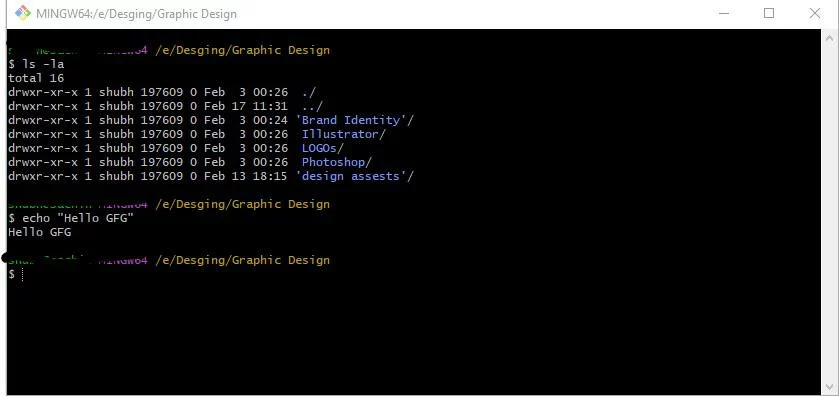
CUI is a text-based interface where users type commands to perform tasks. Unlike GUIs, which rely on visuals like buttons and icons, CUI requires precise text commands to navigate systems, manage files, or run programs. For example, typing ls -l in Linux lists directory details, while echo "Hello World" prints text on the screen.
A Brief History of CUI
CUI dates back to the earliest computers, which operated solely through terminals. Before GUIs became mainstream in the 1980s, CUI was the only way to interact with machines. Today, despite GUIs’ simplicity, CUI remains vital for tasks requiring precision, speed, and automation.
Key Components of CUI
- Shell
The shell acts as a bridge between the user and the operating system. Popular shells include:- Bash (Linux/macOS)
- PowerShell (Windows/Linux)
- Command Prompt (Windows)
- Commands
Commands are instructions typed by users (e.g.,cdto change directories orgit commitfor version control). - Syntax
Commands follow strict syntax rules. For instance,mkdir NewFoldercreates a folder, while incorrect syntax (likemk dir) triggers errors. - Output
After executing a command, the system returns a text-based result, such as a success message, error, or data list.
Why CUI Matters in 2025
Despite the rise of GUIs, CUI is irreplaceable in many fields. Here’s why:
1. System Administration
- Server Management: CUI tools like
sshandrsynchelp admins control remote servers. - Network Configuration: Commands like
pingornetstatdiagnose connectivity issues. - Resource Monitoring: Tools like
top(Linux) orGet-Process(PowerShell) track system performance.
2. Scripting & Automation
- Bash/Python Scripts: Automate backups, log analysis, or updates.
- Workflow Efficiency: Run complex tasks with a single script instead of repetitive clicks.
3. Software Development
- Version Control:
Gitcommands (e.g.,git push,git pull) manage code changes. - Powerful Text Editors: Tools like Vim or Emacs let coders edit files directly via CLI.
4. Data Science & Analysis
- Text Processing: Use
grepto search files orawkto format data. - Statistical Tools: Run Python/R scripts for data modeling.
5. Cybersecurity
- Penetration Testing: Tools like
nmapscan networks for vulnerabilities. - Log Analysis: Filter logs using
catortailto detect anomalies.
6. Cloud & DevOps
- Infrastructure as Code (IaC): Deploy cloud resources using CLI tools like AWS CLI or Terraform.
- Containerization: Manage Docker containers via commands like
docker build.
Examples of CUI in Action
- Bash (Linux/macOS)
- List files:
ls -l - Search text:
grep "error" logfile.txt
- List files:
- Command Prompt (Windows)
- Check IP:
ipconfig - Navigate directories:
cd C:\Users
- Check IP:
- PowerShell
- System info:
Get-ComputerInfo - Manage services:
Restart-Service -Name "Apache"
- System info:
- Python Shell
- Calculate:
print(5 + 3) - Run scripts:
python myscript.py
- Calculate:
- Terminal (macOS)
- Install software:
brew install node - Manage processes:
ps aux | grep Chrome
- Install software:
Advantages of CUI
- Speed: Execute tasks faster than navigating GUIs.
- Low Resource Use: Consumes minimal RAM/CPU.
- Precision: Direct control over system functions.
- Automation: Script repetitive tasks effortlessly.
- Remote Access: Manage servers worldwide via
ssh.
Disadvantages of CUI
- Steep Learning Curve: Requires memorizing commands.
- Error-Prone: Typos can cause system issues.
- Less Intuitive: No visual cues for beginners.
CUI vs. GUI: Which is Better?
| Factor | CUI | GUI |
|---|---|---|
| Ease of Use | Requires technical knowledge | User-friendly for beginners |
| Speed | Faster for advanced users | Slower due to visual navigation |
| Resource Use | Minimal | High (needs graphics rendering) |
| Automation | Excellent (scripting supported) | Limited |
Future of CUI in 2025 and Beyond
As technology advances, CUI is evolving with AI integration and voice commands. Tools like GitHub Copilot now suggest CLI commands, while platforms like Microsoft Azure blend CUI with cloud management. In 2025, expect CUI to remain essential for:
- AI/ML Development: Training models via CLI scripts.
- IoT Device Management: Controlling smart devices through terminals.
- Quantum Computing: Early quantum systems rely on text-based interfaces.
FAQs
Q: Is CUI outdated in 2025?
A: Absolutely not! CUI is critical for developers, sysadmins, and cybersecurity experts.
Q: Can I use CUI on Windows/macOS?
A: Yes! Windows has Command Prompt/PowerShell, while macOS uses Terminal.
Q: What are basic CUI commands?
A: Start with cd (change directory), ls/dir (list files), mkdir (create folder), and rm (delete files).
Q: How do I learn CUI?
A: Practice basic commands, take online courses, or explore tutorials.
Conclusion
CUI is far from obsolete—it’s a powerhouse for tech professionals. Whether you’re automating tasks, managing servers, or coding, mastering CUI unlocks unparalleled efficiency. As we step into 2025, blending CUI with modern tools will shape the future of computing.