Update Delta WhatsApp 2025 APK v3.0.2

August 21, 2025 (10 months ago)

Update Delta WhatsApp 2025 APK v3.0.2


Additional Info

    • Fix Linked Device New
    • Base GB 21.95 (2.25.15.80) New
    • Blur Wallpaper Option New
    • Add Status Update UI New
    • Change Minima UI to Trans UI New
    • Primary Color Changed New
    • Split Video with Dialog Preview and Customize Part New
    • Customize Rounded Floating Action Button New
    • [Fixed] Crash when exiting groups.
    • [Fixed] Crash when entering communities.
    • [Fixed] Green line appearing on temporary message indicator on the home screen.
    • [Fixed] New status notification icon in the old WA UI.
    • [Fixed] New call count not disappearing after opening calls on the home screen.
    • [Fixed] Emojis not changing after downloading.
    • [Improved] Anti-ban protection.
    • Stability and performance improvements.
POST
PostUpdate Delta WhatsApp APK
Genre
🚀 LAUNCH
Announced27-June-2025
Statusv3.0.2
⚙️ PLATFORM
OSAndroid

Disclaimer:

  • We do not guarantee that the data on this website is entirely accurate.

Introduction: Why Delta WhatsApp?

WhatsApp’s official app updates regularly but lacks advanced customization. Users crave extra features like hidden online status, theme engines, and media control. This gap led to Delta WhatsApp 2025, a modded APK by Deltalabs Studio. Unlike the standard app, it offers enhanced privacyAnti-Ban protection, and iOS-like customization. In this guide, you’ll learn to safely download, install, and master its features.


What is Delta WhatsApp?

Delta WhatsApp (also called WhatsApp Delta YOWA) is a modified Android app built on WhatsApp’s core. It adds 100+ features banned in the original app, like:

  • Anti-Ban technology (reduced ban risk).
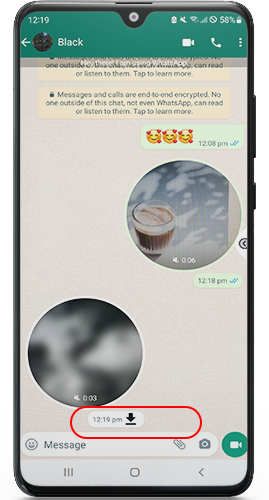
  • View Once media saving.
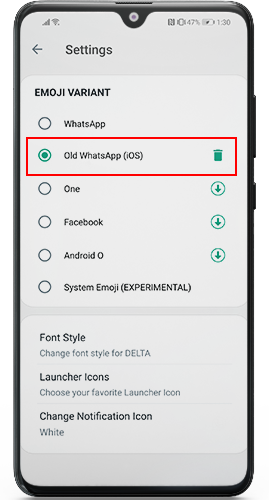
  • iOS emojis and Instagram-style stories.
  • Theme store with 5,000+ free themes.

⚠️ Note: A variant called Delta WhatsApp Ultra (black icon) exists.


How to Install Delta WhatsApp 2025

Follow these simple steps (first-time users):

  1. Download the APK:

  2. Enable Unknown Sources:

    • Go to Phone Settings → Security → Enable “Unknown Sources”.

  3. Install the APK:

    • Open the downloaded file → Tap Install.

  4. Verify Your Number:

    • Launch the app → Enter phone number → Confirm via OTP.

  5. Restore Chats (Optional):

    • Backup chats from official WhatsApp → Restore in Delta.

  6. Done! Start using all features immediately.


Key Features of Delta WhatsApp 2025

1. Anti-Ban Protection ✅

  • How it works: Masks mod usage to avoid WhatsApp’s ban algorithms.
  • User Tip: Avoid spamming to maximize safety.

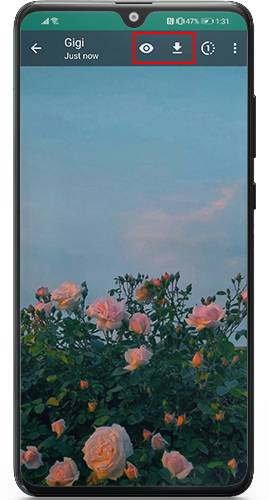
2. Save “View Once” Media 👁️

  • Steps: Open a “view once” photo/video → Tap the eye icon → Save to gallery.
  • Privacy: Sender won’t know you saved it.

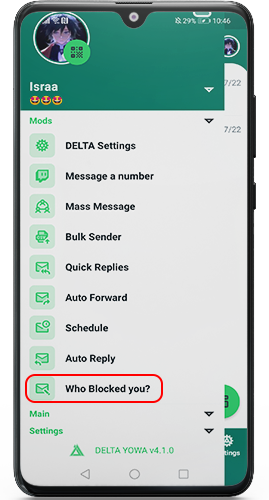
3. Discover Who Blocked You 🚫

  • Feature: “Blocked Contacts” list under Privacy Settings.
  • Accuracy: 99% real-time detection.

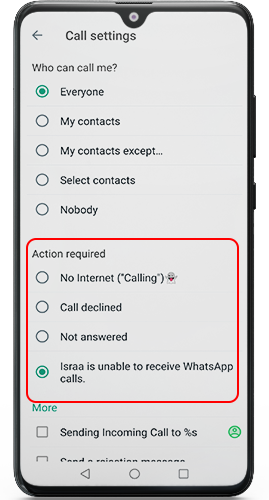
4. Advanced Call Rejection 📞

  • Options:

    • “Show offline” to caller.

    • “Busy” auto-reply.

    • Silent rejection.

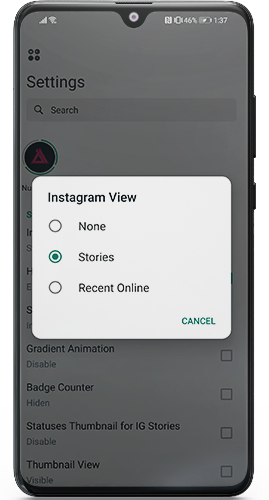
5. Instagram-Style Stories 📸

  • Setup:

    • Go to Settings → Home Screen → Stories → Instagram View.

  • Result: Vertical-scrolling, full-screen statuses.

6. iOS Emojis & Themes 🎨

  • Customization:

    • Settings → Style → Emoji Style → iOS 18.

    • Theme Store: 5,000+ free themes (dark mode, transparent UI).

7. Full HD Media Sharing 🌄

  • Quality: Send photos/videos in 1080p (vs. official WhatsApp’s 720p).

8. Message Pinning & Editing 📌

  • Pin Duration: 24 hours, 7 days, or 30 days.
  • Edit Tracking: See edited messages with timestamps.

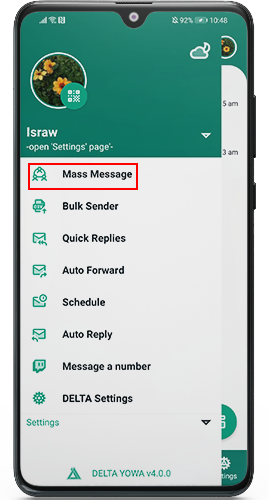
9. Mass Messaging 💬

  • Unlimited texts, images, or videos to 100+ groups at once.

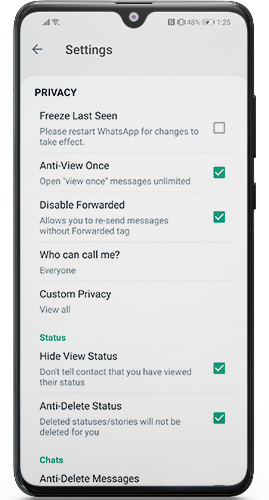
10. Privacy Shield 🛡️

  • Freeze last seen.
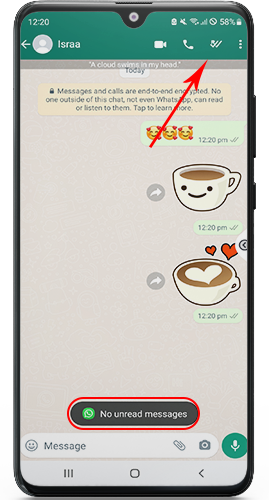
  • Hide blue ticks/typing status.
  • Disable message forwarding.


Delta WhatsApp 2025 vs. Official WhatsApp

FeatureDelta WhatsAppOfficial WhatsApp
Customization OptionsFull control over themes, fonts, chat backgrounds, icons, and notification bars.Limited to basic dark/light themes and chat wallpapers.
View Deleted MessagesShows messages even after the sender deletes them.Deleted messages vanish completely for all users.
Save Deleted StatusesLets you view a contact’s status after they remove it.Statuses disappear permanently once deleted.
Download StatusesDirectly save photos/videos from contacts’ statuses.No built-in download option. Manual screenshots required.
Auto-ReplySends automatic responses when busy/unavailable.Not supported (except for Business accounts).
Message SchedulingSet messages to send at specific times later.No scheduling feature.
Hide Online StatusFreeze “online” status to browse privately.Only hides “last seen.” Online activity remains visible.
In-App DND ModeMute notifications without affecting device settings.Relies entirely on system-level “Do Not Disturb.”
Hide Read ReceiptsBlue ticks appear only after replying.Blue ticks show instantly upon reading (unless disabled globally).
Dark ModeFull dark theme with battery-saving benefits.Standard dark theme (no battery optimization).

How to Update to (2025)

Already have Delta? Update in 3 steps:

  1. Download the latest APK here.
  2. Install without uninstalling the old version.
  3. Launch → New features auto-activate!

Latest Updates:

  • Mark as Read: Hide blue ticks but mark chats read.
  • 60-Second Video Messages: Record/send instantly.
  • Facebook Status Sharing: Post statuses to FB via Status → Privacy → Share.

Delta WhatsApp for iPhone? ❌

Delta is Android-exclusive. iPhone alternatives:

  • WhatsApp++ (Download): Similar privacy tools.
  • WhatsApp Gold (Download): Theme support + message scheduling.

Conclusion

Delta WhatsApp 2025 APK redefines messaging with Anti-Ban securitymedia control, and iOS-level customization. It’s freeeasy to install, and updated monthly. For Android users seeking power beyond official WhatsApp, this is the ultimate tool.

🔑 Pro Tip: Backup chats weekly via Settings → Chats → Chat Backup to avoid data loss.

✅ Pros - Update Delta WhatsApp 2025 APK v3.0.2

    • Enhanced Privacy Shields: The built-in WhatsApp Lock adds a crucial layer of security. Features like No More Blue Ticks and the Group Admin Indicator give you greater control over your online visibility and anonymity within groups.

    • Unmatched Customization Freedom: Go beyond basic settings. Customization lets you change fonts, colors, UI elements, bubbles, and layouts extensively. Choose from Light, Dark, or Transparent Themes for a truly personalized look.

    • Recover Vanished Content: The Anti-Revoke Message feature allows you to view messages deleted by others. Similarly, Anti-Delete Status lets you see status updates even after the sender removes them.

    • Advanced Communication Tools: Access a vast library of Emoji Variants (iOS, Android, etc.) and expressive Sticker Packs. The Auto Reply function is invaluable for businesses managing high message volumes.

    • Stealth Messaging & Block Detection: Remove Forwarded Tags when sharing messages. The clever Know Who Blocked You feature reveals users who have blocked your number.

    • Increased Sharing Capacity: The Mass Message Sender capability lets you transmit large files directly, bypassing cloud storage needs.

    • Instagram-Style Story Features: Enabled Instagram stories integration allows you to view and post statuses in a familiar story format. You can also Post Voice Status updates.

❌ Cons - Update Delta WhatsApp 2025 APK v3.0.2

    • Significant Security Concerns: Being an unofficial mod (APK), it lacks the rigorous security updates and scrutiny of the official WhatsApp. This creates potential risks for malware or data breaches.

    • Risk of Account Ban: Using any modified WhatsApp version, including Delta, violates WhatsApp's terms. Your account faces a high chance of being permanently banned without warning.

    • Unreliable Updates & Support: Updates depend entirely on the third-party developer. They may be slow, unstable, or stop completely, leaving you with an outdated and potentially insecure app. Official support is non-existent.

    • Potential Feature Malfunctions: Mod features like Anti-RevokeAnti-Delete Status, or Know Who Blocked You can break unexpectedly after updates or may not work reliably.

    • Compatibility Issues: Features dependent on WhatsApp's core structure (like seeing Instagram stories or specific Emoji Variants) might suddenly stop working if the official app changes.

    • Privacy Paradox: While offering privacy tools like the Group Admin Indicator, the app's unofficial nature itself compromises your overall privacy and security posture significantly.

❓ FAQ (Frequently Asked Question) - Update Delta WhatsApp 2025 APK v3.0.2

    1. How does customization work in Delta WhatsApp 2025?

    Absolutely! Delta WhatsApp lets you transform the app’s appearance effortlessly. You can:

    • Change themes, fonts, and chat backgrounds.

    • Personalize icons and the notification bar. This ensures the app aligns perfectly with your style.

    2. What is the "Anti-Revoke Message" feature?

    Great question! This feature lets read deleted messages. Even if the sender removes a message, you’ll still see it. No more missing critical chats or information.

    3. How does "Anti-Status Delete" protect me?

    Certainly! It automatically saves contacts’ statuses. If someone deletes their status, you can still view it. Think of it like a backup for updates.

    4. Can I download others’ statuses?

    Yes! The Status Downloader saves photos/videos from contacts’ statuses. You can store them privately or share them with others—no extra apps needed.

    5. How does "Auto Reply" help when I’m busy?

    Simple! Set custom automatic replies when you’re unavailable. Delta WhatsApp sends these instantly, so contacts know you’ll respond later.

    6. What’s the benefit of "Message Scheduler"?

    It sends messages at your chosen time. Schedule birthday wishes or reminders in advance—even if you’re asleep or offline.

    7. Can I hide my online status?

    Definitely! Freeze or hide "Last Seen" to browse privately. Others won’t know you’re active, avoiding interruptions.

    8. What does "Do Not Disturb Mode" do?

    It mutes all notifications instantly, like airplane mode for chats. Ideal for meetings, sleep, or focused work sessions.

    9. How do I hide blue ticks (read receipts)?

    Easily! Disable blue ticks after reading messages. Contacts won’t know you’ve seen their texts—reply on your own terms.

    10. Why use Dark Mode?

    Dark Mode reduces eye strain and saves battery. Switch to a sleek black theme for comfortable nighttime browsing.

Recommended for You