Introduction
Imagine you’re building a Java app that needs to talk to a database—like fetching user details or saving orders. JDBC (Java Database Connectivity) is the magic wand that makes this possible! It’s a Java API that lets applications interact with databases such as MySQL, Oracle, and PostgreSQL. Whether you’re a newbie or a pro, JDBC simplifies database operations with a standard interface, ensuring your code works seamlessly across different databases.
Why JDBC?
- Platform Independence: Write once, run anywhere—connect to any database.
- Universal Compatibility: Works with MySQL, PostgreSQL, Oracle, and more.
- Real-World Use: Perfect for e-commerce, banking apps, and data-driven platforms.
JDBC Architecture: How It Works Under the Hood
JDBC’s architecture is like a well-oiled machine with two main models:
1. Two-Tier Architecture
Think of this as a direct hotline between your Java app and the database.
- Structure:
Java App -> JDBC Driver -> Database - Use Case: Simple apps where the client (your app) talks directly to the database server.
2. Three-Tier Architecture
Here, a middle layer (like an app server) handles the heavy lifting.
- Structure:
Java App -> Application Server -> JDBC Driver -> Database - Use Case: Scalable enterprise apps (e.g., banking systems) where security and load balancing matter.
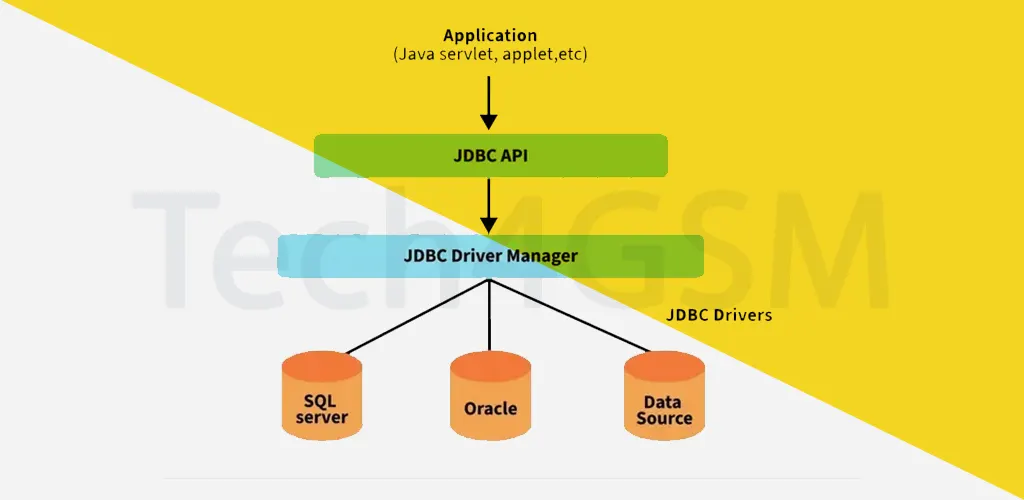
Key Components of JDBC
JDBC has four pillars that make database interactions smooth:
1. JDBC API
The toolbox with classes and interfaces for database tasks.
- java.sql: Core features like connections, queries, and result handling.
- javax.sql: Advanced perks like connection pooling (great for high-traffic apps).
2. JDBC Driver Manager
The matchmaker that loads the right driver for your database.
- Example: It links your MySQL app to the
com.mysql.cj.jdbc.Driver.
3. JDBC Test Suite
Quality control for JDBC drivers, ensuring they work flawlessly.
4. JDBC Drivers
Translators that convert Java calls into database-specific language.
- Type-1 (JDBC-ODBC Bridge): Outdated, uses ODBC drivers.
- Type-2 (Native API): Partly Java, partly native code.
- Type-3 (Network Protocol): Pure Java, uses middleware.
- Type-4 (Thin Driver): Fully Java, connects directly (most popular in 2025).
Note: Avoid Type-1—it’s deprecated since Java 8. Type-4 is the go-to for modern apps!
JDBC Classes and Interfaces: Your Toolkit
Here’s a cheat sheet for essential JDBC components:
| Class/Interface | Role |
|---|---|
DriverManager | Manages drivers and connections. |
Connection | Represents a session with the database. |
Statement | Executes static SQL queries. |
PreparedStatement | Runs dynamic, parameterized queries (safer against SQL injection). |
ResultSet | Holds query results for processing. |
SQLException | Catches database errors. |
Connecting to MySQL in 5 Simple Steps
Let’s connect a Java app to MySQL using JDBC:
Step 1: Load the JDBC Driver
Class.forName("com.mysql.cj.jdbc.Driver");
This initializes the MySQL driver.
Step 2: Establish a Connection
Connection conn = DriverManager.getConnection(
    "jdbc:mysql://localhost:3306/your_database",
    "your_username",
    "your_password"
);
Replace with your database name, username, and password.
Step 3: Create a Statement
Statement stmt = conn.createStatement();
Step 4: Execute a Query
String query = "INSERT INTO students (id, name) VALUES (101, 'John Doe')";
int rowsAffected = stmt.executeUpdate(query);
Use
executeUpdate()for INSERT, UPDATE, DELETE.
Step 5: Close the Connection
stmt.close();
conn.close();
Always free resources to avoid leaks!
Build a Simple JDBC App (2025-Ready Code)
import java.sql.*;

public class Geeks {
    public static void main(String[] args) {
        String url = "jdbc:mysql://localhost:3306/your_database";
        String user = "your_username";
        String pass = "your_password";
        String query = "INSERT INTO students (id, name) VALUES (109, 'bhatt')";

        try {
            Class.forName("com.mysql.cj.jdbc.Driver");
            Connection conn = DriverManager.getConnection(url, user, pass);
            Statement stmt = conn.createStatement();
            int count = stmt.executeUpdate(query);
            System.out.println("Rows affected: " + count);
            stmt.close();
            conn.close();
        } catch (ClassNotFoundException | SQLException e) {
            e.printStackTrace();
        }
    }
}
Output: A new row is added to the students table.
Why JDBC Rocks: Key Features
- Database Freedom: Switch databases without code changes.
- Batch Processing: Run multiple queries in one go.
- Connection Pooling: Boost performance in busy apps.
- Transaction Control: Commit or rollback changes easily.
FAQ: JDBC Demystified
Q1: What’s the difference between Statement and PreparedStatement?
- Statement: Static SQL, prone to injection.
- PreparedStatement: Precompiled, secure, and reusable.
Q2: Can JDBC connect to NoSQL databases like MongoDB?
No—it’s designed for relational databases. For NoSQL, use MongoDB’s Java driver.
Q3: How to handle database errors in JDBC?
Wrap code in try-catch blocks and use SQLException for logging.
Q4: Is JDBC still relevant in 2025?
Absolutely! It’s the backbone for ORM tools like Hibernate.
Q5: What’s connection pooling?
A technique to reuse connections, reducing overhead. Use libraries like Apache DBCP.
Final Thoughts
JDBC is your passport to building dynamic, data-driven Java apps. Whether you’re inserting records or handling complex transactions, mastering JDBC is a must for every developer.