Introduction
Picture this: You’re streaming a song, and just as the chorus hits—buffering. Annoying, right? Behind that loading icon is a tiny unit called Kbps working overtime. Let’s unravel what Kbps means, why it matters, and how it quietly shapes your online life.
What is Kbps?
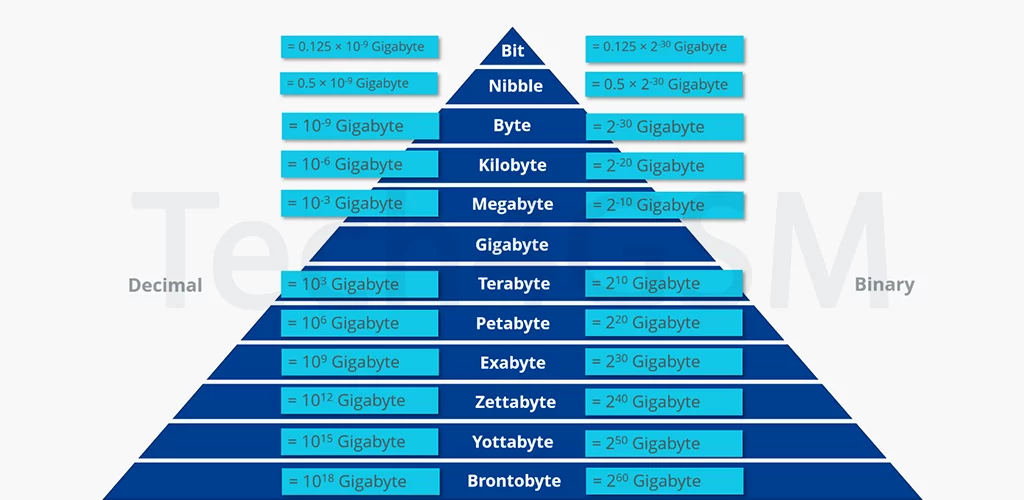
Kbps stands for Kilobits per Second—a measure of how much data (like music, videos, or emails) moves through your internet connection every second. One Kbps equals 1,024 bits per second.
Wait, bits? Yep! Unlike kilobytes (KB), which measure file size, kilobits (Kb) measure speed. Confused? Think of it this way:
- Kilobytes (KB): How big your pizza is.
- Kilobits per second (Kbps): How fast it’s delivered to your door.
Why 1,024 and Not 1,000?
Computers love binary (base-2 math). Since 2¹⁰ = 1,024, tech pros use this for accuracy. But some internet providers use 1,000 bits = 1 Kbps for simplicity—a sneaky trick that makes speeds sound faster!
Kbps in Real Life: What Can You Do?
- Basic Browsing: 100 Kbps lets you check emails or load text-heavy sites.
- Music Streaming: Spotify uses ~96 Kbps for normal quality.
- Video Calls: Zoom needs at least 500 Kbps for a pixel-free chat.
- Old-School Downloads: A 3MB song (≈3,000 KB) takes ~24 seconds at 1,000 Kbps.
But in today’s 4K world, Kbps feels sluggish. That’s why we now talk in Mbps (Megabits per second)—1,000 times faster!
Kbps vs. KBps: Spot the Difference!
- Kbps = Kilobits per second (speed).
- KBps = Kilobytes per second (file transfer rate).
Since 1 byte = 8 bits, 100 KBps = 800 Kbps. Mixing these up can make your internet plan seem 8x slower!
When Did Kbps Rule the World?
In the dial-up era (think screechy modems), Kbps was king:
- A 56 Kbps connection took 5 minutes to load a 1MB photo.
- MP3 downloads felt like a marathon.
- Buffering was a way of life.
Today, even budget Wi-Fi offers 10-50 Mbps—enough to stream Netflix in HD. But Kbps isn’t dead! It’s still used for:
- Low-bandwidth tasks (e.g., IoT devices).
- 2G mobile networks in remote areas.
- Data-saving modes on apps like YouTube.
How to Check Your Internet Speed in Kbps
- Use free tools like Speedtest.net.
- Multiply Mbps by 1,000 to convert to Kbps (e.g., 10 Mbps = 10,000 Kbps).
Why Should You Care About Kbps?
- Data Caps: Lower Kbps = less data used. Great for limited plans!
- Gaming: Online games need stable Kbps to avoid lag.
- Travel: Rural areas might only offer Kbps-tier speeds.
The Bottom Line
Kbps is the grandparent of modern internet speed—a relic of slower times, but still quietly powering essentials. Next time your video buffers, thank Kbps for trying its best! 🐢💨