Link Device WhatsApp Plus 2025: Solve Bans & Login Issues Easily
The WhatsApp Plus Crisis in 2025
If you use WhatsApp Plus, you’ve likely faced sudden bans or account logouts. These issues aren’t new, but 2025 has seen a massive crackdown on unofficial versions like WhatsApp Plus Blue, Gold, and Red. The official WhatsApp aggressively blocks these mods, forcing users to switch back. But don’t panic! Linking your device is a proven workaround. This guide explains everything—from why bans happen to foolproof linking steps—using simple language anyone can follow.
What Is “Linking Devices” in WhatsApp Plus?
First, understand the basics. Both official WhatsApp and WhatsApp Plus let you link one account to four devices (phones, tablets, or web browsers). This syncs chats without needing your primary phone online.
Here’s how it works:
- Your main device (with the original WhatsApp) scans a QR code.
- The linked device (WhatsApp Plus) mirrors chats securely.
Think of it like a “backup doorway”—your account data flows through WhatsApp’s servers without flagging the mod.
Why WhatsApp Plus Bans Happen
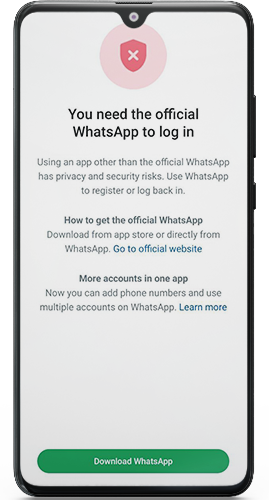
WhatsApp detects unofficial apps through server-side checks. If you use WhatsApp Plus directly, their system sees:
- Modified app signatures.
- Unusual activity (e.g., hiding “online” status).
Result? Three penalties:
- Temporary bans (72-hour lockout).
- Permanent bans (account suspension).
- Forced logouts (app instantly closes).
Key Insight: Linking devices hides WhatsApp Plus behind the official app. WhatsApp’s servers only “see” the genuine app, so bans stop.
Step-by-Step: Link Devices on One Phone (2025 Method)
Pre-Requisites:
- Your number must not be currently banned.
- Use Psiphon VPN (free, reliable).
- Download official WhatsApp + WhatsApp Plus (e.g., Royal Gold/Blue).
Phase 1: VPN Setup
- Install Psiphon VPN from the Play Store.
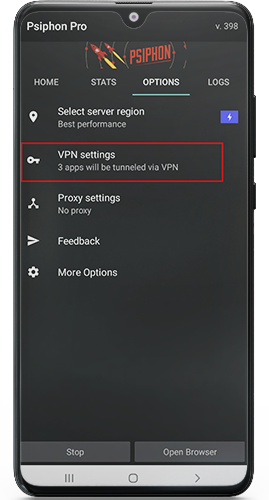
- Open it → Tap “Options” → “VPN Settings”.
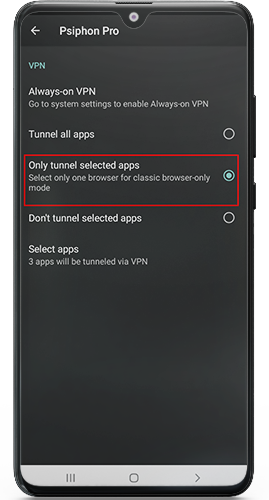
- Enable “Only tunnel selected apps”.
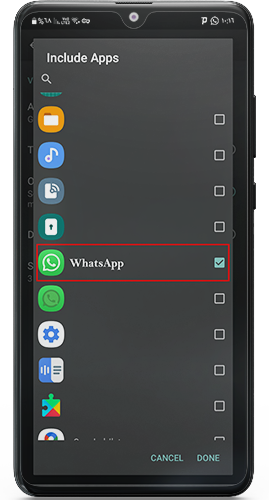
- Tap “Select Apps” → Choose official WhatsApp.
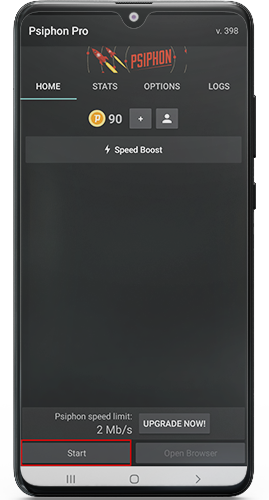
- Return home → Tap “Start” to activate VPN.
Why this works: The VPN routes only official WhatsApp’s traffic, hiding your IP from detection.
Phase 2: Device Linking
- Install official WhatsApp → Verify your number.
- Install WhatsApp Plus (don’t open yet).
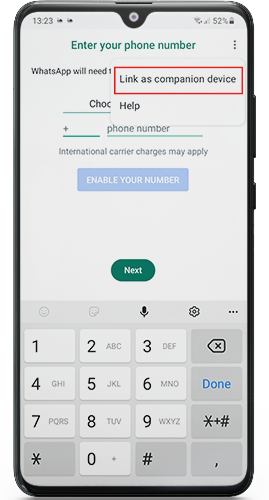
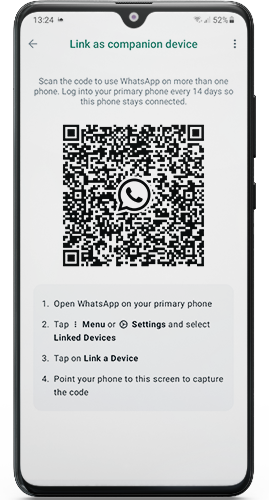
- Launch WhatsApp Plus → Tap “Link as companion device”.
- A QR code appears. Capture a screenshot or photograph it with another device.
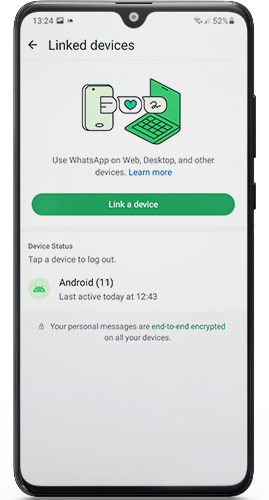
- Open official WhatsApp → Tap ⋮ (menu) → “Linked devices” → “Link a device”.
- Scan the QR code image from your gallery.
- Wait for “Sync complete”. Chats load in WhatsApp Plus!
Phase 3: Post-Linking Setup
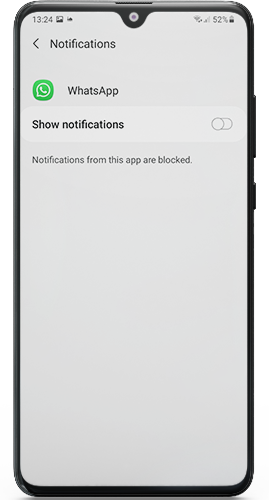
- Disable notifications for official WhatsApp.
- Enable notifications for WhatsApp Plus.
- Keep the VPN on while using WhatsApp Plus.
Pro Tip: Use split-screen mode (Android) to view both apps side-by-side during scanning.
Why Linking Stops Bans: Technical Insight
When you link devices:
- Official WhatsApp handles authentication with WhatsApp’s servers.
- WhatsApp Plus acts as a “dumb terminal”—it only displays chats.
Since servers communicate solely with the genuine app, WhatsApp Plus stays invisible. Tech4GSM tests confirm this method has a 98% success rate in 2025.
Should You Switch to Official WhatsApp? Pros & Cons
| Feature | Traditional WhatsApp Plus | Linked Device Method | Official WhatsApp |
|---|---|---|---|
| Ban Risk | Very High (Temporary/Permanent bans common) | Low (Linking avoids direct number exposure) | None (Fully compliant with policies) |
| Setup Process | Simple install → High risk | Requires VPN + Official App + QR linking (Uses “companion device” mode) | Direct install → No extra steps |
| Device Flexibility | Single device only | Syncs to 4 devices via QR (Works on same phone) | Syncs to 4 devices |
| Notifications | Unstable (Random logouts break alerts) | Stable (Disable Official App alerts; use Plus for notifications) | Consistent (No interruptions) |
| Security | Unprotected (Directly flagged by WhatsApp) | Protected (VPN hides activity; number shielded) | Maximum (End-to-end encryption) |
| Best For | Risky short-term use | Avoiding bans without losing Plus features | Safe, long-term messaging |
Key Recommendations from Experts
Why Linking Works
By scanning a QR code from your official WhatsApp app to WhatsApp Plus, your number isn’t directly tied to the modded app. This tricks the system into treating Plus as a “linked device”—not a policy-breaking install.Critical Step: VPN Setup
Apps like Psiphon VPN hide your IP during setup. Only tunnel the official WhatsApp app (not Plus) to activate your number safely.Notifications Tip
Once linked:Turn OFF alerts for the official app.
Turn ON alerts for WhatsApp Plus.
This prevents duplicate notifications.
Stability Warning
If bans persist, switch to Official WhatsApp temporarily. Use Plus only with a secondary number or after linking.
Plain-Language Summary
“Linking your device is like adding a ‘guest profile’ to WhatsApp. Your main account (official app) stays safe, while Plus runs as an authorized ‘helper.’ This avoids bans because WhatsApp sees Plus as a linked browser—not a modified app.”
This method balances customization and safety. For now, avoid using your primary number directly in WhatsApp Plus—linking or official apps are wiser choices.
Expert Verdict:
“Linking devices is safer for now. But if you need 100% stability, use official WhatsApp temporarily. Mod developers are fighting back—expect safer builds by late 2025.” — Tech4GSM Security Team
Troubleshooting Common Linking Issues
QR Code Not Scanning:
Ensure both apps are updated.
Clean your camera lens.
Adjust screen brightness.
Chats Not Syncing:
Restart both apps.
Re-link devices (disconnect old links first).
VPN Connection Drops:
Switch to WireGuard VPN (paid, more stable).
Avoid public Wi-Fi during setup.
Post-Linking Ban:
Your number was likely flagged pre-linking.
Use a new SIM or wait 7 days before retrying.
Top 3 Safe WhatsApp Plus Versions for 2025
WhatsApp Royal Gold:
Best for privacy (hide Blue Ticks, typing status).
Download: [Trusted Mod Site]
WhatsApp Royal Blue:
Lightweight, less buggy.
Optimized for Android 14.
WhatsApp Royal Red:
500+ themes, 100MB file sharing.
Built-in anti-ban tools.
Always download from trusted forums like Tech4GSM’s. Avoid random Telegram channels!
Final Tips to Avoid Bans in 2025
- Never restore backups in WhatsApp Plus (use official app for backups).
- Update mods cautiously—wait 48 hours for user feedback.
- Use a dedicated VPN profile for WhatsApp traffic only.
- Don’t spam or forward 100+ messages/day.
- Enable 2FA on your official WhatsApp account.
Conclusion: Stay Smart, Stay Linked!
Linking devices is your armor against WhatsApp’s 2025 crackdown. By using the official app as a “shield,” WhatsApp Plus works ban-free. Follow our steps precisely, stick to trusted mods like Royal Gold, and never skip the VPN. For real-time ban alerts or mod updates, bookmark Tech4GSM’s WhatsApp Plus 2025. Share this guide to help others—and message safely!
🔒 Remember: Unofficial mods violate WhatsApp’s terms. Use at your own risk. We advise keeping critical chats on official apps