Introduction
Imagine updating a contact on your phone and poof—it magically appears on your laptop, tablet, and even your smartwatch. That’s the power of SyncML! This behind-the-scenes hero keeps your data in harmony across devices, saving you from endless manual updates. Let’s explore how SyncML works, why it’s a lifesaver, and how it keeps your digital life seamless.
What is SyncML?
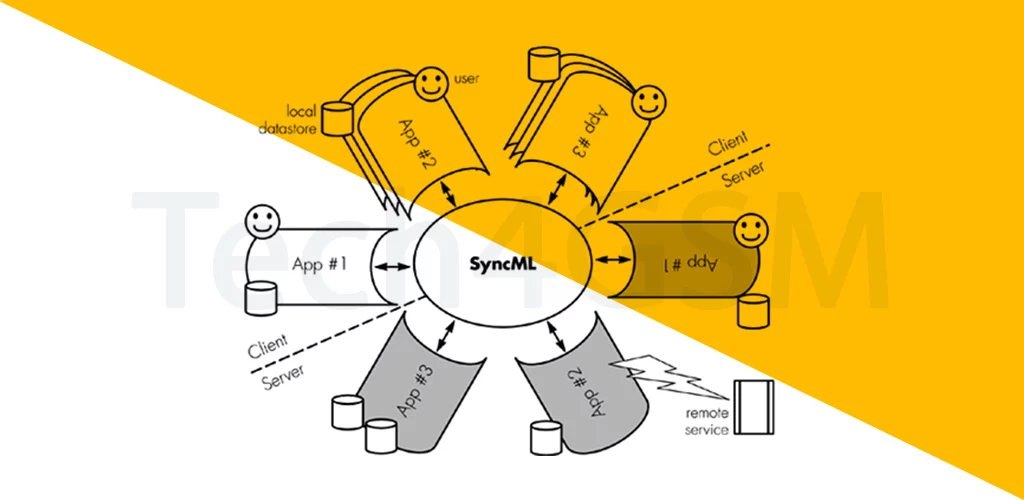
SyncML (Synchronization Markup Language) is a universal standard for syncing personal data like contacts, calendars, to-do lists, and notes between devices. Think of it as a digital mediator that ensures your info stays updated everywhere, whether you’re using a phone, PC, or even a website!
How SyncML Works
- Data Types: Syncs contacts, calendars, tasks, notes, and more.
- XML Magic: Uses a common language (XML) that all SyncML-compatible devices understand.
- Two-Way Sync: Changes on one device update everywhere else automatically.
Example: Add a meeting on your PC → It pops up on your phone → Edit it on your phone → PC reflects the change.
Why SyncML Rocks
- No More Manual Work: Forget typing contacts into every device.
- Cross-Platform Love: Syncs Android ↔ iPhone ↔ PC ↔ Web apps.
- Offline Friendly: Works even without constant internet (syncs when connected).
- Secure: Encrypted data transfer to keep your info safe.
Devices That Use SyncML
| Device Type | Examples |
|---|---|
| Mobile | Phones, PDAs, smartwatches |
| Stationary | PCs, laptops, servers |
| Web Services | Cloud calendars, contact managers |
Pro Tip: Check if your device supports SyncML on tech4gsm.com!
SyncML vs. Manual Syncing
| Feature | SyncML | Manual Copy-Paste |
|---|---|---|
| Speed | Instant updates | Time-consuming |
| Accuracy | Zero errors | Typos galore |
| Convenience | Set it & forget it | Repetitive chores |
Winner: SyncML, by a landslide!
Real-Life Uses of SyncML
- Business Contacts: Sync client details across your phone, laptop, and CRM.
- Shared Calendars: Family events update on everyone’s devices.
- Notes on the Go: Jot ideas on your phone → access them on your PC.
- Backup Safety: Automatically save data to the cloud.
Setting Up SyncML
- Enable Sync: Turn on SyncML in your device settings (often under “Accounts” or “Sync”).
- Choose Data: Pick what to sync (contacts, calendar, etc.).
- Add Server Details: Enter SyncML server info (provided by your email/cloud service).
SyncML’s Legacy & Future
- Pioneered Universal Sync: Before Google Sync or iCloud, there was SyncML.
- IoT Potential: Could sync smart home devices (thermostats, fridges) in the future.
- Open Standard: Still used in niche apps and enterprise tools.
Wrapping Up
SyncML is the invisible glue holding your digital life together—ensuring your data flows smoothly between devices without lifting a finger. While newer tools like iCloud dominate today, SyncML laid the groundwork for seamless syncing. Ready to ditch the manual grind? Embrace SyncML and let your devices do the talking!