Introduction
Ever wondered why your phone’s OS is named after desserts? Or how Android grew from a tiny startup to power 75% of the world’s smartphones? Buckle up—we’re diving into Android’s delicious history, secret battles, and why it’s everyone’s favorite mobile OS!
Android’s Origin Story: From Garage to Global Giant
- 2003: Android Inc. was born, co-founded by Andy Rubin.
- 2005: Google bought Android for **50million∗∗—astealcomparedtotoday’s1.3+ trillion tech giant!
- 2007: Google launched Android Beta, the same year Apple debuted the iPhone. Talk about timing!
🔍 Fun Fact: Google’s then-CEO, Eric Schmidt, was on Apple’s board until 2009. Awkward much?
Why Android Exploded in Popularity
1. Open-Source Freedom
- Manufacturers like Samsung, Xiaomi, and Huawei can customize Android (hello, EMUI and One UI!).
- But wait: To use Google apps (Gmail, Maps, Play Store), companies must license Google Mobile Services (GMS).
2. Affordability
- Android powers budget phones to flagship killers, making tech accessible globally.
3. Innovation Playground
- Foldables, gaming phones, 200MP cameras—Android tries everything first.
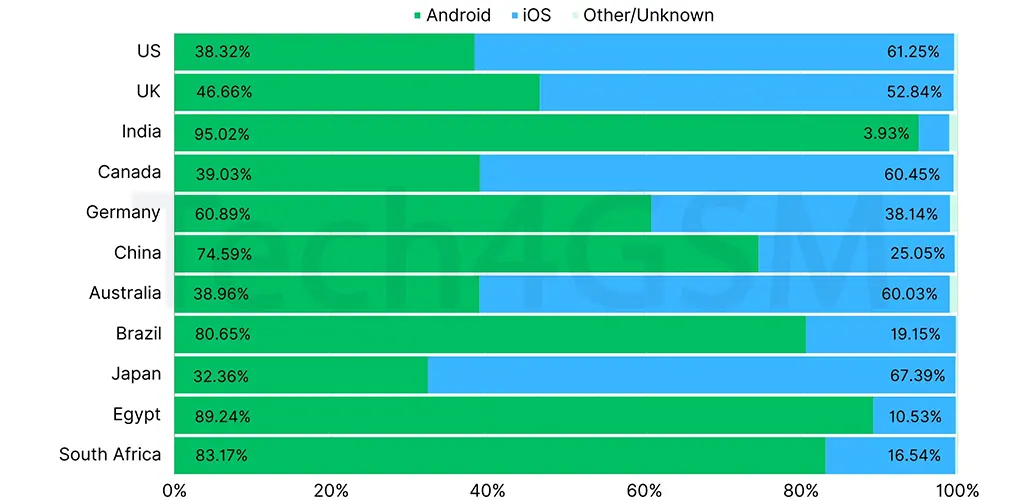
4. Market Domination
- 2011: Android dethroned Nokia’s Symbian as the #1 OS.
- 2023: Still king with 70%+ market share (vs. iOS’ 25%).
Android’s Dessert Menu: Version Names & Key Features
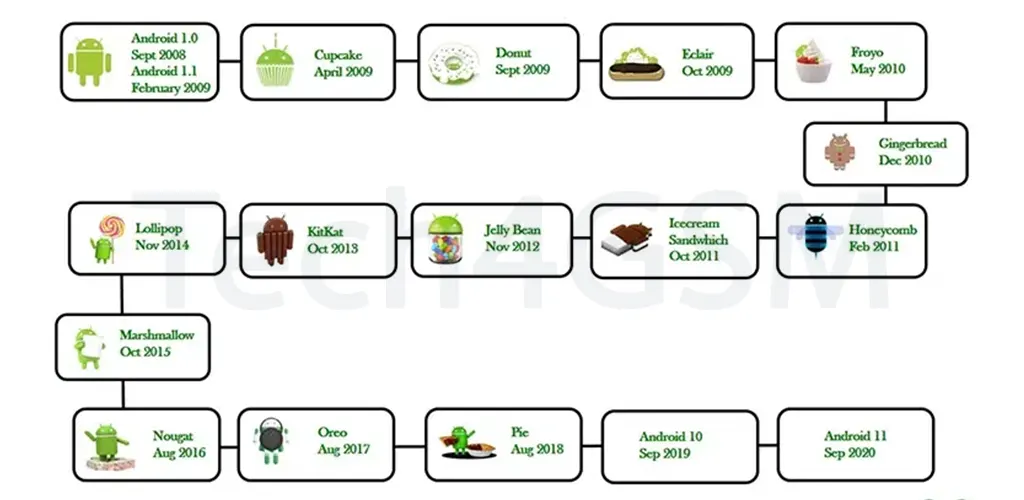
Android versions are named alphabetically after desserts. Here’s the complete list, updated till 2025:
| Version | Codename | Release Year | Key Feature |
|---|---|---|---|
| Android 1.5 | Cupcake | 2009 | On-screen keyboard, widgets |
| Android 2.2 | Froyo | 2010 | Speed boost, USB tethering |
| Android 4.1 | Jelly Bean | 2012 | Google Now, expandable notifications |
| Android 4.4 | KitKat | 2013 | “OK Google,” immersive mode |
| Android 5.0 | Lollipop | 2014 | Material Design, battery saver |
| Android 6.0 | Marshmallow | 2015 | Now on Tap, granular app permissions |
| Android 7.0 | Nougat | 2016 | Multi-window, Vulkan API for gaming |
| Android 8.0 | Oreo | 2017 | Picture-in-picture, notification dots |
| Android 9.0 | Pie | 2018 | AI-powered adaptive battery, gestures |
| Android 10 | Quince Tart | 2019 | System-wide dark mode, gesture navigation |
| Android 11 | Red Velvet Cake | 2020 | Chat bubbles, screen recording |
| Android 12 | Snow Cone | 2021 | Material You design, privacy dashboard |
| Android 13 | Tiramisu | 2022 | Per-app language settings, themed icons |
| Android 14 | Upside Down Cake | 2023 | Enhanced battery life, improved security |
| Android 15 | Vanilla Ice Cream | 2024 | Satellite connectivity, AI enhancements |
| Android 16 | Walnut Brownie | 2025 | Foldable optimizations, AR integration |
Highlights of Android’s Evolution
1. Cupcake (2009)
- Introduced on-screen keyboards—bye-bye, physical keys!
- Added widgets for home screen customization.
2. KitKat (2013)
- Brought “OK Google” voice commands.
- Introduced immersive mode for full-screen apps.
3. Lollipop (2014)
- Debuted Material Design—sleek, colorful, and modern.
- Added battery saver mode to extend juice.
4. Oreo (2017)
- Introduced picture-in-picture for multitasking.
- Added notification dots for quick app updates.
5. Pie (2018)
- Launched AI-powered adaptive battery.
- Introduced gesture navigation for smoother swipes.
6. Snow Cone (2021)
- Introduced Material You—dynamic theming based on your wallpaper.
- Added privacy dashboard to track app permissions.
7. Upside Down Cake (2023)
- Enhanced battery optimization for longer usage.
- Improved security features for safer browsing.
8. Vanilla Ice Cream (2024)
- Added satellite connectivity for remote areas.
- Enhanced AI integration for smarter apps.
9. Walnut Brownie (2025)
- Optimized for foldable devices.
- Integrated AR (Augmented Reality) for immersive experiences.
Why Dessert Names?
Google’s dessert-themed names started as an internal joke but became a beloved tradition. Sadly, after Android 10, Google dropped the dessert names for simplicity. But fans still use them fondly!
What’s Next for Android?
- AI Everywhere: Expect smarter assistants, predictive features, and personalized experiences.
- Foldables & Wearables: Android will optimize for foldable phones, smartwatches, and AR glasses.
- Eco-System Expansion: Deeper integration with smart homes, cars, and IoT devices.
⚠️ Did You Know? Android 1.0 had no codename. The dessert tradition started with Cupcake!
Android’s Dirty Secret: The Google-Apple Love-Hate Saga
- 2007-2009: Google’s CEO Eric Schmidt was on Apple’s board while Android and iPhone competed.
- Conflict? Schmidt often left Apple meetings when iPhone/iOS were discussed. He finally quit in 2009.
- Irony: Early iPhones used Google Maps and YouTube—services Google later restricted on iOS.
Customization Chaos: Skins vs. Stock Android
- Skins: Samsung, Huawei, and others add flashy UIs and features.
- Pros: Extra tools (e.g., Samsung DeX).
- Cons: Slower updates, bloatware.
- Stock Android: Clean, fast, and pure (used by Google Pixel, Nokia).
- Pros: Instant updates, no junk apps.
- 65% of users prefer this!
💡 Pro Tip: Hate your phone’s skin? Install a launcher (e.g., Nova Launcher) for a stock feel!
Why Your Android Isn’t Really Android
- Amazon Fire Tablets: Run “Fire OS”—a forked Android without Google apps.
- China-Only Phones: Use local apps (WeChat, Baidu) instead of Google services.
- Rule: Only devices with Google Mobile Services (GMS) get Play Store, Chrome, etc.
Android’s Future: Foldables, AI, and Beyond
- Foldables: Samsung’s Galaxy Z Fold/Flip, Oppo Find N.
- AI Integration: Google Assistant, real-time translation, smart replies.
- Eco-System: Pair with Wear OS, Android Auto, or Google Nest.
FAQs: Android Unboxed
Q: Can I remove pre-installed bloatware?
A: Yes! Use ADB tools (guide on tech4gsm.com).
Q: Why don’t all Androids get updates fast?
A: Manufacturers customize OS—slowing rollouts. Pixel phones update first!
Q: Is Android really free?
A: Yes, but Google charges for GMS licenses.
Final Thoughts
From its secretive start to global domination, Android’s journey is a tech fairy tale. Whether you’re team #StockAndroid or love flashy skins, Android’s flexibility keeps it unbeatable. Next time you snack on a KitKat or Oreo, remember—your phone’s OS is just as sweet!