Introduction
Imagine a world where you control your phone, tablet, or ATM by touching the screen itself—no keyboards, no mice. That’s the wonder of touchscreens! These digital canvases let you swipe, tap, and pinch your way through apps, games, and more. Let’s explore how they work, why they’re everywhere, and how to pick the perfect touchscreen device for you.
What is a Touchscreen?
A touchscreen is a display that responds to direct touch, whether by:
- Fingers: Tap, swipe, or zoom like a pro.
- Stylus: Draw, write, or click with precision.
- Gloves/Objects: Some screens work with special gloves or tools.
No buttons? No problem! Touchscreens turned glass panels into interactive portals.
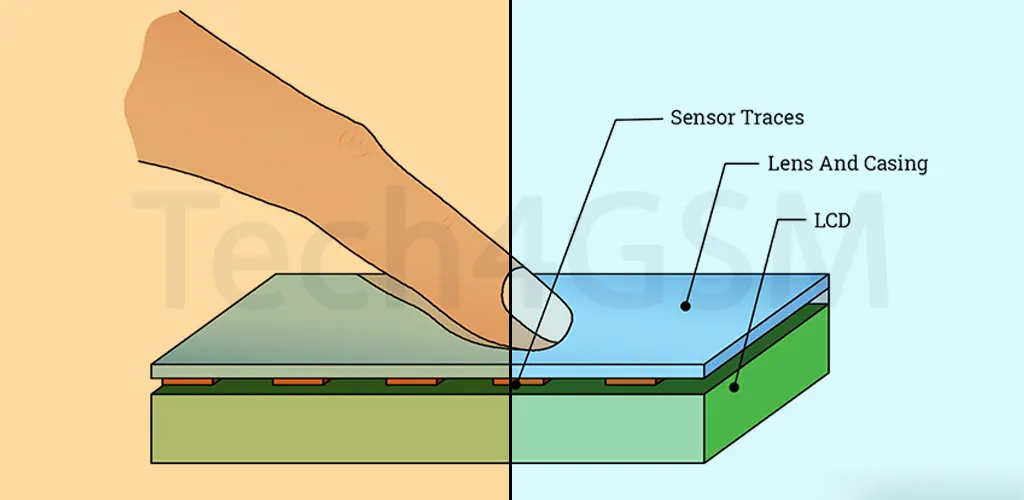
How Touchscreens Work
Think of it as a digital handshake:
- You Touch: Your finger or stylus makes contact.
- Sensors Detect: The screen locates the touchpoint.
- Software Reacts: Opens apps, scrolls pages, or plays games.
Behind the Scenes: Tiny electrical grids or pressure sensors translate touch into commands.
Types of Touchscreens
Not all touchscreens are created equal! Here’s the breakdown:
1. Resistive Touchscreens
- How: Respond to pressure (like old ATM screens).
- Pros: Works with any object (stylus, gloves). Cheap to make.
- Cons: Less sensitive. Poor visibility in sunlight.
2. Capacitive Touchscreens
- How: Detect electrical charges from your finger (used in smartphones).
- Pros: Super responsive. Supports multi-touch (pinch-to-zoom!).
- Cons: Doesn’t work with gloves (unless conductive).
3. Infrared/SAW Screens
- How: Uses light beams or sound waves to sense touch.
- Pros: Durable (great for public kiosks).
- Cons: Expensive. Rare in consumer gadgets.
| Type | Best For | Example |
|---|---|---|
| Resistive | Budget devices, harsh environments | Older GPS units |
| Capacitive | Smartphones, tablets | iPhone, Android phones |
| Infrared | ATMs, airport check-ins | Interactive kiosks |
Why Touchscreens Took Over
- Intuitive Use: Even toddlers can swipe and tap!
- Space-Saving: No physical buttons = bigger screens.
- Multi-Touch Magic: Two-finger zoom, gaming controls, and more.
- Sleek Designs: Glass slabs beat clunky keypads.
Fun Fact: The first touchscreen (1965) was thick as a brick and cost a fortune!
Touchscreens Beyond Phones
- ATMs & Kiosks: Withdraw cash or order food with a tap.
- Car Dashboards: Control music, maps, or AC without buttons.
- Medical Devices: Doctors input data swiftly during surgeries.
- Smart Home Panels: Adjust lights or thermostats on the wall.
Pros & Cons of Touchscreens
Pros:
- Easy to learn (no manuals needed!).
- Interactive & engaging (games, drawing apps).
- Updates via software (no hardware changes).
Cons:
- Fingerprint magnet (keep that microfiber cloth handy!).
- Can crack or scratch (hello, screen protectors!).
- Accidental touches (pocket dials, anyone?).
How to Choose a Touchscreen Device
- Purpose:
- Casual use: Capacitive (smartphones, tablets).
- Industrial: Resistive/Infrared (durable, glove-friendly).
- Touch Type: Need stylus support? Opt for active capacitive.
- Durability: Gorilla Glass or rugged screens for rough use.
- Size: Bigger isn’t always better—consider portability.
The Future of Touchscreens
- Foldables: Screens that bend (Samsung Galaxy Z Fold).
- Haptic Feedback: Feel “clicks” or textures on glass.
- AI Integration: Screens that predict your taps (type faster!).
Wrapping Up
Touchscreens transformed how we interact with tech—turning taps into actions and glass into gateways. Whether you’re scrolling TikTok, drawing a masterpiece, or checking the weather, these displays put the power at your fingertips. Ready to upgrade? Find your perfect touchscreen match and tap into the future!