Introduction
Imagine working from a beach café but accessing your office computer as if you’re sitting at your desk—without worrying about hackers. That’s the magic of a VPN! This digital cloak lets you browse, work, and stream securely, even on public Wi-Fi. Let’s explore how VPNs work, why they’re essential, and how to use them like a pro.
What is a VPN?
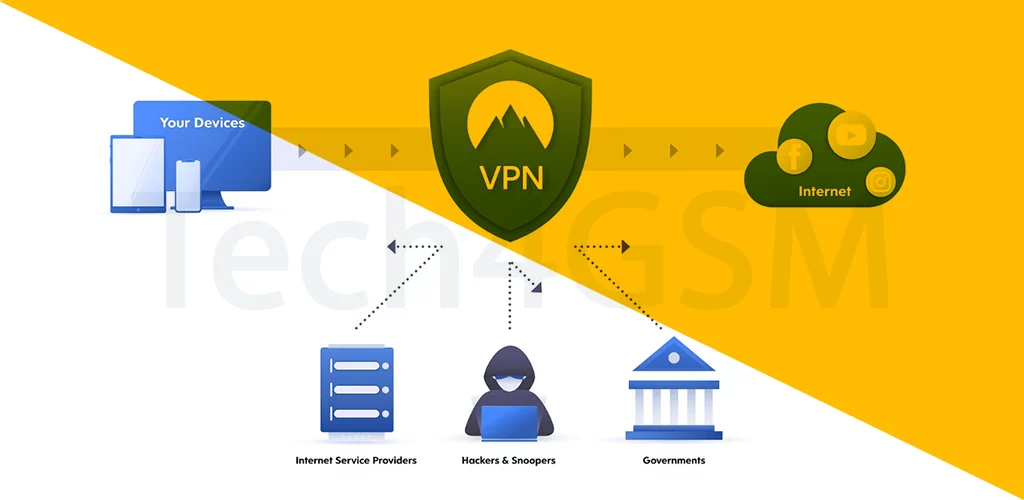
A VPN (Virtual Private Network) is like a secret tunnel between your device and the internet. It:
- Hides your online activity from snoops (like hackers or your nosy neighbor).
- Encrypts data (scrambles it into unreadable code).
- Masks your location (pretend you’re in another country!).
Corporate Example: Access your office’s private intranet from your phone—just like sitting at your desk!
How Does a VPN Work?
- Connect to a VPN Server: Your device links to a secure server (run by your company or a VPN provider).
- Encrypt Everything: Data is scrambled, making it useless to hackers.
- Browse Anonymously: The server acts as a middleman, hiding your real IP address.
It’s like mailing a letter in a locked safe instead of a see-through envelope!
Why You Need a VPN
- Work Remotely: Access company files securely from anywhere.
- Bypass Geo-Blocks: Stream shows only available in other countries.
- Public Wi-Fi Safety: Shop online at airports without fear.
- Avoid Tracking: Stop advertisers from following your every click.
Corporate VPNs vs. Personal VPNs
| Corporate VPN | Personal VPN |
|---|---|
| Connects to company intranet | Connects to public VPN servers |
| Grants work privileges (files, tools) | Focuses on privacy and entertainment |
| Managed by your employer | Choose your own provider (NordVPN, ExpressVPN) |
Fun Fact: The first VPN was created in 1996 to help remote workers securely access office networks!
How to Set Up a VPN
- For Corporate Access:
- Get VPN details from your IT team (server address, login).
- Enter them in your device’s VPN settings (found in Network options).
- Connect and enjoy secure access!
- For Personal Use:
- Download a trusted VPN app.
- Pick a server location (e.g., “UK” for BBC iPlayer).
- Turn it on and browse freely!
VPN Benefits for Businesses
- Secure Remote Work: Employees can safely access sensitive data from home.
- Cost Savings: No need for expensive leased lines.
- Central Control: IT teams manage user access and permissions.
VPN Limitations (and Fixes!)
- Slower Speeds: Encryption adds a tiny delay. Fix: Choose servers closer to you.
- Blocked by Some Sites: Streaming services fight VPNs. Fix: Use premium VPNs with dedicated IPs.
- Complex Setup: Corporate VPNs need tech know-how. Fix: Let your IT team handle it!
VPN Pro Tips
- Always Enable VPN on Public Wi-Fi: Protect passwords and credit card details.
- Use Split Tunneling: Route only work traffic through the VPN (saves bandwidth!).
- Kill Switch Feature: Cuts internet if VPN drops—no data leaks!
The Future of VPNs
- AI-Powered Security: Detect and block threats in real-time.
- 5G VPNs: Ultra-fast, lag-free encryption for mobile users.
- Simpler Apps: One-click solutions for non-techies.
Wrapping Up
A VPN is your digital bodyguard—shielding your privacy, unlocking global content, and letting you work securely from anywhere. Whether you’re a remote employee or a Netflix binge-watcher, using a VPN is a no-brainer in today’s connected world.