Introduction
In today’s fast-paced professional world, emails remain the backbone of organizational communication. Whether you’re a startup founder, a corporate employee, or a freelance engineer, understanding email etiquette is non-negotiable. Among the most critical yet misunderstood features are CC (Carbon Copy) and BCC (Blind Carbon Copy). These tools ensure clarity, privacy, and efficiency—when used correctly.
Why CC and BCC Matter in 2025
Emails are more than just messages—they’re records of accountability, collaboration, and professionalism. With remote work and global teams dominating 2025’s workplaces, mastering CC and BCC ensures you:
- Avoid miscommunication
- Protect privacy
- Streamline workflows
- Build trust
Let’s dive into the specifics.
1. Carbon Copy (CC): Transparency with Accountability
What is CC?
CC stands for Carbon Copy, a term borrowed from the pre-digital era when carbon paper duplicated documents. In emails, CC lets you send a copy to additional recipients without making them the primary addressee.
When to Use CC
- Keeping Stakeholders Informed: Loop in managers or team members who need visibility but don’t require action.
- Group Communication: Share updates with multiple departments while highlighting the main recipient.
- Documenting Communication: Create a paper trail for accountability (e.g., client agreements).
Key Benefits of CC
✅ Transparency: All recipients see who else received the email.
✅ Accountability: Prevents “I wasn’t aware” scenarios.
✅ Efficiency: Reduces follow-up emails by keeping everyone on the same page.
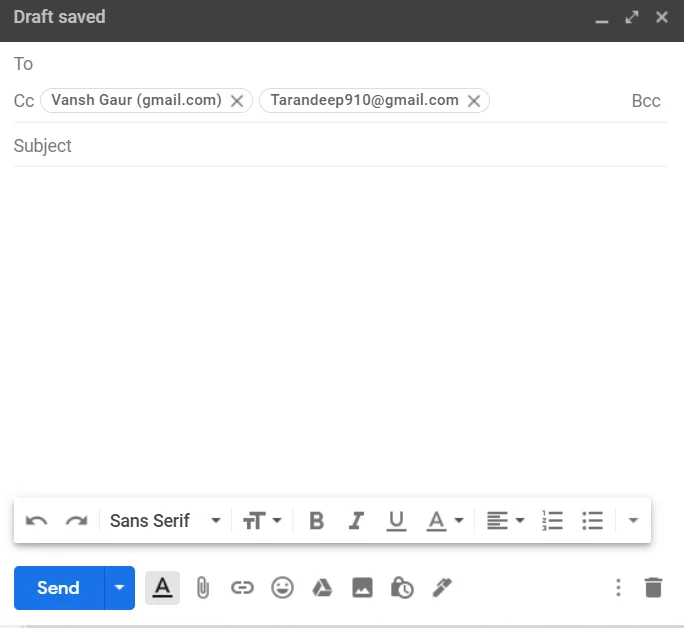
Example of CC in Action
Imagine you’re an engineer emailing a client about a project delay. You CC your project manager and QA lead:
Here, the client knows the manager and QA lead are informed, fostering trust and transparency.
Common CC Mistakes to Avoid
- Overusing CC: Cluttering inboxes with irrelevant copies.
- Ignoring Hierarchy: CC’ing a senior executive without context.
- Forgetting Privacy: CC exposes all emails—avoid sensitive addresses!
2. Blind Carbon Copy (BCC): Privacy Meets Efficiency
What is BCC?
BCC stands for Blind Carbon Copy. Unlike CC, BCC hides recipients’ email addresses, making it ideal for mass emails or confidential communication.
When to Use BCC
- Mass Emails: Send newsletters, company updates, or event invites without exposing contacts.
- Confidentiality: Protect sensitive addresses (e.g., clients, employees).
- Avoiding Reply-All Chaos: Prevent inbox floods in large groups.
Key Benefits of BCC
✅ Privacy: Shields recipients’ email addresses.
✅ Professionalism: Avoids spam-like visibility in mass emails.
✅ Control: Limits unnecessary replies.
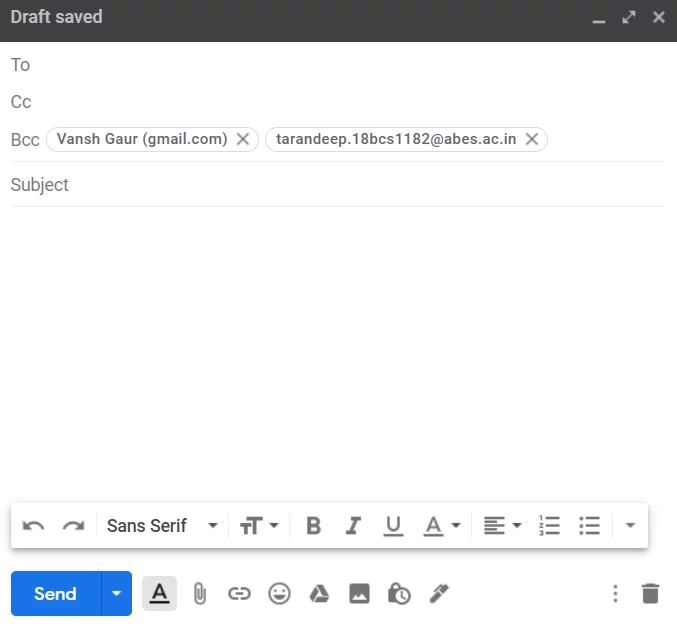
Example of BCC in Action
Suppose you’re announcing a company-wide policy change. Using BCC:
Employees receive the email but can’t see each other’s addresses, reducing clutter and privacy risks.
BCC Best Practices
- Inform Recipients: Add a line like “Sent to BCC for privacy.”
- Avoid Overuse: Reserve BCC for genuine privacy needs.
- Check Legal Compliance: Ensure alignment with data laws (e.g., GDPR).
CC vs BCC: The 8 Key Differences
| No. | CC | BCC |
|---|---|---|
| 1 | Visible Recipients: All see each other’s emails. | Hidden Recipients: No one sees others’ emails. |
| 2 | Use Case: Updates for stakeholders. | Use Case: Mass/confidential emails. |
| 3 | Response Handling: Recipients get all replies. | Response Handling: No replies unless forwarded. |
| 4 | Privacy Risk: Higher (emails exposed). | Privacy Risk: Lower (emails hidden). |
| 5 | Professional Tone: Encourages open collaboration. | Professional Tone: Protects confidentiality. |
| 6 | Email Chains: Keeps everyone looped. | Email Chains: Limits thread inclusion. |
| 7 | Spam Risk: Lower (transparent intent). | Spam Risk: Higher (if misused). |
| 8 | Best For: Teams, clients, projects. | Best For: Newsletters, HR, sensitive data. |
FAQs: CC and BCC in 2025
Q1: Can BCC recipients see each other?
A: No. BCC completely hides recipient lists.
Q2: Should I use CC or BCC for clients?
A: Use CC for transparency (e.g., including their manager). Use BCC only if their privacy is a priority.
Q3: Do CC’d recipients need to reply?
A: Not unless explicitly asked. CC is for awareness, not action.
Q4: Is BCC secure for sensitive data?
A: BCC hides emails but doesn’t encrypt content. Use encryption tools for sensitive info.
Q5: Can I move a CC recipient to BCC later?
A: No—once sent, visibility can’t be changed. Double-check before hitting send!
Q6: Why do some emails auto-populate CC/BCC?
A: Email clients like Outlook or Gmail may save defaults. Review fields every time.
Q7: How many CC/BCC recipients are too many?
A: If CC/BCC exceeds 10, consider a mailing list or separate email.
Conclusion: Mastering Email Etiquette in 2025
CC and BCC aren’t just buttons—they’re tools for building trust, efficiency, and professionalism. Whether you’re keeping stakeholders in the loop (CC) or protecting privacy (BCC), using these features correctly can elevate your communication game.