Introduction
Picture this: You’re sipping coffee at a café, and ding—your boss sends an urgent email. Instead of rushing home to your laptop, you grab your phone and reply in seconds. How? Thank the email client—a tiny app doing big things behind the scenes. Let’s decode how this feature turns your phone into a mobile office!
What’s an Email Client?
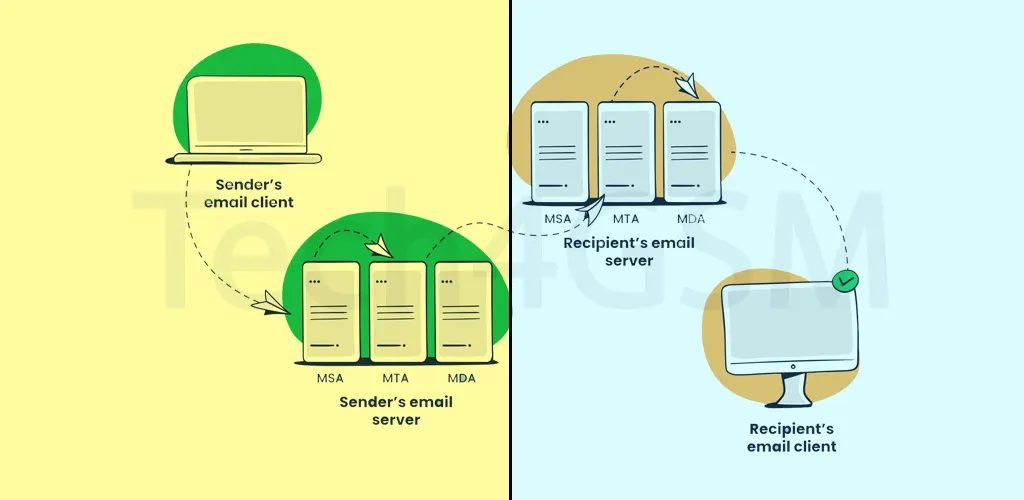
An email client is like a digital postmaster built into your phone. Unlike checking email through a browser (like Gmail.com), a dedicated client directly connects to email servers—whether it’s your work account, Gmail, or grandma’s AOL. Think of it as a VIP shortcut to your inbox.
Phones with a full email client (like iPhones, BlackBerrys, or Android devices) let you:
- Read, write, and organize emails offline.
- Sync contacts and calendars automatically.
- Get push notifications the moment a message arrives.
All you need is a wireless data connection (cellular or Wi-Fi) to keep it running. No browser tabs, no fuss!
How It Works: Magic Behind the Scenes
Here’s the secret sauce: Your email client talks to servers using protocols—fancy rules for sending/receiving data. Common ones include:
- IMAP: Syncs emails across devices (delete on your phone, it’s gone everywhere).
- POP3: Downloads emails to one device (old-school, like saving letters to a drawer).
- Exchange: The corporate favorite (syncs emails, calendars, and to-do lists).
But here’s the catch: Not all protocols are supported by every phone. If your office uses Exchange 2019 but your phone’s client only handles IMAP? You might hit a wall. Always check your phone’s specs or ask IT!
“Why Can’t I Set Up My Work Email?!”
Ever tried adding an account and gotten a cryptic error? Blame protocol mismatches. For example:
- Your phone’s client doesn’t support LDAP (used for corporate address books).
- The server requires two-factor authentication, but your client can’t handle it.
- The email service uses a custom port your phone doesn’t recognize.
Fix? Try these hacks:
- Update your phone’s OS (newer software = better protocol support).
- Use your email provider’s dedicated app (like Outlook for Exchange).
Why Email Clients Still Matter in 2025
With apps like Gmail dominating, you might ask: Who needs a built-in client? Turns out, lots of us!
- Workaholics: Merge multiple accounts (work + personal) in one place.
- Offline Warriors: Draft emails on flights or in subway tunnels.
- Privacy Buffs: Encrypt emails without relying on third-party apps.
Plus, many budget phones still rely on basic email clients to keep costs low.
Fun Fact
The first mobile email client debuted on the BlackBerry 850 in 1999—a pager-like device that made CEOs feel like wizards. ✨
The Bottom Line
A good email client turns your phone into a productivity powerhouse—but only if it “speaks the same language” as your email server. Next time your setup fails, remember: It’s not you, it’s the protocols!