Introduction
Have you ever wanted to stream a movie from your phone to your TV without cables? Or play a photo slideshow on your laptop directly from your tablet? If so, DLNA might be the magic you’re looking for! Let’s break down what DLNA is, how it works, and why it’s a game-changer for home entertainment.
DLNA: The Organization AND The Technology
First things first: DLNA refers to two things.
- The Organization: Founded in 2003, the Digital Living Network Alliance (DLNA) was a group of tech companies like Sony, Intel, and Microsoft. Their goal? Create universal standards for sharing media.
- The Technology: DLNA is also the name of the software standard they developed. It lets devices like TVs, phones, and speakers “talk” to each other over a home network.
Think of DLNA as a universal language that devices use to share music, photos, and videos effortlessly.
How DLNA Works: Share Music, Photos, and Videos Over Your Home Network
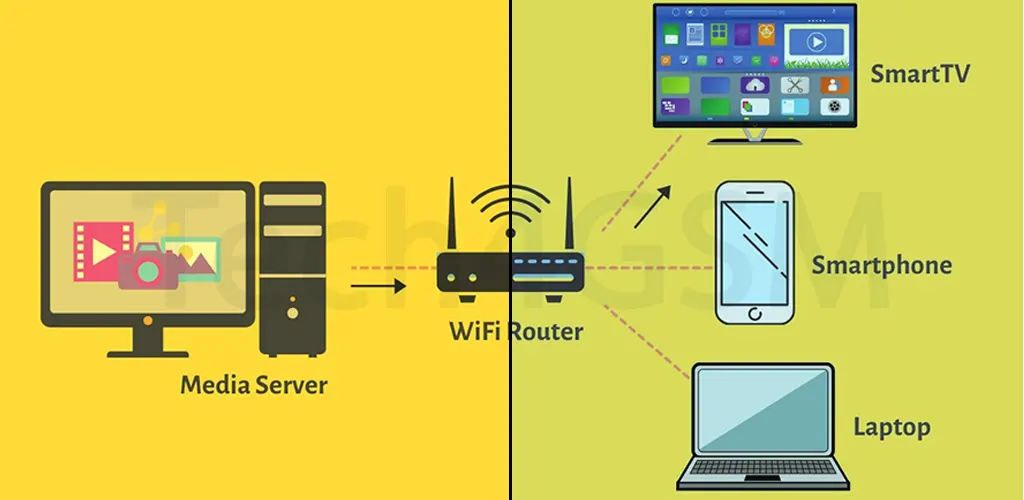
The DLNA standard turns your home Wi-Fi into a media-sharing powerhouse. Here’s the simple version:
- Your devices (phone, TV, laptop) connect to the same Wi-Fi.
- DLNA-certified gadgets recognize each other and share content.
- No cables, no complicated setups—just seamless streaming!
For example, imagine filming a vacation video on your phone. With DLNA, you can instantly play it on your living room TV without transferring files or plugging in a USB.
Real-Life Example: Stream from Phone to TV in Seconds
Let’s paint a picture:
- You’re watching a YouTube video on your phone but want a bigger screen.
- Your TV is DLNA-certified (most smart TVs are).
- Connect both devices to Wi-Fi, tap “Cast” on your phone, and boom—the video plays on your TV!
This works for music playlists, photo albums, and even live camera feeds. DLNA turns your entire home into a connected entertainment hub.
Why DLNA is Awesome: 3 Key Benefits
- No More Cables: Ditch the HDMI cords and USB drives.
- Works Everywhere: Compatible with 10,000+ devices (cameras, game consoles, speakers).
- Easy Setup: If your device has a DLNA logo, it’s ready to connect.
How to Use DLNA in 3 Steps
- Check Compatibility: Look for the DLNA logo on your devices.
- Connect to Wi-Fi: Ensure all devices are on the same network.
- Start Sharing: Use apps like VLC or Windows Media Player to stream content.
Final Thoughts
DLNA isn’t just tech jargon—it’s a practical tool for everyday life. Whether you’re hosting a movie night or sharing vacation pics, this standard makes it easy. And if you’re upgrading your gear, visit tech4gsm.com for devices that play nice with DLNA.
Got questions? Here’s a quick FAQ:
- Q: Is DLNA the same as Wi-Fi Direct?
A: No—DLNA uses your existing Wi-Fi, while Wi-Fi Direct creates a separate connection. - Q: Do I need special apps for DLNA?
A: Some devices have built-in apps, but third-party apps like BubbleUPnP work too.
Now go ahead—stream, share, and enjoy your content the smart way! 🎬🔊