Introduction
The Domain Name System (DNS) is a hierarchical, distributed database that converts human-friendly domain names (like www.tech4gsm.com) into machine-readable IP addresses (like 140.251.190.14). Without DNS, you’d need to memorize complex numbers to visit websites!
Key Functions of DNS:
- Translates Names to IPs: Acts like a phonebook for the internet.
- Hierarchical Structure: Organizes domains in a tree-like system (root → .com → tech4gsm).
- Distributed Database: No single server holds all DNS data; it’s spread globally for efficiency.
- Speeds Up Access: Uses caching to reduce delays when loading websites.
How Does DNS Work? A Step-by-Step Breakdown
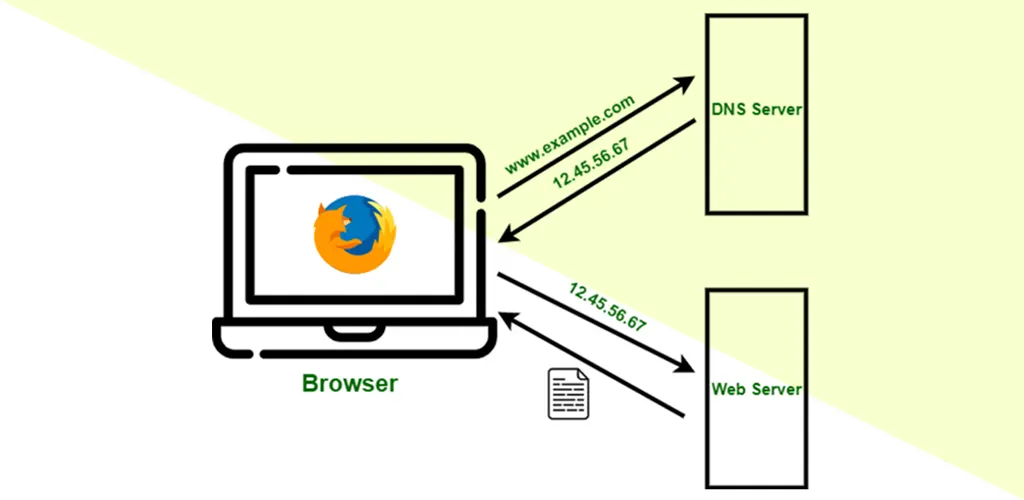
Let’s say you type https://www.tech4gsm.com into your browser. Here’s what happens next:
- Check Local Cache:
- Your device first checks its local cache (browser, OS, or router) for the IP address.
- If found: The website loads instantly.
- Contact DNS Resolver:
- If the cache is empty, your device asks a DNS resolver (usually managed by your ISP).
- The resolver acts like a detective, hunting down the IP address.
- Root Server Query:
- The resolver contacts a root DNS server, which doesn’t have the IP but directs it to the Top-Level Domain (TLD) server (e.g., .com).
- TLD Server Redirect:
- The TLD server points the resolver to the authoritative nameserver for tech4gsm.com.
- Authoritative Server Response:
- This server holds the actual IP address and sends it back to the resolver.
- Cache & Connect:
- The resolver stores the IP in its cache for future requests and sends it to your device.
- Your browser connects to the IP, and the website loads!
DNS Structure: The Hierarchy Explained
DNS operates like an inverted tree, with layers ensuring quick and organized lookups:
- Root DNS Servers:
- 13 global clusters directing queries to TLD servers.
- Example: Root hints “.com” to the TLD server.
- Top-Level Domain (TLD) Servers:
- Manage extensions like .com, .org, or country codes like .in (India).
- Authoritative Nameservers:
- Store the actual IP addresses for specific domains (e.g., tech4gsm.com).
Why This Hierarchy Matters:
- Speed: Distributed layers reduce server load.
- Reliability: If one server fails, others take over.
- Scalability: Handles billions of domains effortlessly.
Types of Domains
DNS categorizes domains into three groups:
- Generic Domains (gTLD):
- Common extensions: .com (commercial), .org (nonprofit), .net (network).
- Newer options: .app, .blog, .tech.
- Country Code Domains (ccTLD):
- Localized extensions: .us (USA), .uk (UK), .in (India).
- Inverse Domains:
- Used for reverse DNS lookups (IP → domain).
- Example: Confirm if 142.250.190.14 belongs to tech4gsm.com.
Types of DNS Servers
- Recursive Resolver:
- Your device’s “detective” that fetches IPs from other servers.
- Root & TLD Servers:
- Direct traffic but don’t store specific IPs.
- Authoritative Nameserver:
- The final stop that holds the domain’s IP address.
DNS Lookup: What Happens Behind the Scenes?
- Step 1: Query starts at your device.
- Step 2: Passes through resolver → root → TLD → authoritative server.
- Step 3: IP address travels back to your browser.
Why It’s Fast: Caching at every level (device, resolver, server) skips repetitive searches.
DNS Caching: The Secret to Speed
Caching temporarily stores DNS data to accelerate future requests:
- Browser/OS Cache: Saves recent lookups.
- Resolver Cache: ISPs retain popular domain IPs.
- TTL (Time to Live): Determines how long data is stored (e.g., 24 hours).
Benefits:
- ⚡ Faster Load Times
- 🌐 Reduces Global DNS Traffic
- 💻 Improves User Experience
Types of DNS Queries
- Recursive Query:
- Resolver must return an answer or error.
- Iterative Query:
- Resolver gets “clues” and continues searching.
- Non-Recursive Query:
- Answer is already cached, so no extra lookups.
FAQs: Your DNS Questions Answered
Q1: What is a Level 3 DNS Server?
- A free, public DNS resolver (like Google’s 8.8.8.8) offering faster, secure lookups.
Q2: Is DNS a Protocol?
- Yes! DNS uses both UDP (quick queries) and TCP (large data transfers).
Q3: How Long Do DNS Changes Take?
- Up to 48 hours due to propagation (global cache updates).
Q4: Can DNS Be Hacked?
- Yes—DNSSEC (DNS Security Extensions) adds encryption to prevent attacks.
Q5: Why Use Custom DNS?
- Speed, privacy (avoid ISP tracking), and ad-blocking.
Conclusion
By 2025, DNS will continue to be the unsung hero of the internet, silently guiding billions of requests daily. Understanding its role helps troubleshoot issues, optimize speed, and enhance security.