
Introduction
Xiaomi’s HyperOS is the latest software upgrade for Xiaomi, Redmi, and Poco devices, packed with features to boost performance. However, like its predecessor MIUI, it’s loaded with bloatware and intrusive ads that slow down your phone and drain resources. Don’t worry—this 2025 guide will help you clean up HyperOS and enjoy a smoother, ad-free experience.
Why Optimize HyperOS?
- Ads disrupt your workflow and compromise privacy.
- Bloatware wastes storage and battery life.
- A cleaner phone = faster performance and better security.
Let’s dive into the step-by-step solutions.
Step 1: Remove Ads from HyperOS
HyperOS hides ads in system apps and menus. Here’s how to eliminate them:
1. Turn Off System-Wide Ads
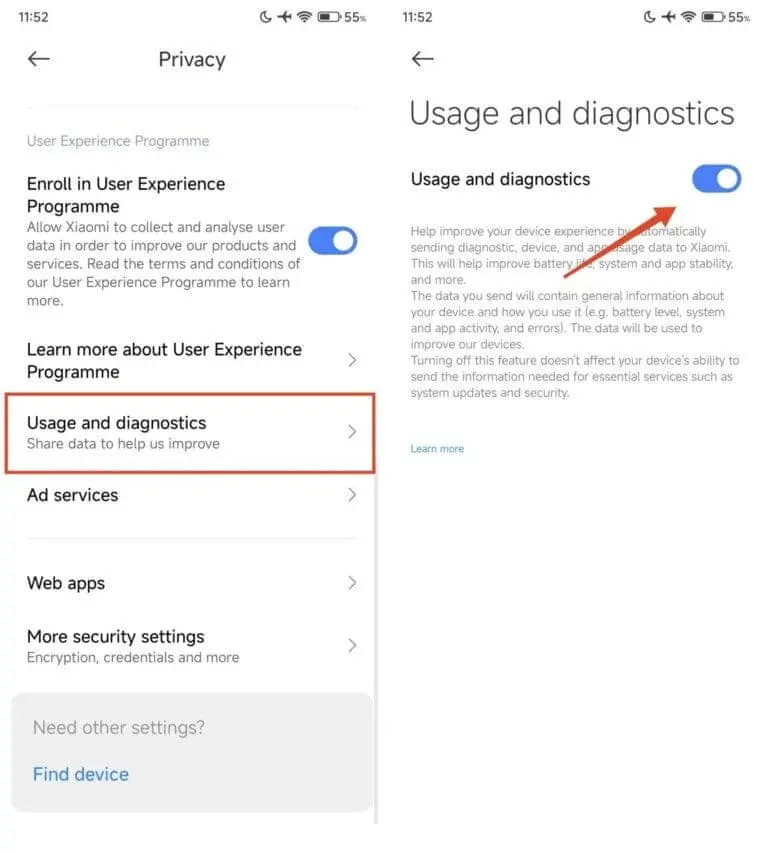
- Open Settings > Privacy.
- Tap Fingerprints, face data, and screen lock.
- Disable:
- User Experience Program
- Usage and diagnostics
- Personalized Ads
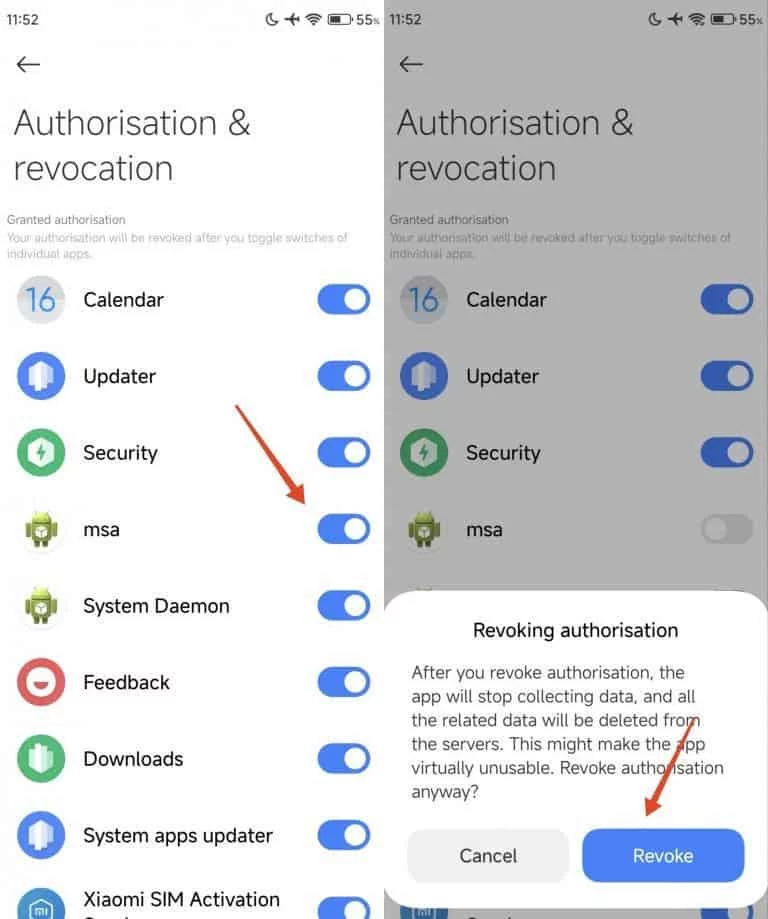
- Go to Authorization and revocation under the same menu.
- Revoke permissions for System Daemon and msa (MIUI System Ads).
- Open apps like Security, Music, or File Manager.
- Go to each app’s Settings and toggle off Show Ads or Recommendations.
3. Clean Up the App Drawer
- Open the App Drawer and tap the gear icon.
- Turn off App Recommendations.
Step 2: Disable Wallpaper Carousel Ads
This feature eats battery life and shows ads. Remove it:
- Go to Settings > Applications > Manage Applications.
- Tap the three-dot menu > View all apps.
- Search for Wallpaper Carousel > Uninstall or Disable.
Step 3: Stop Security Scan Ads
The Security app’s “helpful” scans come with ads:
- Open the Security app > Settings.
- Select Security scan > Turn off Scan before installation.
Step 4: Silence Unwanted Notifications
Reduce distractions by blocking spammy alerts:
- Long-press an app icon > App Info > Notifications.
- Toggle off All Notifications or customize preferences.
Step 5: Remove Bloatware (Pre-Installed Apps)
Free up space and speed up your device:
Basic Method
- Open the App Drawer, long-press an app, and tap Remove.
- Or go to Settings > Apps > Manage apps > Uninstall.
Advanced Method (For Techies)
Use tools like Universal Android Debloater (available on GitHub) to remove stubborn apps.
⚠️ Warning: Avoid deleting critical system apps!
Final Thoughts
With these tweaks, your Xiaomi, Redmi, or Poco device will feel faster, cleaner, and more secure in 2025. HyperOS doesn’t have to be cluttered—take control of your phone’s settings, ditch the ads, and enjoy a streamlined experience!
Pro Tip: Bookmark this guide or share it with friends struggling with HyperOS bloat! 🚀