Introduction
Ever tried typing a text message on an old Nokia brick phone with one hand? If it felt oddly smooth, you might’ve used Half-QWERTY—a clever keyboard hack that squeezed the classic QWERTY layout into half the space. Let’s explore this retro gem and why it’s still relevant today!
What is Half-QWERTY?
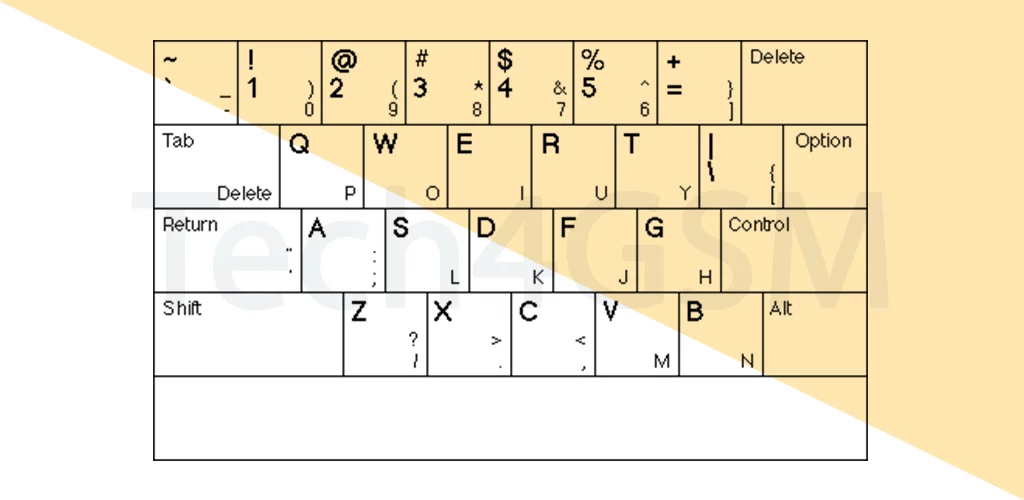
Half-QWERTY is a compact keyboard design that fits the full QWERTY layout into fewer keys. Here’s the twist:
- Two Letters Per Key: Each key has two characters (e.g., “Q” + “P” on one button).
- Narrow & One-Hand Friendly: Perfect for old-school “candy bar” phones or small devices.
- Predictive Text Partner: Auto-suggestions help you type faster by guessing words as you press.
Why Half-QWERTY Was Genius
- Space Saver:
- Shrinks the keyboard to fit the lower half of a device (like old BlackBerrys or feature phones).
- One-Handed Typing:
- Hold your phone in one hand, thumb-type with ease—no acrobatics needed!
- Familiar Layout:
- Uses the same QWERTY arrangement you know, so no relearning required.
How Half-QWERTY Works
Let’s say you’re typing “HELLO”:
- Press the H key (which also has J).
- Predictive text guesses “H” and suggests words like “HELLO” or “HEY”.
- Select the word from the list—done!
No multi-taps! Unlike old T9 keyboards (where you press “2” thrice for “C”), Half-QWERTY relies on predictive software to do the heavy lifting.
Real-Life Uses of Half-QWERTY
- Vintage Phones: Nokia, Sony Ericsson, and early BlackBerry devices.
- Accessibility: Helpful for users with limited hand mobility.
- Modern Compact Keyboards: Some mini Bluetooth keyboards still use this layout.
Pros & Cons of Half-QWERTY
| Pros | Cons |
|---|---|
| Saves space on small screens | Requires practice to master |
| Faster than multi-tap typing | Predictive text isn’t always accurate |
| Familiar QWERTY layout | Less efficient than full keyboards |
Half-QWERTY vs. T9 vs. Full QWERTY
| Feature | Half-QWERTY | T9 | Full QWERTY |
|---|---|---|---|
| Keys per letter | 2 letters per key | 3–4 letters per key | 1 letter per key |
| Typing Speed | Moderate (with AI help) | Slow (multi-taps) | Fast |
| Device Examples | BlackBerry Pearl | Nokia 3310 | Smartphones, laptops |
Why You Don’t See It Anymore (Mostly)
- Touchscreens Took Over: Swipe typing and virtual keyboards killed physical keypads.
- Predictive Text Got Smarter: Apps like Gboard or SwiftKey predict words without needing half-sized layouts.
- Bigger Screens: Modern phones have space for full QWERTY keyboards.
Who Should Still Care About Half-QWERTY?
- Retro Tech Fans: Love old phones? This layout is part of their charm.
- Minimalists: Some compact gadgets (e.g., tiny smartwatches) use similar designs.
- Accessibility Users: Great for one-handed typing without stretching fingers.
Tips to Master Half-QWERTY
- Trust the Predictions: Let the software guess words—don’t type every letter.
- Shortcut Words: Use abbreviations (e.g., “BRB” vs. “Be right back”).
- Practice: Muscle memory kicks in faster than you think!
Final Thoughts
Half-QWERTY was the bridge between T9 chaos and modern touchscreen ease. While it’s mostly retired today, its legacy lives on in predictive text tech and our love for compact design. Next time you see an old phone, tip your hat to this tiny typing hero!
Key Takeaways:
- Half-QWERTY packs a full keyboard into half the keys with two letters per button.
- Relies on predictive text to speed up typing on small screens.
- Perfect for one-handed use on older devices like BlackBerrys.
Phased out by touchscreens but inspired modern AI-driven keyboards.