Introduction
Ever wondered how photographers capture the intricate details of a butterfly’s wings or the dewdrops on a flower? The secret often lies in macro mode—a feature that turns your phone into a portal to explore miniature worlds. Let’s simplify what macro mode is and how it works!
What is Macro Mode?
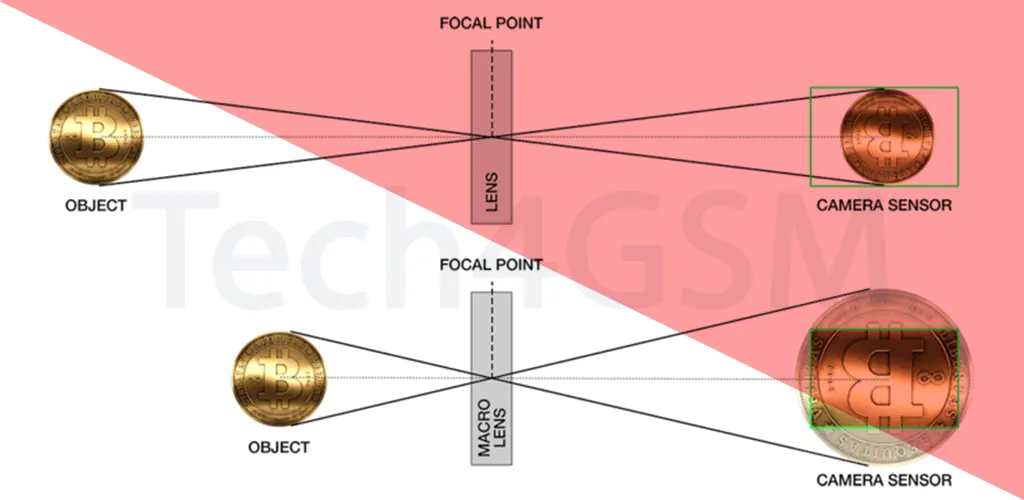
Think of macro mode as your camera’s microscope button. When activated, it lets you take sharp, detailed photos of tiny subjects from extremely close distances—think 2-3 centimeters away! Unlike regular close-up shots, which are taken from slightly farther away, macro mode focuses on making small objects look larger-than-life.
For example, with macro mode, you can photograph the texture of a leaf’s veins or the sparkle of a jewelry gemstone without blur.
Macro vs. Close-Up: What’s the Difference?
Many confuse macro mode with standard close-ups, but there’s a key difference:
- Macro Mode: Designed for ultra-short distances. It requires specialized lenses or sensors to focus on subjects almost touching the camera.
- Close-Up Shots: Taken from a slightly greater distance (like 10-30 cm) and rely on auto-focus to capture details. They’re good for food photos or portraits but lack the “wow” factor of macro.
In short, macro mode is for tiny subjects, while close-ups are for… well, close-but-not-too-close moments.
Why Do Some Phones Struggle with Macro Photos?
Not all macro modes are created equal! Many budget phones label their cameras as “macro” but deliver blurry results. Here’s why:
- Hardware Limits: True macro photography often needs dedicated lenses or sensors. Some phones use software tricks instead, which crop the image and reduce quality.
- Lighting Issues: Shooting this close blocks natural light, causing shadows. A good macro setup includes focus-assist lights or works best in bright environments.
Pro tip: If your phone’s macro shots look grainy, try shooting in daylight or use a small external light source!
How to Master Macro Mode Like a Pro
- Steady Hands (or a Tripod): Even slight shakes ruin macro shots.
- Clean Your Lens: Fingerprints smudge tiny details.
- Tap to Focus: Manually select the part of the subject you want to highlight.
- Experiment with Angles: Shoot from the side or below to add drama.
And remember—practice makes perfect! Start with easy subjects like coins or flowers before moving to fast-moving bugs.
Is a Dedicated Macro Camera Better Than a Phone?
High-end DSLR macro lenses offer unmatched detail, but modern smartphones are catching up. Brands like Xiaomi, Samsung, and Huawei now pack AI-powered macro modes that auto-adjust settings for sharper results. For casual users, a phone’s macro mode is more than enough to spark creativity!
Final Thoughts
Macro mode is more than just a camera feature—it’s an invitation to see the world differently. Whether you’re snapping photos of everyday objects or nature’s hidden gems, this mode turns the ordinary into the extraordinary. So, grab your phone, switch to macro, and start exploring the tiny wonders around you!