Introduction
Ever wondered why your Netflix show buffers or your Zoom call freezes? The answer often lies in your internet speed, measured in Mbps. Let’s break down what Mbps means, why it matters, and how it affects your daily online life—no tech jargon, just plain talk!
What Is Mbps?
Mbps stands for Megabits per second. It’s a unit that measures how fast data travels over the internet. Think of it like a highway: the higher the Mbps, the more “cars” (data) can zoom through without traffic jams.
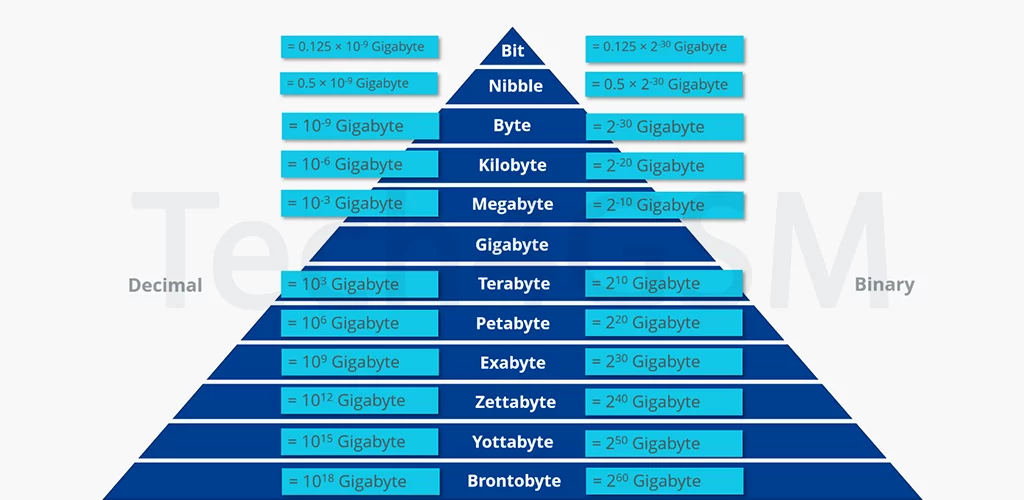
- 1 Mbps = 1,048,576 bits per second (since computers use binary math).
- 1 Mbps = 1,024 Kilobits per second (Kbps).
Confused about “bits”? A bit is the smallest unit of digital data—like a single light switch (on/off). Eight bits make a byte, which represents a character (like the letter “A”).
Why Should You Care About Mbps?
Your internet plan’s Mbps determines how smoothly you can:
- Stream videos (Netflix, YouTube).
- Game online (Fortnite, Call of Duty).
- Video call (Zoom, WhatsApp).
- Download files (movies, software).
Higher Mbps = Faster Speeds. For example:
- 10 Mbps: Basic browsing, emails.
- 50 Mbps: HD streaming on 2 devices.
- 200 Mbps: 4K streaming + gaming + downloads.
Mbps vs. MBps: Don’t Mix Them Up!
- Mbps = Megabits per second (internet speed).
- MBps = Megabytes per second (file download speed).
Since 1 Byte = 8 Bits, a 100 Mbps connection downloads files at 12.5 MBps (100 ÷ 8). So, a 1GB movie (8000 megabits) takes ~1.3 minutes at 100 Mbps.
How Much Mbps Do You Really Need?
| Activity | Recommended Mbps |
|---|---|
| Browsing, emails | 5–10 Mbps |
| HD video streaming | 25 Mbps |
| Online gaming | 50 Mbps |
| 4K streaming + smart home | 200+ Mbps |
Pro Tip: Multiply your household’s devices by their needs. A family of 4 streaming, gaming, and working? Aim for 200+ Mbps.
Myths About Mbps
❌ Myth: “More Mbps always means faster internet.”
✅ Truth: If your plan is 500 Mbps but your Wi-Fi router is old, you’ll never hit that speed.
❌ Myth: “All Mbps are the same.”
✅ Truth: Upload vs. download speeds matter too! Gaming and video calls need good upload rates.
Boost Your Mbps Experience
- Upgrade Your Router: Older routers can’t handle high speeds.
- Use Ethernet: For critical tasks (gaming, work), skip Wi-Fi and plug in.
- Check for Interference: Microwaves, walls, and other devices slow Wi-Fi.
- Test Your Speed: Use free tools like Speedtest.net to see if you’re getting what you pay for.
Final Thoughts
Understanding Mbps helps you pick the right internet plan and troubleshoot slowdowns. Whether you’re binge-watching, gaming, or working from home, the right Mbps keeps your digital life smooth. Remember, it’s not just about big numbers—it’s about balancing speed, reliability, and your needs.
Next time your video buffers, you’ll know exactly what to check! 🚀📶