Introduction
The Routing Information Protocol (RIP) is a distance-vector routing protocol that helps routers determine the optimal path to transfer data packets across a network. Operating at the Network Layer (Layer 3) of the OSI model, RIP uses hop count as its primary metric. Designed for simplicity, RIP is ideal for small to medium-sized networks, but its 15-hop limit makes it unsuitable for larger infrastructures.
Key Takeaway: RIP is easy to configure but limited by its hop count, making it a legacy choice in modern, expansive networks.
What is Hop Count?
Hop count refers to the number of routers a packet must traverse between a source and destination. RIP prioritizes routes with the lowest hop count, storing them in the routing table. To prevent infinite loops, RIP caps the maximum hop count at 15—any route requiring 16 hops is deemed unreachable.
Why 15 Hops?
- Historical networks were smaller, and 15 hops sufficed.
- This limit controls network complexity and convergence time.
Features of RIP
- Periodic Updates: Routers broadcast full routing tables every 30 seconds.
- Broadcast/Multicast Updates:
- RIPv1 uses broadcast (255.255.255.255).
- RIPv2 and RIPng use multicast (224.0.0.9 for IPv4, FF02::9 for IPv6).
- Classful vs. Classless:
- RIPv1 is classful (no subnet mask in updates).
- RIPv2 is classless (includes subnet masks).
- Rumor-Based Routing: Routers trust updates from neighbors without verification.
Analogy: Think of RIP as a town crier announcing routes regularly, whether needed or not.
How Does RIP Work?
- Distance Vector Algorithm: Each router maintains a table listing destinations and hop counts.
- Regular Updates: Every 30 seconds, routers share their entire table with neighbors.
- Route Selection: The path with the fewest hops is chosen.
- Route Expiry: If a route isn’t updated in 180 seconds, it’s marked invalid and flushed after 240 seconds.
Example:
- Router A sends its table to Router B.
- Router B updates its table if Router A’s path is shorter.
RIP Versions Compared
| Feature | RIPv1 | RIPv2 | RIPng |
|---|---|---|---|
| Updates | Broadcast | Multicast | Multicast (IPv6) |
| Authentication | No | Yes | No |
| Subnet Mask | No (Classful) | Yes (Classless) | Yes (Classless) |
| Network Support | IPv4 | IPv4 | IPv6 |
Why RIPv2 is Better:
- Supports authentication to prevent malicious updates.
- Uses multicast, reducing network traffic.
RIP Configuration: Step-by-Step
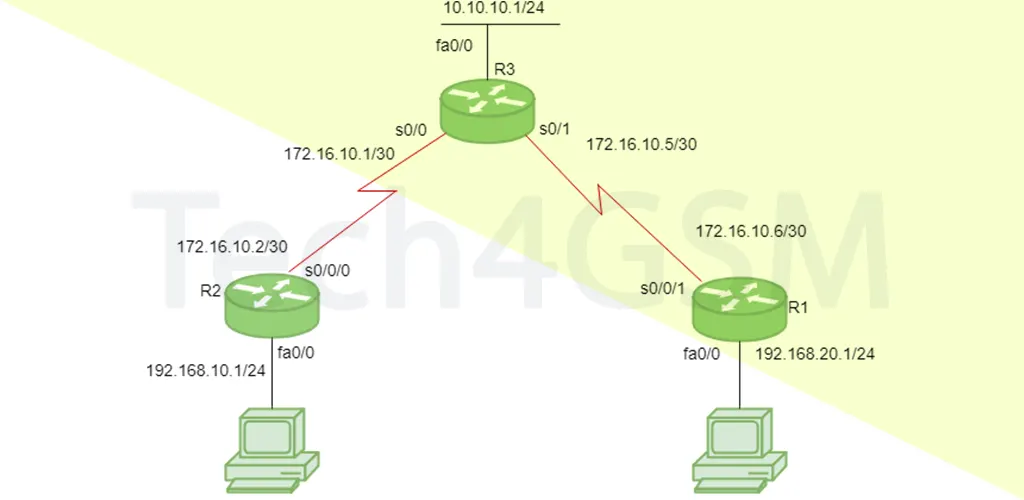
Topology Example:
- R1: 192.168.20.1/24 (LAN), 172.16.10.6/30 (WAN).
- R2: 192.168.10.1/24 (LAN), 172.16.10.2/30 (WAN).
- R3: 10.10.10.1/24 (LAN), 172.16.10.5/30 and 172.16.10.1/30 (WAN).
Configuring R1:
R1(config)# router rip
R1(config-router)# network 192.168.20.0
R1(config-router)# network 172.16.10.4
R1(config-router)# version 2
R1(config-router)# no auto-summary
- no auto-summary: Disables classful behavior, allowing subnet masks in updates.
Verification Commands:
debug ip rip: Troubleshoot RIP updates in real-time.show ip route: Displays the routing table.show ip protocols: Lists configured routing protocols.
Pro Tip: Always use RIPv2 for modern networks due to its classless support.
RIP Timers Explained
- Update Timer (30s): Interval for sending routing tables.
- Invalid Timer (180s): Marks a route invalid if no updates are received.
- Hold-Down Timer (180s): Waits for neighbor confirmation before removing a route.
- Flush Timer (240s): Removes invalid routes from the table.
Customizing Timers:
R1(config-router)# timers basic 20 80 80 90
(Update, Invalid, Hold-Down, Flush in seconds)
Where is RIP Used in 2025?
- Small Businesses: Easy to set up with minimal hardware.
- Legacy Systems: Older networks avoiding costly upgrades.
- Labs/Education: Teaching routing basics without complexity.
- Backup Routing: Acts as a failsafe if primary protocols fail.
Case Study: A small office with three routers uses RIPv2 for its simplicity and low maintenance.
Advantages of RIP
- Simplicity: No advanced training needed.
- Automatic Updates: Reduces manual intervention.
- Fast Convergence: Adapts quickly in small networks.
- Low Bandwidth Use: Minimal overhead in updates.
Disadvantages of RIP
- 15-Hop Limit: Not scalable for large networks.
- Slow Convergence in Large Nets: Updates take longer to propagate.
- No Load Balancing: Only equal-hop paths are shared.
- Security Risks: No encryption in RIPv1/v2.
Limitations of RIP
- Network Traffic Spikes: Frequent updates can congest slow links.
- Ignores Bandwidth/Delay: Chooses shortest path, not fastest.
Real-World Issue: A 16-hop route to a cloud server? RIP can’t handle it—use OSPF instead.
Conclusion
RIP remains relevant in 2025 for small networks and educational purposes due to its simplicity. However, its limitations in scalability and security make protocols like OSPF or EIGRP better for enterprises.
FAQ
Q1: What is split horizon in RIP?
A: A loop-prevention technique where a router doesn’t send updates back to the neighbor it learned them from.
Q2: Can RIP handle load balancing?
A: Yes, but only across paths with equal hop counts.
Q3: How do I configure RIP on a router?
A: Use router rip, specify networks with network [subnet], and set the version.
Q4: What is route poisoning?
A: Marking a failed route as “unreachable” (16 hops) to quickly notify the network.
Q5: Is RIP still used today?
A: Yes, in legacy systems and small setups, but largely replaced by OSPF/EIGRP in enterprises.
Q6: How does RIP compare to OSPF?
A: OSPF uses link-state algorithms and factors like bandwidth, making it faster and scalable.