Introduction
Do you have trouble getting beyond your Samsung Galaxy F05’s user lock and factory reset protection (FRP)? If so, you’ve come to the correct spot. This tutorial will let you use the test point technique to remove your Samsung Galaxy F05 SM-E055F device’s FRP and account. It is an easy-to-follow, straightforward tutorial that will help you complete the task without any issues.
One well-liked smartphone with a reputation for dependability and performance is the Samsung Galaxy F05 SM-E055F. However, we are here to help you if you are locked out of your device because to Factory Reset Protection (FRP) and are looking for a solution. This blog article will examine how to do a Frp bypass on the Samsung Galaxy F05 using the Unlock Tool. So let’s get started!
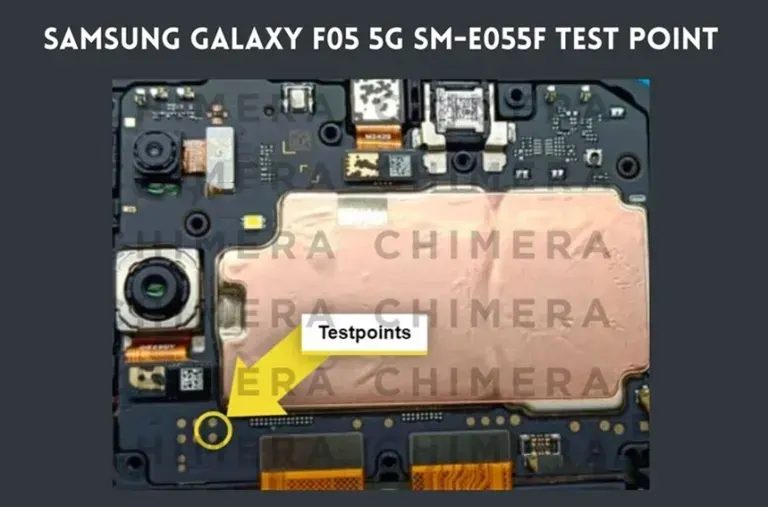
The Samsung Galaxy F05’s Emergency MTK Download mode was the previous name for this. This test point may be used in any box, including Chimera, UFI, UMT, and Unlock Tool. All you have to do is connect the USB cord and short the gold point to ground. Because it’s a sophisticated method of avoiding the bootloader having to be unlocked, some individuals still use it.
We tried this approach using the most recent Android version. We can provide a straightforward method for removing the screen lock on your Samsung Galaxy F05, regardless of whether it is a pattern, password, or pin lock. It is crucial to remember that completing this procedure will cause your Samsung Galaxy F05 to undergo a hard reset, erasing all of your data, including contacts, call logs, messages, images, and videos.
What Is FRP Lock and its Purpose
Manufacturers of smartphones have included a security feature called Factory Reset Protection (FRP) to safeguard user data in the event that the device is stolen or lost. Following a factory reset, users must confirm their Google account information. If you need to remember your Google account information, this function may become inconvenient even if it adds an extra degree of protection. FRP bypass tools are useful in this situation.
Samsung Galaxy F05 SM-E055F Test Point – Boot Into MTK Download Mode:
Instructions for use the Test Point approach to access Download Mode on the Samsung Galaxy F05:
- Turn the gadget off.
- Remove the Samsung Galaxy F05’s non-functional rear cover with care. Information on dismantling the Samsung Galaxy F05 is available online.
- When removing the rear cover, take care not to harm any inside components.
- After the rear cover has been properly removed, take out the battery. It’s crucial to keep in mind that you may enter download mode without the battery.
- You may now access the MTK Download mode or test point for the Samsung Galaxy F05. These may be used to get rid of the pattern lock and FRP bypass.
- How to Unlock the FRP and User Lock on a Samsung Galaxy F05:
- You may use tools like the Octopus FRP Tool, EFT dongle, UMT dongle, and Unlock Tool to remove the pattern lock and FRP from your Samsung Galaxy F05 SM-E055F. Remove the
- battery, short the test point to the ground, then insert the USB cord to put your phone into emergency download mode.
How to Unlock the FRP and User Lock on a Samsung Galaxy F05:
You may use tools like the Octopus FRP Tool, EFT dongle, UMT dongle, and Unlock Tool to remove the pattern lock and FRP from your Samsung Galaxy F05 SM-E055F. Use these procedures to enter emergency download mode on your phone: Plug the USB cord in, short the test point to ground, then take out the battery.
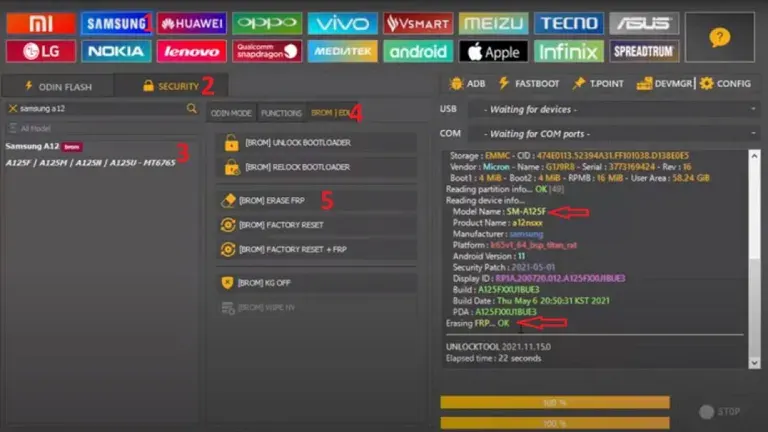
Use the Unlock Tool to Remove Samsung Galaxy F05 FRP
- Launch the UnlockTool application.
- Select Samsung.
- Choose the tab for SECURITY.
- Select the Samsung Galaxy F05 5G SM-E055F model.
- Select the BROM/EDL menu item.
- Press BROM ERASE FRP after that.
- Connect the phone using the aforementioned test point.
Use of the Samsung Galaxy F05 Test Point:
You may utilize a variety of tools and applications in Test Point Download Mode to carry out tasks like:
- Flashing the firmware: If there are any software-related problems or defects with your device, you may return it to its factory settings.
- Restoring a device that has bricked: If your Samsung Galaxy F05 SM-E055F is not responding or is caught in a boot loop, you may try unbricking it using Test Point Download Mode.
- Modifying the system documents: Test Point Download Mode allows advanced users to root their devices, install custom recoveries, and change system data.
One of the most effective ways to debug and restore your Samsung Galaxy F05 is to enter Test Point Download Mode. It may be used to update firmware, fix issues with software, and make complex changes. To avoid losing any crucial information, it is crucial to backup your data before making any changes. This tutorial will show you how to access and use Test Point Download Mode.