Introduction
In today’s tech-driven world, User Interface (UI) Design is the backbone of every digital interaction. Whether you’re browsing a website, using an app, or operating a smart device, UI design determines how effortlessly you can navigate and achieve your goals. By 2025, UI will continue to evolve, blending creativity with functionality to deliver seamless user experiences. Let’s explore what UI design is, why it matters, and how it impacts our daily digital interactions.
What is a User Interface (UI)?
A User Interface (UI) is the bridge between humans and technology. It includes everything you see, touch, or hear while interacting with a device—like buttons, menus, icons, and voice commands. A UI has two primary roles:
- Accepting user input (e.g., typing, swiping, speaking).
- Displaying results (e.g., visuals, sounds, feedback).
Think of UI as the “look and feel” of an app or website. Good UI design uses colors, layouts, and interactive elements to make complex tasks feel simple.
A Quick History of UI
- 1940s-1960s: Early computers used punch cards and physical buttons.
- 1970s: Command-line interfaces (CLI) required users to type text commands.
- 1980s: Xerox introduced Graphical User Interfaces (GUI) with icons and windows, later popularized by Apple and Microsoft.
- 2000s-Today: Touchscreens, voice assistants (like Siri), and augmented reality (AR) revolutionized UI.
By 2025, innovations like AI-driven interfaces and gesture-based controls will redefine how we interact with technology.
Types of UI Design
- Graphical UI (GUI): Uses visuals like buttons and icons (e.g., Windows, iOS).
- Menu-Driven UI: Guides users through options (e.g., ATMs, vending machines).
- Form-Based UI: Simplifies data entry (e.g., login screens, surveys).
- Touch UI: Relies on haptic feedback (e.g., smartphones, tablets).
- Voice UI (VUI): Operates via speech (e.g., Alexa, Google Assistant).
Why Does UI Design Matter?
- First Impressions Count: 94% of users judge a website/app based on its UI.
- Boosts Usability: Intuitive designs reduce frustration and learning time.
- Builds Trust: Professional UI reflects brand credibility.
- Drives Engagement: Well-placed buttons and eye-catching visuals keep users hooked.
Bad UI vs. Good UI Example:
- Bad UI: Cluttered layout, hidden buttons, poor color contrast.
- Good UI: Clean structure, easy navigation, consistent branding.
Key Principles of Effective UI Design
- Simplicity: Remove unnecessary elements.
- Consistency: Use familiar icons/buttons (e.g., a magnifying glass for search).
- Smart Placement: Highlight critical features (e.g., “Buy Now” buttons in red).
- Color Psychology: Use calming blues for trust or vibrant oranges for urgency.
- Anticipate Needs: Pre-fill forms or suggest popular searches.
Pros and Cons of UI Design
| Advantages | Disadvantages |
|---|---|
| Easy for beginners | Poor design confuses users |
| Reduces technical complexity | Time-consuming to perfect |
| Enhances visual appeal | Limited customization options |
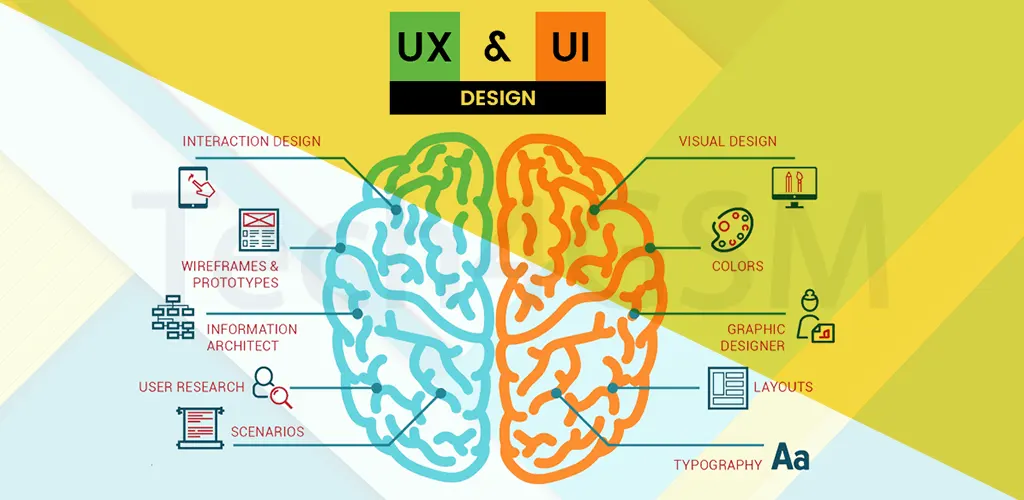
UI vs. UX: What’s the Difference?
| UI Design | UX Design |
|---|---|
| Focuses on visuals and interaction | Focuses on overall user journey |
| Deals with buttons, colors, fonts | Involves research and user testing |
| Makes interfaces attractive | Makes experiences meaningful |
FAQs About UI Design
1. Does UI design require coding?
No, but basic coding knowledge helps collaborate with developers.
2. What are UI design stages?
Research → Wireframing → Prototyping → Testing → Final Design.
3. List 3 futuristic UI trends for 2025.
- AI-powered adaptive interfaces.
- Gesture and eye-tracking controls.
- 3D and holographic displays.
4. How does UI impact business?
Great UI boosts conversions, loyalty, and brand reputation.
Final Thoughts
By 2025, UI design will prioritize personalization and accessibility, ensuring technology adapts to users—not the other way around. Whether you’re designing an app or a website, remember: a user-friendly interface isn’t just a luxury—it’s a necessity.