Introduction
Imagine browsing the web, streaming videos, or sharing files without a single cable. That’s the magic of WLAN (Wireless Local Area Network)! As we embrace 2025, WLAN remains the backbone of home, office, and public internet access. Let’s dive into how WLAN works, its pros and cons, and why it’s still a game-changer.
What is WLAN?
WLAN (Wireless Local Area Network) is a wireless version of a traditional wired LAN. It uses radio waves to connect devices like laptops, smartphones, and IoT gadgets to the internet—and each other—within a limited area (e.g., homes, offices, campuses).
- Key Components:
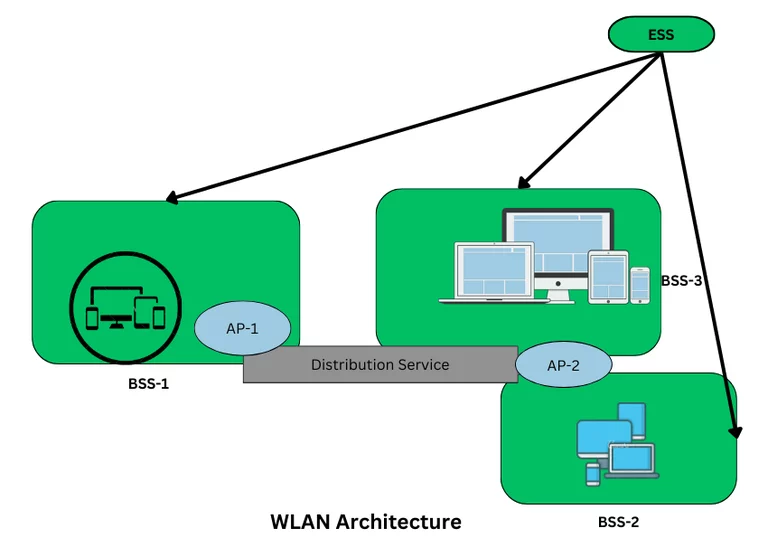
- Access Point (AP): Acts as a bridge between wired and wireless networks (e.g., your Wi-Fi router).
- Wireless Adapters: Built into devices to receive/transmit signals.
- Standards: IEEE 802.11 (Wi-Fi), HiperLAN.
A Brief History of WLAN
- 1971: Norman Abramson (University of Hawaii) created the first wireless network, ALOHAnet.
- 1979: Gfeller and Bapst experimented with infrared WLAN.
- 1991: IEEE held its first WLAN workshop, paving the way for modern Wi-Fi.
How WLAN Works
- Radio Signals: Data travels via radio waves, split into packets with unique MAC addresses.
- Access Point Role: The AP routes these packets between devices and the internet.
- Mobility: Move freely within the coverage area (up to 90 meters) without losing connection.
Types of WLAN
- Infrastructure Mode
- Uses a router/AP (e.g., home Wi-Fi).
- Ideal for internet access and connecting multiple devices.
- Ad Hoc Mode
- Peer-to-peer connections without a router (e.g., sharing files between phones).
- Quick setup but limited to small groups.
Setting Up WLAN in 2025
- Option 1: Use a router/AP (purchased from ISPs like Comcast or Verizon).
- Option 2: Enable Wi-Fi Direct for cable-free device connections.
Is WLAN Secure?
While convenient, WLAN can be vulnerable. Boost security with:
- Encryption: Use WPA3 (latest standard) or WPA2. Avoid outdated WEP.
- Authentication: Implement WPA-EAP for enterprise-grade login security.
- Monitor Rogue APs: Watch for unauthorized networks mimicking yours.
Key Features of WLAN
- Easy Setup: Ready in minutes with a router.
- Cost-Effective: Cheaper than laying cables.
- Scalability: Add devices effortlessly.
- Compatibility: Works with most gadgets (smartphones, smart TVs, etc.).
Pros and Cons of WLAN
| Pros | Cons |
|---|---|
| No cables = clean setup. | Slower than wired networks. |
| Mobile access anywhere at home. | Security risks if poorly configured. |
| Affordable for small businesses. | Signal blocked by walls/furniture. |
| Easy to expand. | RF emissions (low risk, but debated). |
FAQs: WLAN in 2025
- What’s the range of a typical WLAN?
About 30-90 meters, but walls and furniture can reduce it. - WEP vs. WPA vs. WPA2?
- WEP: Outdated and insecure.
- WPA/WPA2: Secure with strong encryption (use WPA3 if available).
- Can I create WLAN without a router?
Yes! Use Ad Hoc mode or Wi-Fi Direct for device-to-device links. - Is WLAN safe for offices?
Yes, with WPA-EAP authentication, network segmentation, and regular audits. - Does WLAN harm health?
Emits low RF levels—deemed safe, but minimize exposure if concerned. - Need help setting up WLAN?
Visit tech4gsm.com for guides and troubleshooting!
Why WLAN Still Matters in 2025
From smart homes to coffee shops, WLAN keeps us connected without wires. While newer tech like 5G and Wi-Fi 6 boosts speeds, the core principles of WLAN remain unchanged. Just remember: security first!