Introduction
When it comes to connecting storage devices to computers, the Advanced Technology Attachment (ATA) has played a pivotal role since its debut in 1986. Often referred to as IDE (Integrated Drive Electronics), ATA revolutionized how hard drives interacted with motherboards, offering faster data transfer and simpler designs compared to older interfaces. Though largely replaced by Serial ATA (SATA) in the mid-2000s, ATA remains relevant in specific applications even as we step into 2025. Let’s explore how ATA works, its types, benefits, and why it still matters today.
How Does ATA Work?
Imagine a highway with multiple lanes—this is how ATA’s parallel interface functions. It sends data in “blocks” (like groups of cars) through a ribbon cable connecting the hard drive to the motherboard. Here’s a simplified breakdown:
- ATA Controller: Acts as a traffic controller, managing data flow between the drive and the computer.
- ATA Commands: These are instructions (e.g., “read” or “write”) sent to the drive.
- Data Transfer: Bits of data travel simultaneously through the cable, speeding up communication.
During tasks, the ATA controller sends commands, and the drive responds by reading/writing data. This system also introduced SMART technology to monitor drive health, alerting users before failures.
Key Components of ATA
- ATA Controller: A chip (on the motherboard or a card) that directs data flow.
- ATA Cable: A flat ribbon cable for connecting drives.
- Hard Drive/Storage Device: Stores data and communicates via the controller.
- ATA BIOS: Detects drives during startup and initializes the controller.
- ATA Commands: Standardized codes for controlling drive operations.
Types of ATA & Their Uses
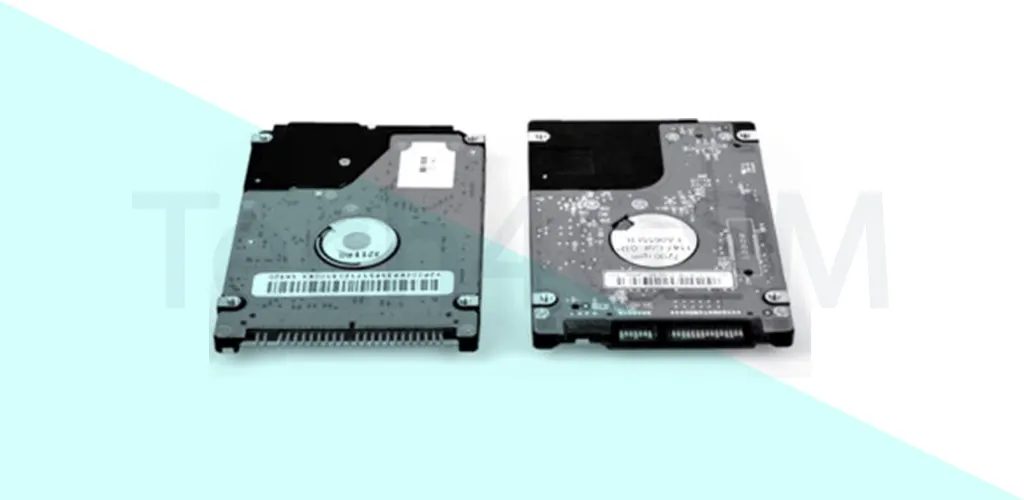
- Parallel ATA (PATA): The original version using wide ribbon cables. Still used in older systems.
- Serial ATA (SATA): Replaced PATA with faster, slimmer cables. Dominates modern PCs.
- IDE (Integrated Drive Electronics): Combines the controller and drive, simplifying design.
- SCSI (Small Computer System Interface): High-speed interface for servers but costlier.
Applications:
- PATA/IDE: Legacy systems, industrial machines.
- SATA: Everyday computers, gaming consoles.
- SCSI: Servers, high-performance workstations.
Pros and Cons of ATA
Benefits:
- ✅ Affordable: Cheaper than SCSI.
- ✅ Easy Setup: Plug-and-play installation.
- ✅ Wide Compatibility: Works with HDDs, optical drives, etc.
Limitations:
- ❌ Slower Speeds: Limited by parallel data transfer (vs. SATA’s serial approach).
- ❌ Short Cables: Ribbon cables restrict device placement.
- ❌ Capacity Limits: Older versions struggle with drives over 137 GB.
Why ATA Still Matters in 2025
While SATA dominates today, ATA persists in niche roles like legacy hardware repair, industrial systems, and retro computing. Its simplicity and cost-effectiveness keep it alive for specific needs. Innovations like SMART monitoring also laid the groundwork for modern drive diagnostics.
FAQs
Q1. PATA vs. SATA: What’s the difference?
PATA uses parallel cables for data transfer, while SATA uses faster serial cables.
Q2. What is IDE?
IDE integrates the drive controller into the storage device, simplifying connections.
Q3. Is SCSI better than ATA?
SCSI offers higher speeds and supports more devices but is pricier and complex.
Q4. Can I use ATA drives in 2025?
Yes! Adapters allow ATA drives to connect to modern systems for data recovery or retro projects.
In summary, ATA laid the foundation for today’s storage technology. Whether you’re troubleshooting an old PC or exploring tech history, understanding ATA remains valuable. As we embrace 2025, its legacy continues to influence how we store and access data.