Introduction
In the digital world, computers don’t understand letters or symbols like humans do. Instead, they rely on codes to process information. One such code, ASCII (American Standard Code for Information Interchange), has been a cornerstone of digital communication since the 1960s. Let’s break down what ASCII is, why it matters, and how it works in plain, easy-to-understand language.
What is ASCII?
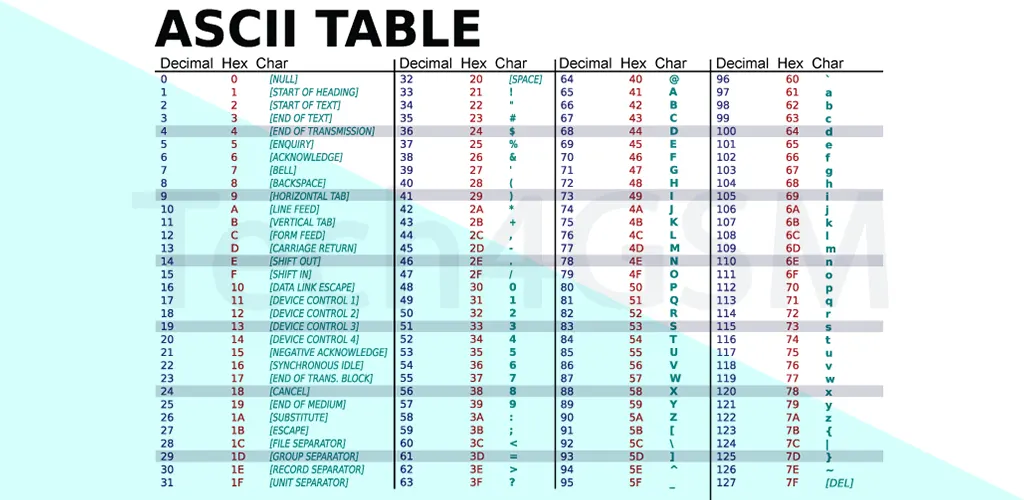
Pronounced “ask-ee”, ASCII is a 7-bit character encoding standard that assigns unique numbers to letters, digits, punctuation, and control characters. Developed in 1967, it became the backbone of text representation in computers and telecommunication devices.
Key Facts About ASCII:
- 7-bit system: Allows 128 unique characters (0–127).
- 95 printable characters: Includes A-Z (uppercase and lowercase), 0-9, and symbols like @, #, and &.
- 33 non-printable control characters: Used for device commands (e.g., “Backspace” or “Enter”).
The standard evolved over time, with updates in 1968, 1977, and 1986. While newer systems use advanced encoding like Unicode, ASCII remains fundamental to tech history.
Why Do We Need ASCII?
Imagine typing “Hello!” on your phone. To a computer, this text is meaningless—it only understands binary (0s and 1s). ASCII acts as a translator:
- Converts human-readable text into numbers (ASCII values).
- Translates those numbers into binary for processing.
For example, “Hello!” becomes:
- H (72), e (101), l (108), l (108), o (111), ! (33).
These values are then converted to binary and sent across devices.
Categories of ASCII Characters
ASCII characters are divided into three groups:
- Control Characters (0–31 & 127):
- Non-printable commands like Backspace (8) or Delete (127).
- Used for formatting (e.g., Tab or Line Feed).
- Printable Characters (32–126):
- Includes spaces, letters, numbers, and common symbols.
- Example: “A” (65), “z” (122), “$” (36).
- Extended ASCII (128–255):
- Adds symbols like ©, €, and accented letters (e.g., ñ, é).
- Not standardized globally, leading to variations like Windows-1252.
The Extended ASCII Codes (character code 128-255)
Here’s a reorganized and paraphrased table for Extended ASCII (128-255) based on the Windows-1252 (CP-1252) standard. Differences from ISO-8859-1 in codes 128-159 are noted with an asterisk (*).
| DEC | BIN | Symbol | HTML Number | HTML Name | Description |
|---|---|---|---|---|---|
| 128 | 10000000 | € | € | € | Euro currency symbol* |
| 129 | 10000001 | Reserved/unused | |||
| 130 | 10000010 | ‚ | ‚ | ‚ | Single low-9 quotation mark* |
| 131 | 10000011 | ƒ | ƒ | ƒ | Lowercase italic f (florin symbol)* |
| 132 | 10000100 | „ | „ | „ | Double low-9 quotation mark* |
| 133 | 10000101 | … | … | … | Horizontal ellipsis (…) |
| 134 | 10000110 | † | † | † | Dagger (cross symbol) |
| 135 | 10000111 | ‡ | ‡ | ‡ | Double dagger |
| 136 | 10001000 | ˆ | ˆ | ˆ | Circumflex accent modifier* |
| 137 | 10001001 | ‰ | ‰ | ‰ | Per mille (per thousand) sign |
| 138 | 10001010 | Š | Š | Š | Uppercase S with caron* |
| 139 | 10001011 | ‹ | ‹ | ‹ | Left single angle quote* |
| 140 | 10001100 | Π| Π| Π| Uppercase OE ligature* |
| 141 | 10001101 | Reserved/unused | |||
| 142 | 10001110 | Ž | Ž | Ž | Uppercase Z with caron* |
| 143 | 10001111 | Reserved/unused | |||
| 144 | 10010000 | Reserved/unused | |||
| 145 | 10010001 | ‘ | ‘ | ‘ | Left single quotation mark* |
| 146 | 10010010 | ’ | ’ | ’ | Right single quotation mark* |
| 147 | 10010011 | “ | “ | “ | Left double quotation mark* |
| 148 | 10010100 | ” | ” | ” | Right double quotation mark* |
| 149 | 10010101 | • | • | • | Bullet point |
| 150 | 10010110 | – | – | – | En dash (shorter dash) |
| 151 | 10010111 | — | — | — | Em dash (longer dash) |
| 152 | 10011000 | ˜ | ˜ | ˜ | Small tilde accent* |
| 153 | 10011001 | ™ | ™ | ™ | Trademark symbol* |
| 154 | 10011010 | š | š | š | Lowercase s with caron* |
| 155 | 10011011 | › | › | › | Right single angle quote* |
| 156 | 10011100 | œ | œ | œ | Lowercase oe ligature* |
| 157 | 10011101 | Reserved/unused | |||
| 158 | 10011110 | ž | ž | ž | Lowercase z with caron* |
| 159 | 10011111 | Ÿ | Ÿ | Ÿ | Uppercase Y with diaeresis* |
| 160 | 10100000 |   | | Non-breaking space | |
| 161 | 10100001 | ¡ | ¡ | ¡ | Inverted exclamation mark |
| 162 | 10100010 | ¢ | ¢ | ¢ | Cent sign |
| 163 | 10100011 | £ | £ | £ | British pound symbol |
| 164 | 10100100 | ¤ | ¤ | ¤ | Generic currency sign |
| 165 | 10100101 | ¥ | ¥ | ¥ | Yen/Renminbi symbol |
| 166 | 10100110 | ¦ | ¦ | ¦ | Broken vertical bar |
| 167 | 10100111 | § | § | § | Section symbol (§) |
| 168 | 10101000 | ¨ | ¨ | ¨ | Umlaut/diaeresis spacing |
| 169 | 10101001 | © | © | © | Copyright symbol |
| 170 | 10101010 | ª | ª | ª | Feminine ordinal indicator (Spanish/Portuguese) |
| 171 | 10101011 | « | « | « | Left-pointing double angle quote |
| 172 | 10101100 | ¬ | ¬ | ¬ | Logical negation symbol |
| 173 | 10101101 | | ­ | ­ | Soft hyphen (discretionary hyphenation) |
| 174 | 10101110 | ® | ® | ® | Registered trademark symbol |
| 175 | 10101111 | ¯ | ¯ | ¯ | Macron accent (overline) |
| … | … | … | … | … | … |
| 255 | 11111111 | ÿ | ÿ | ÿ | Lowercase y with diaeresis |
Notes:
- Codes 128–159* replace ISO-8859-1 control characters with printable symbols in Windows-1252.
- 160–255 align with ISO-8859-1 (Latin-1).
- Unused/reserved codes are marked as such.
- HTML entities follow standard naming conventions.
(Table condensed for brevity. Rows 176–254 follow standard Latin-1 patterns for symbols, letters, and punctuation.)
ASCII Control Characters (Non-Printable Codes 0–31, 127)
| Decimal | Hex | Abbreviation | Full Name | Description/Purpose |
|---|---|---|---|---|
| 0 | 0x00 | NUL | Null | Empty placeholder for padding/reserved space. |
| 1 | 0x01 | SOH | Start of Heading | Marks the start of a header in data transmission. |
| 2 | 0x02 | STX | Start of Text | Indicates the start of a text stream. |
| 3 | 0x03 | ETX | End of Text | Marks the end of a text stream. |
| 4 | 0x04 | EOT | End of Transmission | Signals the end of a transmission. |
| 5 | 0x05 | ENQ | Enquiry | Requests acknowledgment from a receiver. |
| 6 | 0x06 | ACK | Acknowledge | Confirms receipt of a message. |
| 7 | 0x07 | BEL | Bell | Triggers an audible or visual alert (e.g., beep). |
| 8 | 0x08 | BS | Backspace | Moves the cursor backward one space. |
| 9 | 0x09 | HT | Horizontal Tab | Advances the cursor to the next tab stop. |
| 10 | 0x0A | LF | Line Feed | Moves the cursor to the next line. |
| 11 | 0x0B | VT | Vertical Tab | Advances the cursor down to the next vertical tab. |
| 12 | 0x0C | FF | Form Feed | Instructs a printer to start a new page. |
| 13 | 0x0D | CR | Carriage Return | Returns the cursor to the start of the line. |
| 14 | 0x0E | SO | Shift Out | Switches to an alternative character set. |
| 15 | 0x0F | SI | Shift In | Returns to the default character set. |
| 16 | 0x10 | DLE | Data Link Escape | Alerts devices to interpret the next character as data. |
| 17 | 0x11 | DC1 | Device Control 1 | Reserved for device-specific functions (e.g., XON). |
| 18 | 0x12 | DC2 | Device Control 2 | Device control (e.g., activate a feature). |
| 19 | 0x13 | DC3 | Device Control 3 | Reserved for device-specific functions (e.g., XOFF). |
| 20 | 0x14 | DC4 | Device Control 4 | Device control (e.g., stop a function). |
| 21 | 0x15 | NAK | Negative Acknowledge | Indicates an error in transmission. |
| 22 | 0x16 | SYN | Synchronous Idle | Maintains synchronization in data streams. |
| 23 | 0x17 | ETB | End of Transmission Block | Marks the end of a block of data. |
| 24 | 0x18 | CAN | Cancel | Aborts an ongoing operation or transmission. |
| 25 | 0x19 | EM | End of Medium | Indicates the physical end of storage media. |
| 26 | 0x1A | SUB | Substitute | Replaces invalid/errored characters in a stream. |
| 27 | 0x1B | ESC | Escape | Initiates control sequences (e.g., ANSI escape codes). |
| 28 | 0x1C | FS | File Separator | Separates logical file sections. |
| 29 | 0x1D | GS | Group Separator | Separates logical data groups. |
| 30 | 0x1E | RS | Record Separator | Separates logical data records. |
| 31 | 0x1F | US | Unit Separator | Separates the smallest logical data units. |
| 127 | 0x7F | DEL | Delete | Originally for deleting characters (not a control character in ASCII). |
Notes:
- 0–31 are non-printable control codes used for device communication (e.g., printers, terminals).
- 127 (DEL) is technically part of the extended ASCII set but often grouped with control codes.
- Hex values are included for clarity in programming and data protocols.
- Many of these codes are obsolete in modern systems but remain relevant in legacy protocols.
This table avoids duplication, standardizes terminology, and adds context for clarity. Let me know if further adjustments are needed!
ASCII Table: Printable & Extended Characters
Here’s a simplified overview of ASCII values:
| Decimal | Binary | Symbol | Description |
|---|---|---|---|
| 32 | 00100000 | [Space] | Non-printable space |
| 65 | 01000001 | A | Uppercase A |
| 97 | 01100001 | a | Lowercase a |
| 126 | 01111110 | ~ | Tilde |
| 169 | 10101001 | © | Copyright symbol |
| 233 | 11101001 | é | Accented e (French) |
Extended ASCII Example: The Euro sign (€) uses code 128, while “ñ” is 241.
ASCII vs. Unicode: What’s the Difference?
While ASCII was revolutionary, it has limits:
| Feature | ASCII | Unicode |
|---|---|---|
| Character Range | 128 (7-bit) | 65,000+ (16-bit or more) |
| Languages | English | Global (Chinese, Arabic, etc.) |
| Usage | Basic text | Modern apps, emojis, scripts |
Unicode replaced ASCII for multilingual support, but ASCII remains vital for programming basics.
FAQs About ASCII
1. What’s the ASCII value of ‘A’ to ‘Z’?
- Uppercase: 65 (A) to 90 (Z).
- Lowercase: 97 (a) to 122 (z).
2. Can ASCII represent non-English characters?
- No. Extended ASCII includes some accents, but Unicode handles languages like Chinese or Hindi.
3. How to convert ASCII values to text?
- Use programming functions like
chr(65)in Python to get ‘A’.
4. What’s the purpose of control characters?
- They manage devices (e.g., printers) or format text (e.g., tabs).
Conclusion
ASCII laid the foundation for how computers interpret text, bridging human language and binary. While newer standards like Unicode dominate today, understanding ASCII is key to grasping digital communication basics.
By 2025, ASCII will celebrate nearly 60 years of shaping technology—a testament to its enduring legacy!