Introduction
Whether you’re hunting for a standalone headset or a high-powered tethered model, 2025 is packed with groundbreaking VR tech that transports you to unimaginable worlds. From gaming to professional design, VR is no longer a niche—it’s a lifestyle. At Tech4GSM, we’ve tested every major VR headset since the Oculus Rift DK1 era. Our team of experts has spent thousands of hours evaluating specs, comfort, software libraries, and user experiences to bring you this definitive guide. Let’s dive in!
Why Trust Tech4GSM?
For over a decade, Tech4GSM has been at the forefront of VR innovation. We’ve reviewed everything from Google Glass to the Apple Vision Pro, combining technical analysis with real-world testing. Our criteria? Performance, comfort, value, and future-proofing. Whether you’re a casual gamer or a tech enthusiast, we’ve got you covered.
Top 7 VR Headsets for 2025
1. Meta Quest 3: The All-Rounder

Quick Verdict: 4.5/5 ⭐
The Meta Quest 3 remains a crowd favorite in 2025, blending cutting-edge tech with accessibility. Whether you’re gaming, exploring mixed reality, or diving into fitness apps, this headset delivers a premium wireless experience. Let’s break down why it’s still a top pick.
Pros & Cons: What We Love (and Don’t)
👍 Pros:
- Color Passthrough Cameras
See your real world in vibrant color while interacting with virtual objects—perfect for avoiding couch collisions during intense Beat Saber sessions. - Crisp 4K+ Resolution
With 2,064 x 2,208 pixels per eye, text looks sharp, and games like Resident Evil 4 VR feel terrifyingly real. - Snapdragon XR2 Gen 2 Power
Handles AAA titles like Asgard’s Wrath 2 smoothly—no PC required! - Comfy, Streamlined Design
Adjustable head strap and balanced weight make 2-hour play sessions fatigue-free.
👎 Cons:
- Battery Life Blues
Lasts just 2–2.5 hours on a charge. Keep that USB-C cable handy for marathons. - No Eye Tracking
Unlike the Quest Pro, it can’t follow your gaze—avatars won’t blink in Zoom VR meetings.
Why We Picked It
The Quest 3 strikes the perfect balance between price and performance. While the 499tagis200 pricier than the Quest 3S, you gain:
- Wider 110° Field of View: No more “goggle effect”—immersion feels natural.
- Mixed Reality Magic: Build virtual furniture (via IKEA Kreativ) overlaid on your living room.
- Future-Proof Processor: The XR2 Gen 2 chip ensures compatibility with 2025’s VR trends.
Even the Quest Pro ($999) can’t match its color passthrough quality, making the Quest 3 a smarter buy for most users.
Who Should Buy It?
- VR Newbies: Skip the cables and dive into Superhot VR or VRChat hassle-free.
- Fitness Fans: Track workouts in Les Mills Bodycombat with full room-scale movement.
- Budget-Conscious Gamers: Don’t want to splurge $3,500 on an Apple Vision Pro? This is your golden middle ground.
Key Specs
| Feature | Details |
|---|---|
| Type | Standalone (No PC/Console Needed) |
| Resolution | 2,064 x 2,208 per eye (4K+ Clarity) |
| Refresh Rate | Up to 120Hz (Buttery Smooth Motion) |
| Tracking | 6DOF Head & Hand Motion |
| Controllers | Redesigned Touch Plus (Haptic Feedback!) |
| Battery Life | ~2.5 Hours (Extendable via Power Bank) |
| Price | $499 |
The Final Word
The Meta Quest 3 is 2025’s best entry into wireless VR. While it lacks eye tracking and burns through battery life, its stunning visuals, mixed reality capabilities, and vast app library (500+ titles!) make it unbeatable under $500. For gamers, fitness buffs, or anyone craving freedom from cables, this headset is a no-brainer.
Upgrade Tip: Grab the Elite Strap ($79) for even better comfort during long sessions! See It (Meta Quest 3)
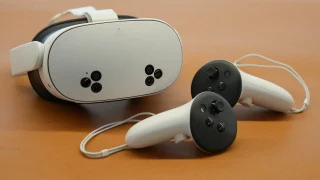
2. Meta Quest 3S: Budget-Friendly Brilliance
Quick Verdict: 4.5/5 ⭐
The Meta Quest 3S proves you don’t need to break the bank for a great VR experience. With core features borrowed from its pricier sibling, this headset is perfect for first-timers and budget-conscious buyers. Let’s dive into the details!
Pros & Cons: The Honest Truth
👍 Pros:
- Wallet-Friendly Price
At 299∗∗,it’s∗∗200 cheaper than the Quest 3—ideal for testing the VR waters. - Snappy Performance
Same Snapdragon XR2 Gen 2 processor as the Quest 3 ensures smooth gameplay in Beat Saber and Walkabout Mini Golf. - Color Passthrough Cameras
See your surroundings in color for safer mixed reality adventures (no tripping over pets!). - Standalone + PC Hybrid
Play wireless or connect to a gaming PC via USB-C for Half-Life: Alyx on SteamVR. - Massive App Library
Access 500+ games and apps, including Rec Room and Meta Horizon Worlds.
👎 Cons:
- Grainy Display
Lower 1,832 x 1,920 per-eye resolution makes text slightly fuzzy in apps like Bigscreen VR. - Tracking Limitations
Controllers must stay in the headset’s view—no behind-the-back tricks in Superhot VR.
Why We Picked It
The Quest 3S is the ultimate entry-level VR headset. While it lacks the Quest 3’s razor-sharp display and wide field of view, it retains the same powerful processor, color passthrough, and 120Hz refresh rate. For under $300, you’re getting:
- Standalone freedom (no PC/console required).
- Mixed reality capabilities to overlay virtual objects in your living room.
- Cross-buy support for Meta’s ecosystem—buy once, play on Quest 3/Pro too.
It’s a steal for casual users who don’t need cutting-edge specs.
Who Should Buy It?
- VR Curious Newbies: Dip your toes without overspending.
- Families/Kids: Durable design + parental controls = peace of mind.
- Fitness Newcomers: Sweat it out in FitXR without worrying about damaging a pricier headset.
- PC Gamers on a Budget: Use the Link Cable to play SteamVR titles like Boneworks.
Key Specs
| Feature | Details |
|---|---|
| Type | Standalone + PC Hybrid |
| Resolution | 1,832 x 1,920 per eye (Sharp Enough!) |
| Refresh Rate | Up to 120Hz (Smooth as Quest 3) |
| Tracking | 6DOF Head & Hand Motion |
| Controllers | Meta Touch Controllers (Comfy Grip) |
| Battery Life | ~2.5 Hours (Same as Quest 3) |
| Price | $299 |
The Final Word
The Meta Quest 3S is 2025’s best budget VR headset. Yes, the display isn’t as crisp, and tracking has minor limits, but its performance, portability, and price make it a winner. For under $300, you’re getting 90% of the Quest 3’s magic—perfect for families, fitness rookies, or anyone skeptical about VR.
Pro Tip: Pair it with a 10,000mAh power bank ($25) to double your playtime! See It (Meta Quest 3S)
3. Meta Quest Pro: For Creators

Quick Verdict: 4.0/5 ⭐
The Meta Quest Pro caters to professionals and tech enthusiasts craving cutting-edge tracking tech in a sleek package. While it’s not for everyone, its unique features justify the splurge for the right user. Let’s break it down!
Pros & Cons: The Highs and Lows
👍 Pros:
- Next-Level Tracking
Eye & face tracking lets avatars mirror your expressions in apps like Horizon Workrooms—ideal for virtual meetings. - Premium Comfort
Redesigned ergonomics with a balanced weight distribution reduce pressure during marathon creative sessions. - Color Passthrough Cameras
Overlay 3D models onto your workspace using mixed reality tools like Gravity Sketch. - All-in-One Charging
Rechargeable headset + controllers—no scrambling for batteries mid-project. - Standalone Power
No PC needed! Run apps like Adobe Substance 3D directly on the headset.
👎 Cons:
- Pricey Investment
At $899, it’s double the Quest 3—hard to justify for casual users. - Meta Horizon’s Ghost Town
The metaverse feels empty; stick to Zoom VR or Microsoft Teams for collaboration. - Battery Life Struggles
~2 hours of runtime—keep that charger close.
Why We Picked It
The Quest Pro shines with industry-leading eye/face tracking—a rarity in standalone headsets. While its Snapdragon XR2+ processor is older than the Quest 3’s XR2 Gen 2, the 12GB RAM handles multitasking better for creators juggling 3D apps. For professionals, features like:
- Workroom Collaboration: Annotate 3D designs in real time with colleagues.
- Pro Controllers: Track fingers without line-of-sight for precision in Blender VR.
…make it a niche powerhouse. But unless you need these tools, the Quest 3 offers better value.
Who Should Buy It?
- Designers & Engineers: Perfect for 3D modeling or virtual prototyping.
- VR Streamers: Eye tracking adds depth to VTuber avatars in VRChat.
- Tech Enthusiasts: Experiment with futuristic interfaces (just don’t expect Apple Vision Pro polish).
Key Specs
| Feature | Details |
|---|---|
| Type | Standalone |
| Resolution | 1,920 x 1,800 per eye (Good, Not Great) |
| Refresh Rate | 90Hz (Smooth, But Not Top-Tier) |
| Tracking | 6DOF + Eye/Face Sensors |
| Controllers | Pro Touch Controllers (Self-Tracking) |
| Battery Life | ~2 Hours (Charge During Breaks!) |
| Price | $899 |
The Final Word
The Meta Quest Pro is 2025’s best niche headset. If you’re a creator, collaborator, or early adopter obsessed with tracking tech, it’s worth the premium. But casual users should stick with the Quest 3 or 3S.
Pro Tip: Pair it with a Kensington VR Power Pack ($99) to double your workflow time! See It (Meta Quest Pro)
4. Apple Vision Pro: The Luxury Pioneer

Quick Verdict: 4.0/5 ⭐
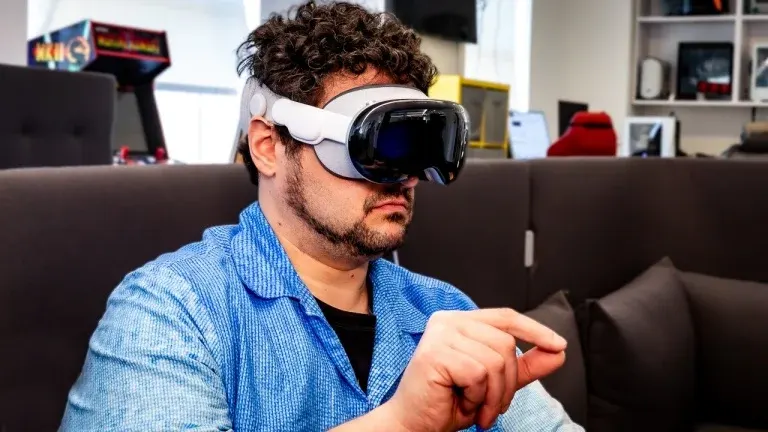
The Apple Vision Pro isn’t just a headset—it’s a glimpse into the future. With groundbreaking eye tracking, buttery-smooth controls, and a stunning display, Apple’s $3,500 “spatial computer” redefines AR/VR. But is it worth the premium? Let’s dive in.
Pros & Cons: Innovation vs. Reality
👍 Pros:
- Revolutionary Interface
Navigate with eyes and hands—no clunky controllers. Pinch to select, scroll with a glance. It’s Minority Report meets 2025. - Crisp 22MP Micro-OLED Display
Text is razor-sharp, colors pop, and movies in Apple Immersive Video feel like IMAX in your living room. - Seamless VisionOS Ecosystem
Run iPad apps like Procreate Dreams in 3D space or mirror your MacBook as a floating 4K monitor. - Best-in-Class Passthrough
Real-world view is so clear, you’ll forget you’re wearing a headset. Perfect for multitasking while cooking via AllRecipes AR.
👎 Cons:
- Wallet-Wilting Price
At $3,500, it’s 3x costlier than the Meta Quest Pro—hard to justify for non-professionals. - Neck Strain Alert
Front-heavy design weighs 1.4 lbs—after an hour, you’ll crave a neck massage. - Battery Blues
2-hour runtime on the external pack. For all-day work, keep it plugged in. - App Gaps
Netflix and YouTube still lack native VisionOS apps. Side-loading iPad apps? Hit or miss.
Why We Picked It
The Vision Pro isn’t just another headset—it’s Apple’s moonshot into spatial computing. While rivals rely on controllers, Apple bets on biometric sensors and its M2 chip to create a UI that feels like magic. Highlights include:
- 3D FaceTime: Avatars mimic your facial expressions in real time (yes, it sees your smirk).
- Cinematic Environments: Work atop a virtual mountain or meditate on Mars.
- Developer Momentum: Over 5,000 VisionOS apps launched in 2024, from Adobe Lightroom VR to Star Wars: Jedi Challenges 2.
But it’s a first-gen product. Bugs? A few. Perfection? Not yet. Yet, nothing else matches its ambition.
Who Should Buy It?
- Creative Pros: Edit 3D models in Shapr3D or storyboard films in Final Cut Pro Vision.
- Tech Early Adopters: Flaunt the future at coffee shops (if you dare).
- Apple Die-Hards: If you’re deep into the ecosystem (iPhone, Mac, HomePod), integration is flawless.
Avoid if: You’re budget-conscious or want gaming-first VR—Resident Evil Village can’t justify the price alone.
Key Specs
| Feature | Details |
|---|---|
| Type | Standalone Spatial Computer |
| Resolution | 22 Million Pixels (4K Clarity Per Eye) |
| Refresh Rate | 100Hz (Smooth for Work & Play) |
| Tracking | 6DOF + Eye/Hand Sensors |
| Chip | Apple M2 + R1 Co-Processor |
| Battery Life | ~2 Hours (External Pack) |
| Price | $3,499 |
The Final Word
The Apple Vision Pro is 2025’s most audacious tech experiment. It’s not for everyone—but for those who crave the cutting edge, it’s unparalleled. Seamlessly blend apps into your world, collaborate with holographic colleagues, or binge Ted Lasso on a 100-foot virtual screen. Just know: You’re paying to beta-test the future.
Wait for Vision Pro 2 if: You want lighter hardware, better battery, and more apps. See It (Apple Vision Pro)
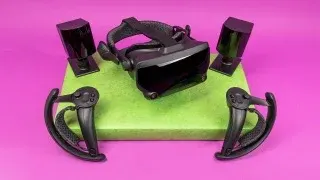
5. Valve Index VR Kit: PC Mastery
Quick Verdict: 4.0/5 ⭐
The Valve Index VR Kit remains the gold standard for PC-tethered VR, blending precision tracking, buttery-smooth performance, and revolutionary controllers. If you’re serious about high-fidelity gaming, this is your rig—but be ready to invest. Let’s break it down!
Pros & Cons: The Highs and Lows
👍 Pros:
- Finger-Tracking Controllers
Feel every gesture in Half-Life: Alyx 2—grip, throw, or flip off zombies with lifelike finger movements. - 120Hz Refresh Rate
Silky-smooth action in fast-paced titles like BoneLab or Pistol Whip. - Massive SteamVR Library
Access 5,000+ games/apps, from Skyrim VR Skin to indie gems like Vertigo 2. - Crisp Visuals
1,600 x 1,440 per-eye resolution delivers sharp details in dark, atmospheric worlds.
👎 Cons:
- Pricey Setup
At $1,736+, it’s a splurge—especially compared to standalone headsets. - Tethered Hassles
Tripping over cables? Still a risk in room-scale games like Blade & Sorcery.
Why We Picked It
The Valve Index isn’t just a headset—it’s a PC VR ecosystem. While the specs aren’t bleeding-edge in 2025, its Knuckles controllers redefine immersion. Highlights:
- Natural Interaction: Pick up virtual objects by squeezing, not button-mashing.
- Base Station Tracking: Flawless 6DOF movement with 360° coverage (no occlusions!).
- Upgrade Flexibility: Already own a Vive Pro 2? Pair Index controllers ($279) for finger magic.
Yes, the resolution lags behind the Vive Pro 2, but the 120Hz/144Hz modes keep it competitive for hardcore gamers.
Who Should Buy It?
- PC Gaming Enthusiasts: Max out your RTX 4090 with Cyberpunk 2077 VR.
- VR Veterans: Upgrade from older WMR/Oculus headsets for precision tracking.
- Modders & Tinkerers: Endless customization via SteamVR settings.
Avoid if: You hate cables or want plug-and-play simplicity—this is a dedicated setup.
Key Specs
| Feature | Details |
|---|---|
| Type | PC-Tethered |
| Resolution | 1,600 x 1,440 per eye (LCD Clarity) |
| Refresh Rate | 120Hz (144Hz Experimental Mode) |
| Tracking | 6DOF via SteamVR Base Stations |
| Controllers | Valve Index Knuckles (Finger Tracking!) |
| Setup | 2 Base Stations + Tether Cable |
| Price | $1,736 |
The Final Word
The Valve Index VR Kit is 2025’s ultimate PC VR experience for purists. While the price and cables are drawbacks, nothing matches its controllers or SteamVR synergy. For jaw-dropping immersion in AAA titles or modded classics, it’s worth the investment.
Pro Tip: Pair it with a Kiwi Design Pulley System ($49) to keep cables off the floor! See It (Valve Index VR Kit)
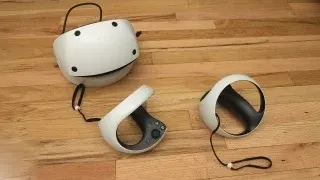
6. Sony PlayStation VR2: Console King
Quick Verdict: 4.5/5 ⭐
The PlayStation VR2 is Sony’s crown jewel for immersive console gaming, blending stunning visuals, intuitive controls, and exclusive titles. While it’s not perfect, it’s the ultimate upgrade for PS5 owners diving into VR. Let’s unpack why!
Pros & Cons: The Highs and Lows
👍 Pros:
- Gorgeous OLED Display
2,000 x 2,040 pixels per eye deliver deep blacks and vibrant colors—perfect for horror gems like Resident Evil Village VR. - Eye-Tracking Magic
Foveated rendering boosts performance by focusing detail where you look. Horizon Call of the Mountain never looked so lush. - Plug-and-Play Simplicity
Single USB-C cable to PS5—no base stations or PC tweaking required. - Haptic Immersion
Sense Controllers rumble, resist triggers, and track fingers—feel every bowstring pull in Half-Life: Alyx 2. - Growing Game Library
From Gran Turismo 7 VR to Astro Bot 2, Sony’s exclusives shine here.
👎 Cons:
- No Backward Compatibility
Your PS VR1 games? Dust collectors. Sony wants you to rebuy classics like Beat Saber. - Tethered to PS5
Cables limit movement—dodge carefully in Synapse!
Why We Picked It
The PS VR2 is the best console VR headset in 2025, period. Its 4K HDR OLED panels and 120Hz refresh rate make every frame pop, while eye-tracking and haptics add layers of immersion PC VR can’t match. For PS5 gamers, it’s a no-brainer:
- Exclusive Titles: Marvel’s Iron Man VR 2 and Project Wingman: Frontline 59 are system-sellers.
- Effortless Setup: No drivers, no fuss—just plug in and play.
- Future-Proofed: Sony’s investing heavily—2025’s Blood & Truth 2 proves it.
Who Should Buy It?
- PS5 Die-Hards: Unlock your console’s full potential.
- Horizon Fans: Call of the Mountain’s sequel is a visual masterpiece.
- VR Newbies: Simpler than PC setups, with killer launch titles.
Avoid if: You own a PS VR1 library or crave wireless freedom.
Key Specs
| Feature | Details |
|---|---|
| Type | PS5-Tethered |
| Resolution | 2,000 x 2,040 per eye (OLED Glory) |
| Refresh Rate | 120Hz (Buttery Smooth) |
| Tracking | 6DOF Inside-Out |
| Controllers | PS VR2 Sense (Haptic Triggers + Feedback) |
| Setup | 1 Cable, 5 Minutes |
| Price | $399 |
The Final Word
The PlayStation VR2 is 2025’s top console VR headset, offering unmatched ease and exclusives. While the lack of backward compatibility stings, its visuals, haptics, and growing library justify the $399 ask. For PS5 gamers craving immersion, this is your gateway.
Pro Tip: Grab the Globular Cluster Comfort Mod ($29) for marathon sessions in No Man’s Sky VR. See It (Sony PlayStation VR2)
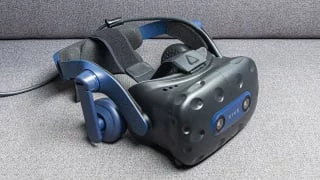
7. HTC Vive Pro 2: Enterprise-Grade
Quick Verdict: 4.0/5 ⭐
The HTC Vive Pro 2 is a resolution beast, offering the sharpest visuals in consumer VR. But with great pixels comes a great price tag—ideal for pros and hardcore gamers who demand perfection. Let’s dive deeper!
Pros & Cons: Crystal Clear, But Costly
👍 Pros:
- Best-in-Class Resolution
2,440 x 2,440 pixels per eye—spot distant enemies in Skyrim VR or read tiny text in Microsoft Flight Simulator 2025. - Buttery-Smooth 120Hz
No motion blur in frenetic games like Pavlov VR or Boneworks 2. - SteamVR & Viveport Flexibility
Access 6,000+ titles on Steam or binge Viveport Infinity’s subscription library (Netflix for VR). - Upgrade-Friendly
Pair with Valve Index Controllers for finger-tracking magic—no need to ditch your setup.
👎 Cons:
- Wallet-Wilting Price
Starts at 799∗∗(headsetonly)—addbasestations,controllers,andaRTX4080PC?∗∗2,500+. - No Controllers/Base Stations Included
Budget another $500+ for essentials.
Why We Picked It
The Vive Pro 2 isn’t just about specs—it’s a premium VR ecosystem. While the Meta Quest Pro and Valve Index cater to specific niches, this headset is for those who crave:
- Pixel-Perfect Detail: Ideal for sim racers spotting apexes in Assetto Corsa Competizione VR.
- Future-Proofing: Dual-mode display (120Hz or 90Hz) adapts to your GPU’s muscle.
- Modular Freedom: Swap faceplates for hygiene or add wireless adapters (sold separately).
Yes, it’s pricey, but for creators rendering 3D art in Adobe Medium or pilots training in VTOL VR, the clarity justifies the cost.
Who Should Buy It?
- VR Pros: Architects, developers, or streamers needing reference-grade visuals.
- Sim Junkies: iRacing or DCS World fans who live for lifelike cockpits.
- Upgraders: Vive Pro 1 owners ready to leap to 5K+ resolution.
Avoid if: You’re on a budget or hate cable clutter—this isn’t a casual buy.
Key Specs
| Feature | Details |
|---|---|
| Type | PC-Tethered |
| Resolution | 2,440 x 2,440 per eye (Stunning 5K) |
| Refresh Rate | 120Hz (Smooth as Butter) |
| Tracking | 6DOF via SteamVR Base Stations |
| Controllers | None Included (Buy Separately) |
| Software | SteamVR + Viveport Infinity |
| Price | $799 |
The Final Word
The HTC Vive Pro 2 is 2025’s pinnacle of PC VR clarity. While the upfront cost is daunting, its unmatched resolution and upgradeability make it a long-term investment for pros and sim enthusiasts. Pair it with Valve Index controllers and a RTX 5090, and you’ve got a rig that’ll dominate for years.
Pro Tip: Grab the Vive Wireless Adapter ($349) to cut the cord without sacrificing quality! See It (HTC Vive Pro 2)
Buying Guide: Tethered vs. Standalone
Tethered Headsets
- Pros: Higher fidelity, better for AAA games.
- Cons: Cables limit movement; requires PC/console.
- Top Picks: Valve Index, PS VR2.
Standalone Headsets
- Pros: Portability; no extra hardware.
- Cons: Less processing power.
- Top Picks: Quest 3, Apple Vision Pro.
The Metaverse in 2025: Beyond the Hype
Meta’s Horizon Worlds still struggles, but alternatives thrive:
- VRChat: User-generated worlds like “Cyber Tokyo” explode in popularity.
- Roblox VR: Play Doors or attend virtual concerts with friends.
Tip: Quest 3’s cross-platform support makes it the metaverse gateway.
AR in 2025: Vision Pro Leads the Charge
While Magic Leap and HoloLens target enterprises, Apple Vision Pro redefines AR:
- Mac Virtual Display: Work with a 4K virtual monitor anywhere.
- 3D Object Scanning: Redecorate your room using IKEA Kreativ.
Future Trends to Watch
- AI NPCs: Characters in VR games adapt to your playstyle.
- Haptic Suits: Feel virtual environments with devices like Teslasuit.
- CES 2025: Sony’s “Project Gemini” may debut a Quest 3 rival.
Final Thoughts
2025’s VR landscape offers something for everyone. Our top pick? Meta Quest 3 for its versatility. But if money’s no object, Apple Vision Pro is the future. Stay tuned to Tech4GSM for hands-on reviews of upcoming headsets like Samsung’s rumored Galaxy Glasses!