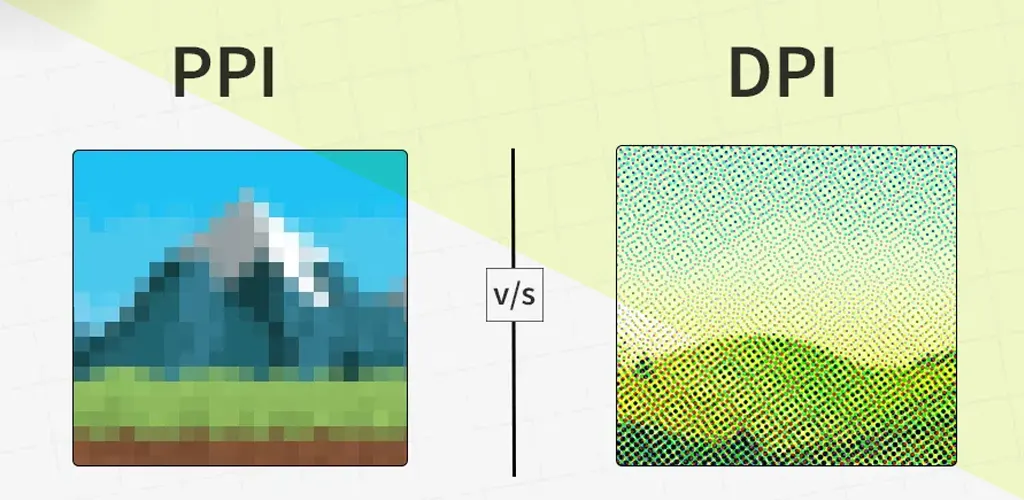
Introduction
In the world of digital displays and print media, terms like PPI (Pixels Per Inch) and DPI (Dots Per Inch) are thrown around frequently. While they both measure resolution, they serve entirely different purposes. Let’s break down their differences, uses, and why they matter in 2025.
What is PPI?
PPI (Pixels Per Inch) refers to the number of pixels packed into one inch of a digital image. The higher the PPI, the sharper and more detailed the image appears on screens.
Types of PPI
- Screen PPI:
- Determines clarity on devices like smartphones, tablets, and monitors.
- Example: A 4K screen has ~3840 pixels horizontally, offering crisper visuals.
- Print PPI:
- Ensures printed images retain quality. Ideal resolution: 300 PPI for magazines.
- Scanner PPI:
- Affects scan detail. Higher PPI scans capture finer textures (e.g., 600 PPI for archival photos).
- Web Design PPI:
- Balances responsiveness across devices.
Uses of PPI
- Enhances video editing precision.
- Critical for VR/AR immersion (e.g., Meta Quest 3 uses 773 PPI displays).
- Improves e-book readability on Kindle or tablets.
- Optimizes UI/UX design for apps and websites.
Advantages of PPI
✅ Sharper Images: High PPI (e.g., Apple’s Retina Display) reduces pixelation.
✅ Better Editing: Graphic designers zoom in without losing detail.
✅ Responsive Web Design: Adapts visuals seamlessly across devices.
Disadvantages of PPI
❌ Large File Sizes: A 300 PPI image consumes more storage than 72 PPI.
❌ Device Compatibility: Older gadgets may lag with high-PPI content.
❌ Battery Drain: Higher PPI screens (like 4K laptops) reduce battery life.
What is DPI?
DPI (Dots Per Inch) measures print resolution, indicating how many ink dots a printer places per inch. Higher DPI means smoother gradients and finer details on paper.
Types of DPI
- Printer DPI:
- Standard printers use 300 DPI, while professional photo printers hit 1200+ DPI.
- Scanner DPI:
- Affects scan quality. 1200 DPI scanners capture intricate details.
- Mouse DPI:
- Determines cursor speed. Gamers prefer 1600+ DPI for precision.
- Monitor DPI:
- Often confused with PPI, it impacts text clarity on screens.
Uses of DPI
- Photography: 300 DPI ensures print-ready photos.
- Architectural Designs: Blueprints require 600+ DPI for accuracy.
- Marketing Materials: Flyers and banners use high DPI for vibrancy.
Advantages of DPI
✅ Professional Prints: 1200 DPI produces gallery-quality photos.
✅ Color Accuracy: Printers like Epson SureColor achieve 98% Pantone coverage.
✅ Detailed Artwork: Artists use DPI to prevent pixelation in posters.
Disadvantages of DPI
❌ Costly Printing: High DPI consumes more ink.
❌ Skill Dependency: Incorrect settings lead to blurry prints.
❌ File Compatibility: Printers may not support ultra-high DPI files.
PPI vs DPI: Key Differences
| Aspect | PPI | DPI |
|---|---|---|
| Purpose | Digital screens (phones, TVs) | Printed materials (photos, docs) |
| Measurement | Pixels per inch | Dots per inch |
| Quality Focus | Screen sharpness | Print clarity and color depth |
| Flexibility | Adjustable for responsiveness | Fixed once printed |
| 2025 Trends | 8K screens (7680×4320 pixels) | Eco-friendly high-DPI inkjets |
Why Does This Matter in 2025?
- Foldable Phones: Devices like Samsung Galaxy Z Fold 6 use adaptive PPI for seamless screen transitions.
- 3D Printing: DPI precision ensures smoother surface textures.
- AI Design Tools: Platforms like Canva auto-adjust PPI/DPI for projects.
FAQs
Q1: Is higher PPI always better?
A: Not necessarily. Beyond 400 PPI, human eyes can’t discern differences on small screens.
Q2: Can I use PPI for printing?
A: No! Convert PPI to DPI (300 PPI = 300 DPI) for print-ready files.
Q3: Does mouse DPI affect gaming?
A: Yes! Higher DPI (e.g., 3200) allows faster cursor movements in FPS games.
Q4: Why does my photo look grainy when printed?
A: Low DPI (below 300) causes pixelation. Always resize images to match printer DPI.
Conclusion
Understanding PPI and DPI is crucial for digital creators and print professionals alike. While PPI rules screens, DPI dominates print quality. As 2025 approaches, advancements in both fields will continue to blur lines, but their core principles remain distinct.