Introduction
Ever get a random notification saying, “Software update available”? That’s FOTA doing its thing! Let’s uncover how this invisible tech wizard keeps your phone fresh and secure—no cables required!
1. FOTA Explained: No Wires, No Fuss!
FOTA (Firmware Over-The-Air) is like giving your phone a digital makeover while you sleep. It lets your device download and install critical software updates directly through your mobile network or Wi-Fi. No need to plug into a computer, hunt for cables, or download sketchy third-party apps.
Why it’s awesome: Fix bugs, boost security, or even get new emojis—all with a tap!
2. How Does FOTA Work?
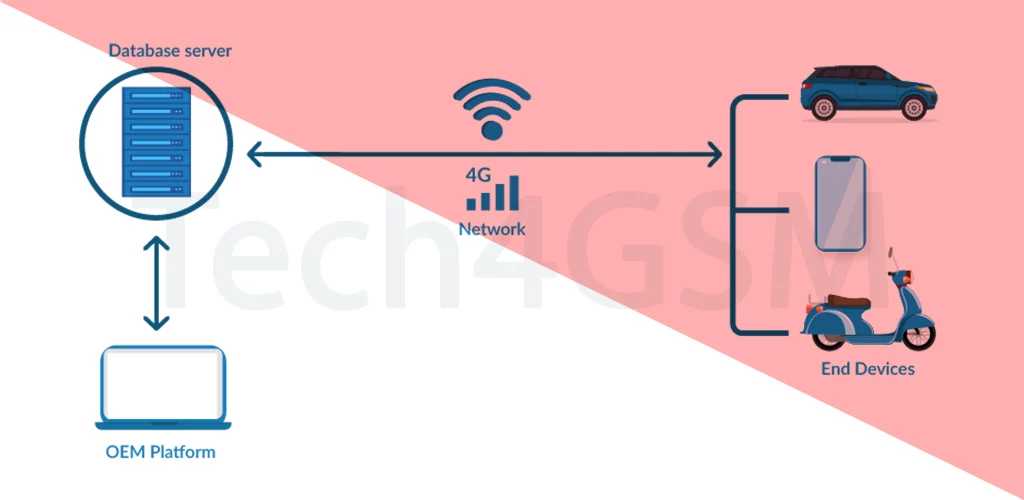
Imagine your phone whispering to your carrier: “Got any updates for me?” Here’s the process:
- Your carrier or manufacturer sends a firmware update (fancy term for phone software).
- Your phone downloads it wirelessly.
- You approve the install, and voilà—your phone reboots, upgraded!
Pro tip: Always connect to Wi-Fi for big updates to avoid eating your data plan!
3. Why FOTA is a Game-Changer
- No tech skills needed: Grandma-friendly! Just tap “Update.”
- Security fixes: Patches vulnerabilities that hackers could exploit.
- New features: Surprise upgrades (like better camera modes or battery life).
- Saves time: Skip the hassle of manual updates.
But wait: Not all phones support FOTA. Older or budget models might need cables. Check your device’s specs on tech4gsm.com to confirm!
4. Why Don’t All Phones Have FOTA?
- Hardware limits: Older phones lack the tech to handle wireless updates.
- Carrier rules: Some networks block FOTA to control software rollouts.
- Manufacturer choice: Brands may reserve FOTA for premium models.
Final Thoughts
FOTA is the unsung hero of smartphone convenience. It keeps your device safe, speedy, and stylish—all without lifting a finger (except to tap “Install”). If your phone supports it, always update when prompted! Not sure? Visit tech4gsm.com to learn more about your device’s capabilities.