Introduction
Ever binge-watched Netflix in HD or enjoyed a crystal-clear video call? Thank H.264—the video codec that revolutionized how we stream, record, and share video. Let’s unpack why this tech is everywhere (and why you should care).
What is H.264?
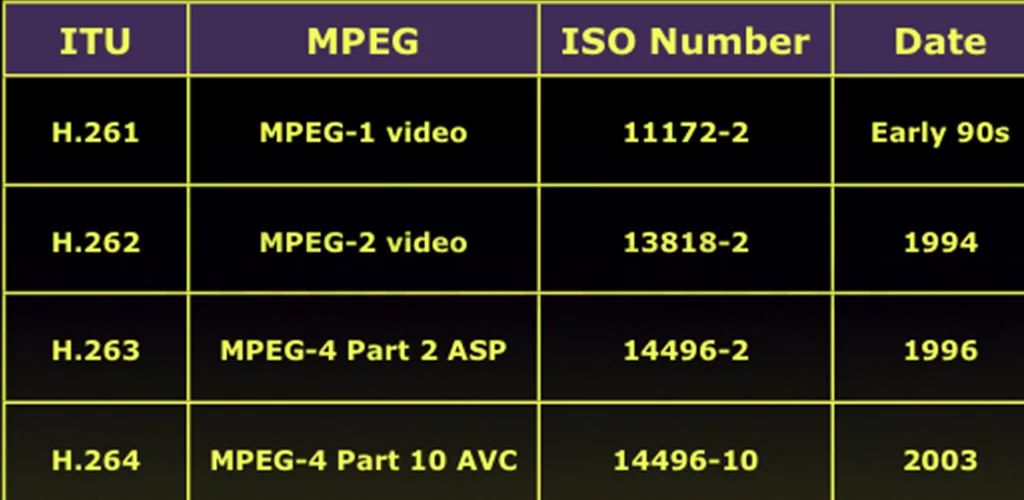
H.264, also called Advanced Video Coding (AVC), is a video compression standard developed in 2003. Think of it as a smart file shrinker: it squeezes massive video files into smaller sizes without sacrificing quality. This makes it perfect for:
- 4K streaming (up to 4096×2304 pixels!).
- Video calls (Zoom, Skype).
- Blu-ray discs (yes, your HD movies use it!).
Why H.264 Dominates the Digital World
- Ultra-Efficient Compression:
- Cuts video file sizes by 50–80% compared to older codecs like H.263.
- Saves data on mobile networks and reduces buffering.
- 4K Ready:
- Supports resolutions up to 4K UHD (8 million pixels per frame!).
- Universal Compatibility:
- Works on almost every device: smartphones, smart TVs, gaming consoles, and cameras.
(For tips on optimizing video quality, check out tech4gsm.com.)
H.264 in Real Life: Where You’ve Seen It
- Streaming Giants: Netflix, YouTube, and Amazon Prime use H.264 for smooth HD playback.
- Blu-Ray Movies: Your favorite films are stored in H.264 for crisp, high-quality visuals.
- Security Cameras: Efficient compression allows 24/7 recording without eating up storage.
- Social Media: Instagram Reels and TikTok videos load faster thanks to H.264.
H.264 vs. Old Codecs: Why It’s Better
| Feature | H.263 (2000s) | H.264 (Modern King) |
|---|---|---|
| Resolution | Up to 352×288 (CIF) | Up to 4K (4096×2304) |
| Data Efficiency | Low (High buffering) | High (Less buffering) |
| Usage | Early video calls | Streaming, Blu-ray, apps |
How H.264 Saves Your Data (and Sanity)
Imagine streaming a movie:
- Without H.264: A 2-hour HD film = 10 GB of data (ouch, data plan!).
- With H.264: Same film = 2–3 GB—saving data and time!
This efficiency is why mobile networks and websites love H.264.
Fun Fact: H.264 Made Blu-Ray Possible
Before H.264, fitting HD movies on discs was tough. H.264’s compression let studios pack hours of 1080p footage onto a single Blu-ray disc. That’s why your Avengers marathon looks so sharp!
The Downsides? Barely!
- Not Perfect for 8K: Newer codecs like H.265 handle 8K better.
- Processing Power: Encoding H.264 videos needs moderate device power (but modern gadgets handle it easily).
Is H.264 Still Relevant in 2024?
Absolutely! Even with newer codecs like AV1 or H.265, H.264 remains the “universal language” of video due to its broad compatibility. Most apps and devices still prioritize it for reliability.
How to Use H.264 Wisely
- Streaming: Choose “HD” or “1080p” options—they often use H.264.
- Recording: Set your camera or phone to H.264 for smaller files.
- Editing: Export videos in H.264 for easy sharing on social media.
Final Thoughts
H.264 is the quiet workhorse behind our HD world—balancing quality, file size, and compatibility like a pro. Next time you stream a show or watch a Blu-ray, remember: this 20-year-old tech is still making your visuals stunning!
Key Takeaways:
- H.264 = HD streaming + Blu-ray thanks to its 4K-ready compression.
- Saves up to 80% data compared to older codecs.
- Universally supported on phones, cameras, and smart TVs.
Still dominates despite newer competitors like H.265.