Introduction
Imagine your phone had a passport. That’s exactly what an IMEI (International Mobile Equipment Identity) number is—a 15-digit code that’s as unique as your fingerprint. Whether you own a budget Android or a flagship iPhone, this number helps networks, law enforcement, and even you keep your device safe. Let’s decode the power of IMEI!
What is an IMEI Number?
The IMEI is a 15-digit serial number assigned to every GSM or UMTS mobile phone. Think of it like a car’s VIN number: it reveals details about the device, such as:
- Manufacturer (e.g., Samsung, Apple).
- Model type.
- Country of origin.
- A unique serial code for your specific device.
You’ll find it printed under the battery (for phones with removable backs) or in the settings menu. Dial *#06# to display it instantly!
Breaking Down the IMEI: 4 Parts Explained
The IMEI isn’t random—it’s a coded story:
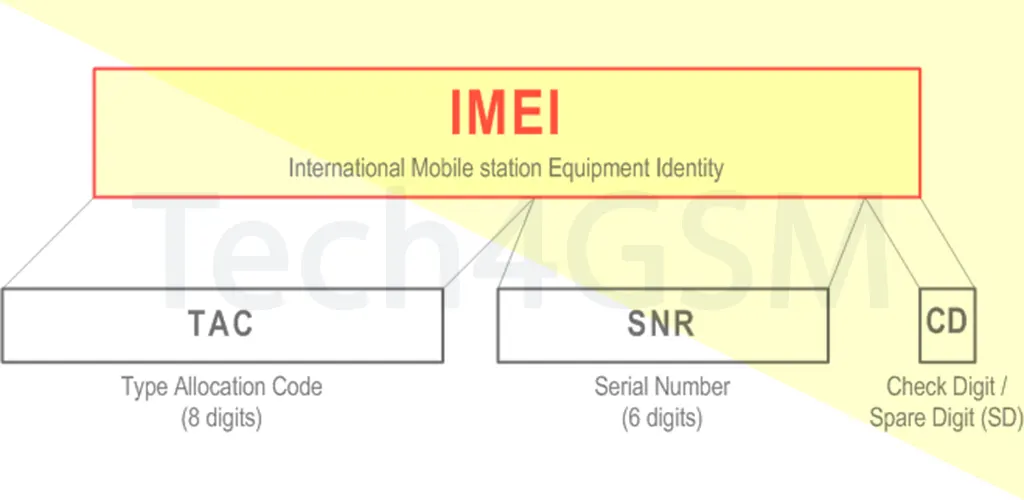
- Type Allocation Code (TAC): The first 8 digits identify the brand and model.
- Serial Number (SNR): Digits 9-14 are the phone’s unique ID.
- Check Digit: The 15th digit verifies the number’s validity.
- Software Version (SVN): Optional extra digits for software updates.
For example, an IMEI starting with 35-xxxxxx likely belongs to an Apple device.
IMEI vs. Thieves: How It Protects Your Phone
If your phone is stolen, the IMEI becomes your shield. Here’s why:
- Network Blacklist: Report the theft to your carrier, and they’ll block the IMEI across all networks. Even with a new SIM, the phone can’t make calls or use data.
- Global Tracking: Law enforcement uses IMEI to track stolen devices worldwide.
- Resale Roadblock: Thieves can’t easily sell a banned phone—it’s basically a fancy paperweight.
⚠️ Pro Tip: Always note down your IMEI before your phone goes missing! Store it in a secure app or cloud.
How to Find Your IMEI
- Dial
*#06#: Instantly displays the number. - Check Settings: Go to About Phone > Status.
- Physical Device: Look under the battery, on the box, or the SIM tray.
Beyond Security: IMEI’s Everyday Uses
- Warranty Checks: Verify if your phone is genuine or refurbished.
- Unlocking Phones: Carriers use IMEI to unlock devices for other networks.
- Buying Used: Always check the IMEI on sites like IMEI.info to avoid stolen devices.
Keep Your IMEI Safe – But Don’t Panic!
While sharing your IMEI isn’t as risky as sharing a password, avoid posting it publicly. Scammers could misuse it to clone phones or fake warranties.
In a Nutshell
Your phone’s IMEI is more than a random number—it’s a lifeline. From fighting theft to ensuring smooth network access, this tiny code plays a big role in keeping your device secure. 🔒📱