Introduction
Picture this: You’re streaming a 4K movie while your sibling games online, and your mom video-calls Aunt Linda—all without a single buffering wheel. Behind this magic? MIMO (Multiple-Input Multiple-Output), the unsung hero turning your Wi-Fi into a speed demon. Let’s decode how this tech transforms your internet from a country road to a futuristic freeway!
What Is MIMO? Wi-Fi’s Traffic Cop
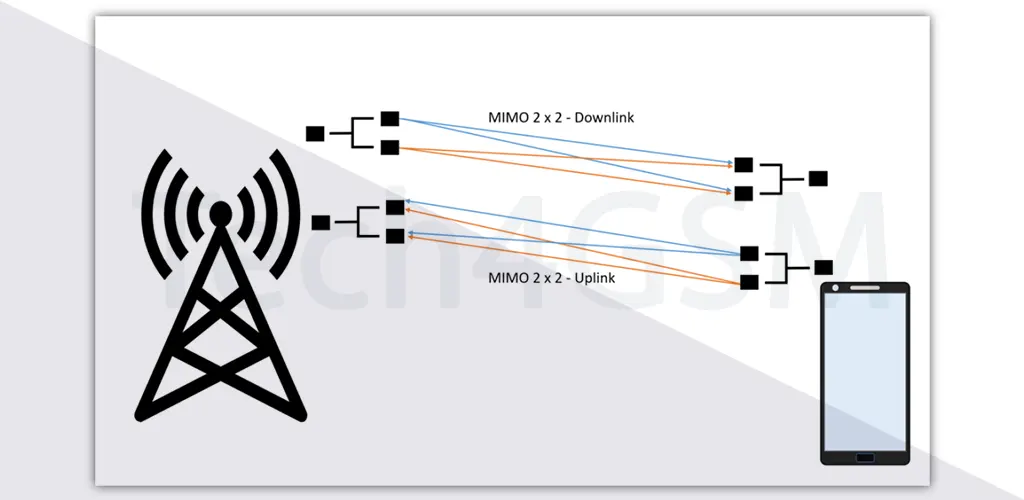
MIMO is like adding extra lanes to a highway for data. Instead of one antenna sending/receiving signals (old-school SISO tech), MIMO uses multiple antennas to shuttle data simultaneously. The result? Faster speeds, stronger connections, and fewer “Why is the internet so slow?!” meltdowns.
- SISO (Single-Input Single-Output): One antenna. Think dial-up-era vibes.
- MIMO: 2+ antennas. Modern Wi-Fi that handles Netflix, Zoom, and TikTok parties at once.
Fun Fact: MIMO debuted with the 802.11n Wi-Fi standard (circa 2009) and revolutionized wireless tech forever!
How MIMO Works: Turning Chaos Into Superpowers
Ever shout in a canyon and hear your echo? That’s multipath—signals bouncing off walls, furniture, and even your fridge. Older Wi-Fi hated this, as echoes caused messy interference. But MIMO? It loves multipath!
Here’s the genius:
- Multiple Antennas: Send/receive different data streams at the same time.
- Smart Signal Processing: Combine bounced signals to strengthen your connection.
- Spatial Streaming: Use “3D space” to route data efficiently (like GPS for Wi-Fi).
Result: Wider coverage, fewer dead zones, and speeds up to 600Mbps+ (with 3 antennas)!
Why Your Router and Devices Need to “Team Up”
MIMO is a teamwork champ. For max speed, both your router (Access Point) and device (phone, laptop) must support MIMO. Otherwise, you’re stuck in SISO slow lanes.
- Example: A MIMO router + a 2-antenna laptop = 300Mbps.
- Upgrade to a 3-antenna device? Hello, 600Mbps!
Pro Tip: Check device specs for “MIMO” or “802.11n/ac/ax” support. Unsure?
MIMO vs. Old Wi-Fi: No Contest!
| Feature | SISO (Old Wi-Fi) | MIMO (Modern Wi-Fi) |
|---|---|---|
| Antennas | 1 | 2, 3, 4, or more! |
| Speed | Snail-paced | Racecar-fast |
| Coverage | Weak, spotty | Strong, room-to-room |
| Multipath Use | “Ugh, interference!” | “Yass, free speed boost!” |
How to Harness MIMO’s Power at Home
- Upgrade Your Router: Look for “dual-band” or “tri-band” MIMO routers.
- Check Device Compatibility: Newer phones/laptops usually support MIMO.
- Antenna Math: More antennas = higher speeds. A 4×4 MIMO router? Chef’s kiss.
Budget Hack: Even a 2×2 MIMO router (under $50) beats SISO.
MIMO Myths Busted!
- ❌ “More antennas = bigger router”: Nope! Modern designs hide antennas stylishly.
- ❌ “MIMO is only for large homes”: Small apartments benefit from faster speeds too!
MIMO in 2024: What’s Next?
From Wi-Fi 6’s OFDMA pairing to 5G networks, MIMO keeps evolving. Future routers might use AI to optimize antenna use—think “self-driving Wi-Fi”!
Final Signal Boost
MIMO isn’t just tech jargon—it’s the reason your video calls don’t freeze and downloads don’t drag. Whether you’re working from home, gaming, or binge-watching, MIMO ensures your Wi-Fi keeps up with life’s demands.