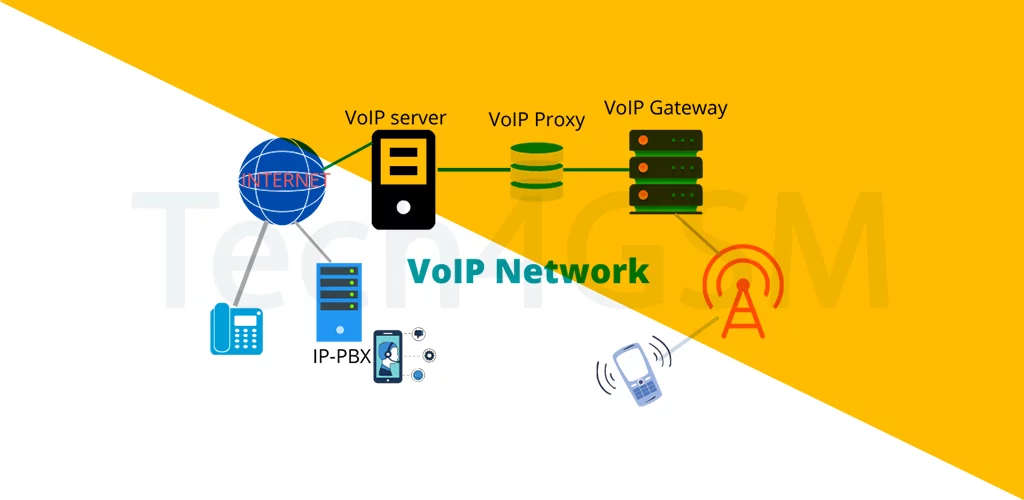
Introduction
Imagine calling your friend in another country—without a phone plan—using only Wi-Fi. That’s the power of VoIP! This tech turns your internet connection into a superhighway for voice calls, making traditional phone lines look like dial-up. Let’s unpack how VoIP works, why it’s a game-changer, and how you can start using it today.
What is VoIP?
VoIP stands for Voice over Internet Protocol. In simple terms, it’s like sending voice messages over the internet instead of using old-school phone towers. Think of it as “email for your voice”! With VoIP, you can:
- Make calls using apps (WhatsApp, Zoom, Skype).
- Host conference calls with people worldwide.
- Save money (especially on international calls!).
How Does VoIP Work?
VoIP converts your voice into digital data packets and zaps them over the internet. Here’s the step-by-step magic:
- Speak: Your voice is picked up by a microphone.
- Digitize: Software turns sound waves into data.
- Transmit: Data travels via internet to the receiver.
- Reassemble: The receiver’s device converts data back into sound.
No cell towers, no copper wires—just pure internet power!
Why VoIP is Cheaper (and Better!) Than Traditional Calls
| VoIP | Traditional Calls |
|---|---|
| Uses internet (free/low cost) | Uses phone networks (expensive for long distance) |
| Works on Wi-Fi or mobile data | Needs cellular signal |
| Supports video, text, file sharing | Voice-only |
| Easy to scale for businesses | Requires physical infrastructure |
Fun Fact: The first VoIP call was made in 1973—before the internet went public!
Top Benefits of VoIP
- Cost-Effective: Free app-to-app calls; cheaper rates for landlines.
- Global Reach: Call anywhere with internet (goodbye, roaming fees!).
- Rich Features: Voicemail, call recording, auto-attendants.
- Flexibility: Use your phone, laptop, or tablet to call.
Popular VoIP Apps You Already Use
- WhatsApp/Telegram: Free voice and video calls.
- Zoom/Skype: For meetings and group calls.
- Google Voice: Get a virtual phone number for business.
- Discord: Gamers’ favorite for voice chat.
How to Start Using VoIP
- Pick an App: Choose one based on your needs (personal or business).
- Connect to Wi-Fi/Mobile Data: Stable internet = crystal-clear calls.
- Dial Away: Call numbers or app users instantly.
VoIP Limitations? Yes, But Fixable!
- Internet Dependency: No Wi-Fi/data = No calls. Fix: Use hybrid systems (VoIP + traditional backup).
- Latency Issues: Laggy calls on slow networks. Fix: Upgrade your internet plan.
- Security Risks: Hackers can intercept calls. Fix: Use apps with end-to-end encryption.
VoIP for Businesses: Why It’s a Must
- Cost Savings: Cut phone bills by up to 60%.
- Remote Work Friendly: Teams can connect from anywhere.
- Professional Features: Call queues, IVR menus, analytics.
VoIP Pro Tips
- Test Your Speed: Use speedtest.net—aim for 100 kbps per call.
- Use Headphones: Reduces echo and background noise.
- Enable Encryption: Opt for apps like Signal for sensitive chats.
The Future of VoIP
- 5G Integration: Ultra-HD voice quality with zero lag.
- AI Assistants: Smart call routing (“Transfer me to billing!”).
- AR Calls: Visualize products during sales calls (like holograms!).
Wrapping Up
VoIP is reshaping how we communicate—turning the internet into a global telephone network. Whether you’re a budget-savvy traveler, a remote worker, or a business owner, VoIP offers freedom, flexibility, and savings. Ditch the old phone lines and join the internet-calling revolution!