Introduction
In today’s fast-paced digital world, ensuring error-free communication between devices is crucial. Enter ARQ (Automatic Repeat Request)—a smart error-control method that keeps data transmission reliable even over shaky connections. Let’s break down what ARQ is, how it works, and why it matters in 2025.
What is ARQ?
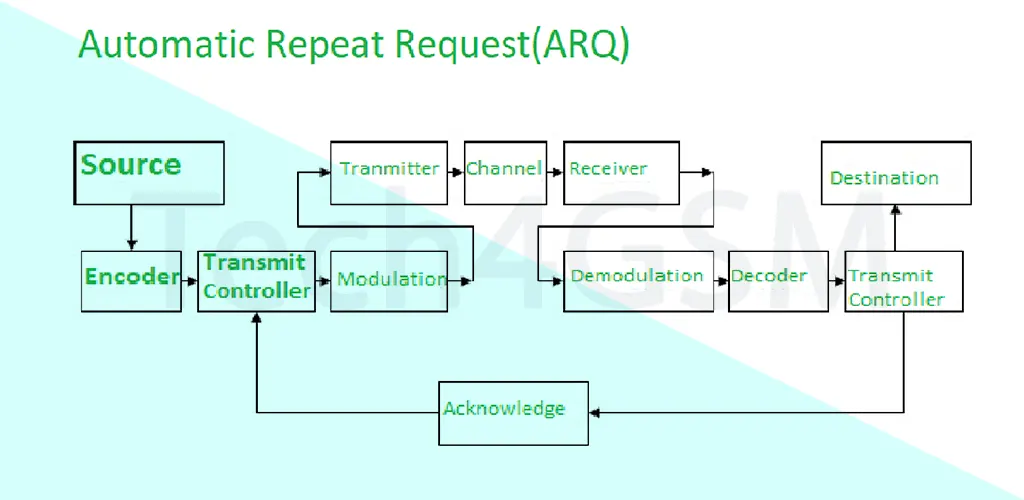
ARQ stands for Automatic Repeat Request (or Automatic Repeat Query). Think of it as a safety net for data transfer. When two devices communicate, ARQ steps in to detect errors or lost data packets. If something goes wrong, it simply asks the sender to retransmit the data. This method operates in the Transport Layer and Data Link Layer of the OSI model, ensuring your messages, files, or signals reach their destination intact.
How Does ARQ Work?
Imagine mailing a letter and waiting for a confirmation postcard. ARQ works similarly:
- The sender transmits a data packet.
- The receiver checks for errors. If everything’s fine, it sends an acknowledgment (ACK).
- If the sender doesn’t get an ACK before a set timeout period, it assumes the packet was lost or corrupted and resends it.
This cycle repeats until the data is successfully delivered. Simple, right?
Where is ARQ Used?
ARQ isn’t just a tech buzzword—it’s everywhere!
- Shortwave Radio Communication: Ensures signals aren’t lost in transmission.
- Modem Protocols like Xmodem (learn more about modem tech at tech4gsm.com).
- High-Level Data Link Control (HDLC) and IBM’s Binary Synchronous Communications.
- TCP (Transmission Control Protocol): Uses ARQ-like mechanisms for internet reliability.
Types of ARQ Protocols
ARQ comes in different flavors, each suited for specific scenarios:
- Stop and Wait ARQ
- How it works: The sender transmits one packet and waits for an ACK before sending the next.
- Real-life analogy: Like a teacher collecting homework one by one, ensuring each is checked before moving on.
- Go-Back-N ARQ
- How it works: The sender sends multiple packets at once. If an error occurs, it retransmits all packets from the lost one.
- Drawback: Can be inefficient if errors are frequent (like resending an entire chapter for a single typo).
- Selective Repeat ARQ
- How it works: Only the corrupted/lost packet is resent, saving time and bandwidth.
- Bonus: Ideal for high-error environments—like fixing a single puzzle piece without redoing the whole puzzle.
ARQ vs. TCP: What’s the Difference?
| Aspect | TCP | ARQ |
|---|---|---|
| Function | Manages errors, flow, and congestion. | Focuses on error detection and retransmission. |
| Layer | Transport Layer only. | Transport + Data Link Layers. |
| Complexity | Like a meticulous editor—checks everything. | Like a quick proofreader—fixes only obvious errors. |
| Use Cases | Web browsing, emails, file transfers. | Radio comms, modem protocols. |
Pros and Cons of ARQ
✅ Advantages
- Simple error detection.
- Cost-effective (no fancy hardware needed).
❌ Disadvantages
- Struggles in high-error environments (e.g., noisy networks).
- Repeated retransmissions can slow things down.
Why ARQ Matters in 2025
With rising reliance on IoT devices and wireless communication, ARQ remains a backbone for reliable data transfer. Whether it’s streaming a video or sending satellite signals, ARQ quietly ensures nothing gets lost in transit.
FAQs
Q: Does ARQ work for wireless communication?
A: Absolutely! It’s widely used in Wi-Fi, Bluetooth, and cellular networks.
Q: Can ARQ and TCP work together?
A: Yes! TCP uses ARQ-like methods but adds extra layers of control.
Q: Is ARQ outdated in 2025?
A: Not at all! It’s still vital for low-power devices and unstable networks.
In a nutshell, ARQ is the unsung hero of seamless communication. By understanding its types and uses, we can better appreciate the tech that keeps our digital world connected! 🌐✨