Introduction
GIF stands for Graphics Interchange Format. It is a type of image file that combines multiple encoded images or frames into a single file. These frames play in a specific sequence to create animations, making GIFs a popular choice for short, looped clips. Introduced in 1987, GIFs became iconic in the 1990s when Netscape 2.0 added support for animated versions (GIF89a). Today, they remain a staple for memes, ads, and social media.
Key Features of GIFs:
- Lossless Compression: Quality stays intact even after compression.
- 256-Color Limit: Uses indexed color, limiting palettes but keeping files small.
- Supports Static & Animated Images: Works for both photos and mini-videos.
- Universal Compatibility: Plays on almost all devices and browsers.
How Animated GIFs Took Over the Internet
In the 1990s, Netscape’s Application Block revolutionized GIFs by turning static images into animations. This feature spread rapidly, making GIFs a go-to for early web designers. Fast-forward to 2025, and GIFs dominate social media, messaging apps, and digital marketing due to their small size and ease of sharing.
Why Animated GIFs Are Still Popular:
- Quick to Load: Ideal for slow internet connections.
- No Plugins Needed: Unlike Flash or Java, GIFs work natively in browsers.
- Versatile Use: From memes to tutorials, GIFs simplify communication.
How to Create an Animated GIF Using Photoshop
Step-by-Step Guide (2025 Edition):
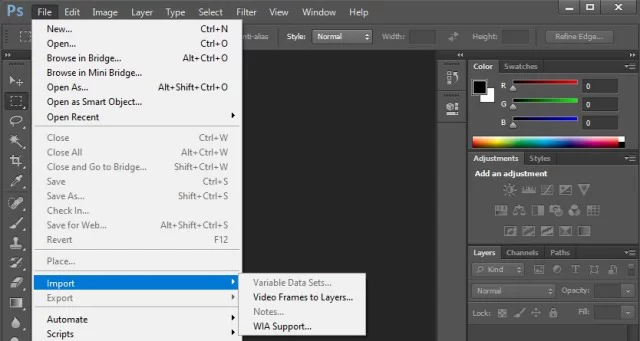
Import Images: Open Photoshop and upload your image layers.
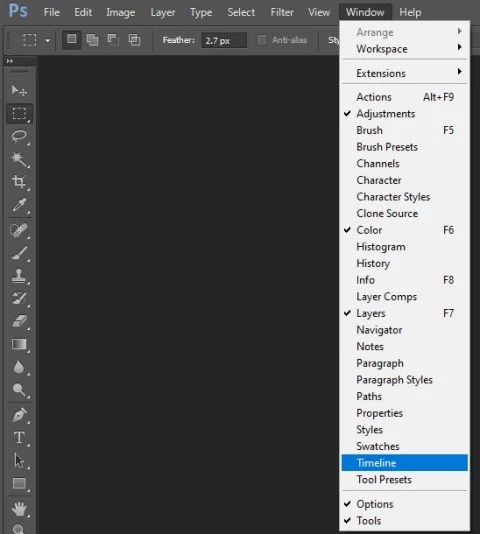
Open Timeline: Go to Window > Timeline to activate the animation panel.
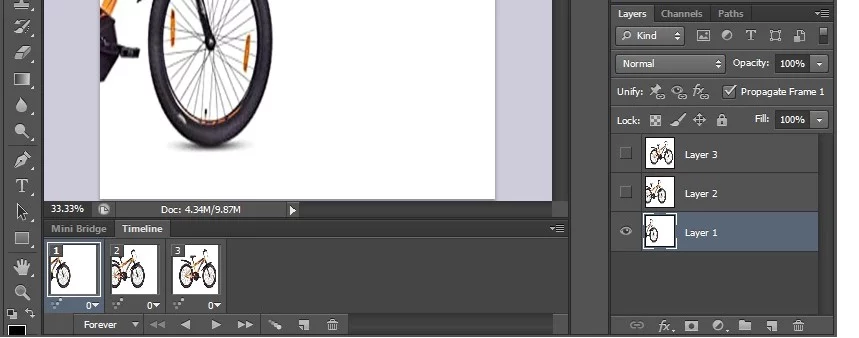
Create Frame Animation: Click the menu icon and select “Create Frame Animation”.
Convert Layers to Frames: Under the same menu, choose “Make Frames from Layers”.
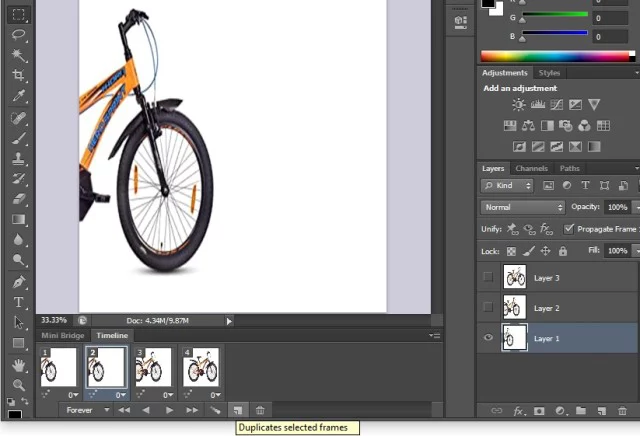
Adjust Timing: Set each frame’s duration (e.g., 0.5 seconds).
Set Looping Options: Choose “Forever” or a specific number of loops.
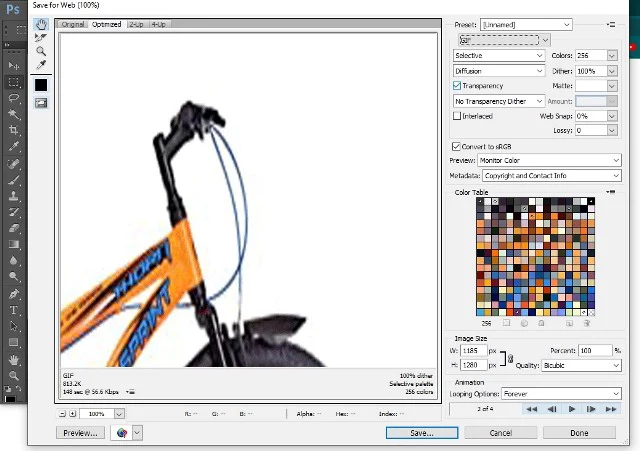
Preview & Export: Hit the Play button, then save via File > Export > Save for Web.
Free Alternatives to Photoshop:
- GIMP: Open-source tool with similar features.
- Canva: User-friendly for beginners.
- Online Platforms: Ezgif, Giphy, and ImgFlip.
Top 5 Characteristics of GIF Files
- Small File Size: Compressed without quality loss.
- Animation Support: Up to 256 colors per frame.
- Transparency: Allows for see-through backgrounds.
- No Sound: Focuses purely on visual content.
- Wide Compatibility: Works on 99% of modern devices.
Advantages of Using GIFs in 2025
- Engagement Boost: GIFs increase social media interaction by 30%.
- Easy to Share: Compatible with WhatsApp, Instagram, and emails.
- Memory Efficient: Takes up 10x less space than MP4 videos.
- No Copyright Issues: Most platforms allow royalty-free GIF use.
FAQ: Everything You Need to Know About GIFs
Q1: What does GIF stand for?
A: Graphics Interchange Format.
Q2: Can GIFs have sound?
A: No—GIFs are silent by design.
Q3: Why are GIFs limited to 256 colors?
A: To keep file sizes small and loading times fast.
Q4: Are GIFs still relevant in 2025?
A: Absolutely! They’re key for quick communication on apps like Slack and TikTok.
Q5: How do I reduce a GIF’s file size?
A: Use tools like Ezgif or lower the frame rate in Photoshop.
Future of GIFs: Predictions for 2025 and Beyond
- AI-Generated GIFs: Tools like DALL-E will let users create custom GIFs via text prompts.
- 4K GIFs: Improved compression tech may support HD animations.
- AR Integration: GIFs could overlay animations in real-world AR apps.
Final Thoughts
GIFs blend simplicity with creativity, making them timeless in digital communication. Whether you’re making memes or ads, mastering GIFs is a skill worth having in 2025. Ready to start? Grab Photoshop or free tools like GIMP and let your ideas loop endlessly!