Introduction
Ever tried sending a video from your phone, only to watch a progress bar crawl like a snail? Meet HSUPA (High-Speed Uplink Packet Access)—the behind-the-scenes tech that made uploading selfies, emails, and live streams actually bearable in the 3G era. Let’s unravel how this upgrade turbocharged mobile data and why it still matters today.
HSUPA Explained: The Upload Sidekick to HSDPA
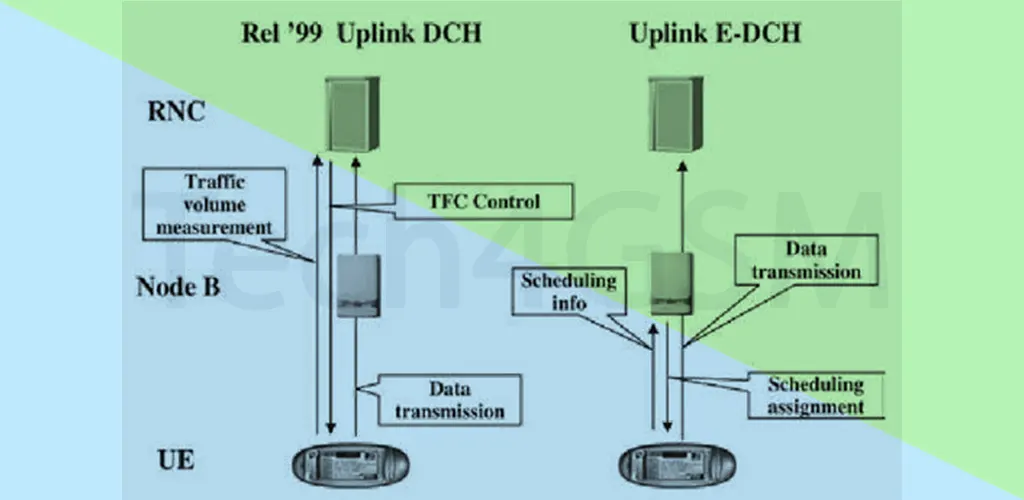
If HSDPA was the “download hero” of 3G, HSUPA was its trusty upload sidekick. Introduced in the mid-2000s, HSUPA boosted upload speeds on 3G networks from a sluggish 384 kbps to a zippy 5.76 Mbps. Finally, sharing that vacation album didn’t require a coffee break!
How It Worked:
- Focused on Uploads: While HSDPA handled downloads, HSUPA optimized sending data from your device.
- Smarter Data Packets: Used efficient coding to reduce delays.
- Backward Compatibility: Worked with older UMTS/HSDPA devices—no need for a new phone!
Imagine your internet connection as a highway: HSDPA widened the download lanes, and HSUPA did the same for upload traffic.
HSUPA + HSDPA = HSPA: The Dynamic Duo
Together, HSUPA and HSDPA formed HSPA (High-Speed Packet Access), branded as 3.5G. This combo gave users:
- Faster Downloads: Up to 21 Mbps (thanks to HSDPA).
- Speedier Uploads: Up to 5.76 Mbps (courtesy of HSUPA).
- Smoother Experience: Better video calls, cloud backups, and social media updates.
Fun Fact: The iPhone 3GS supported HSPA—making it a powerhouse for early mobile internet!
Why Backward Compatibility Mattered
HSUPA’s genius lay in its flexibility:
- No New Gear Needed: Older UMTS/HSDPA phones could still connect to HSUPA-upgraded towers (just at lower speeds).
- Gradual Upgrades: Carriers could roll out HSUPA without ditching existing infrastructure.
This made the transition seamless for users. Got an old flip phone? It worked. Upgraded to a smartphone? Enjoy faster uploads!
HSUPA in Real Life: Where Did It Shine?
- Video Calls: Reduced pixelated faces and frozen screens.
- Social Media: Uploading photos to Facebook (RIP waiting rooms).
- Cloud Services: Backing up files without tying up your phone for hours.
Pro Tip: HSPA (HSUPA + HSDPA) is still used in areas with weak 4G/5G signals. Spot an “H+” icon on your phone? That’s HSPA keeping you connected!
HSUPA’s Legacy: Paving the Way for Modern Mobile
While 4G and 5G have left HSUPA in the dust, its impact remains:
- Proved Uploads Matter: Showed carriers that users needed speed both ways.
- Inspired 4G Techniques: Concepts like efficient data bundling evolved into LTE features.
- Kept 3G Relevant: Extended the life of 3G networks well into the 2010s.
Today, HSUPA is a reminder of how far mobile tech has come—from struggling to send a text-heavy email to live-streaming in HD.
Could You Still Use HSUPA?
Absolutely! Many global 3G networks still support HSPA. While it’s no match for 5G’s gigabit speeds, HSUPA is a reliable fallback when newer networks fail. Plus, IoT devices (like smart meters) often use HSPA for its balance of speed and coverage.
Final Thoughts
HSUPA might not be a household name, but it played a vital role in making mobile internet practical for the masses. Next time you upload a story to Instagram or join a Zoom call on the go, tip your hat to this 3.5G pioneer. And if you’re ever stuck with an “H+” signal? Thank HSUPA for keeping you online!