Introduction
In the fast-paced digital world of 2025, email remains a cornerstone of communication. At the heart of this system lies IMAP (Internet Message Access Protocol), a protocol that revolutionized how we access and manage emails. Unlike older methods like POP3, IMAP offers dynamic synchronization across devices, making it indispensable for modern users. Let’s dive into everything you need to know about IMAP, its features, benefits, and why it’s the go-to choice for email management.
What is IMAP?
IMAP is an application-layer protocol designed to retrieve emails from a mail server while keeping them synchronized across all devices. Created by Mark Crispin in 1986, its latest version, IMAP4, dominates email systems today. Here’s why it’s a game-changer:
- No Deletion After Download: Emails stay on the server unless you manually delete them.
- Multi-Device Sync: Read an email on your phone? It’ll show as “read” on your laptop too.
- Remote Management: Organize folders, flag messages, or delete spam—all changes sync globally.
Key Features of IMAP
IMAP isn’t just about fetching emails—it’s packed with features tailored for efficiency:
- Multi-Mailbox Management: Sort emails into custom folders (e.g., Work, Personal).
- Message Flags: Track emails with labels like “Seen,” “Answered,” or “Important.”
- Selective Download: Preview headers before downloading entire messages.
- Attachment Handling: Download only essential files to save bandwidth.
- Server-Side Storage: Free up device space—emails stay securely on the server.
How IMAP Works: A Simple Breakdown
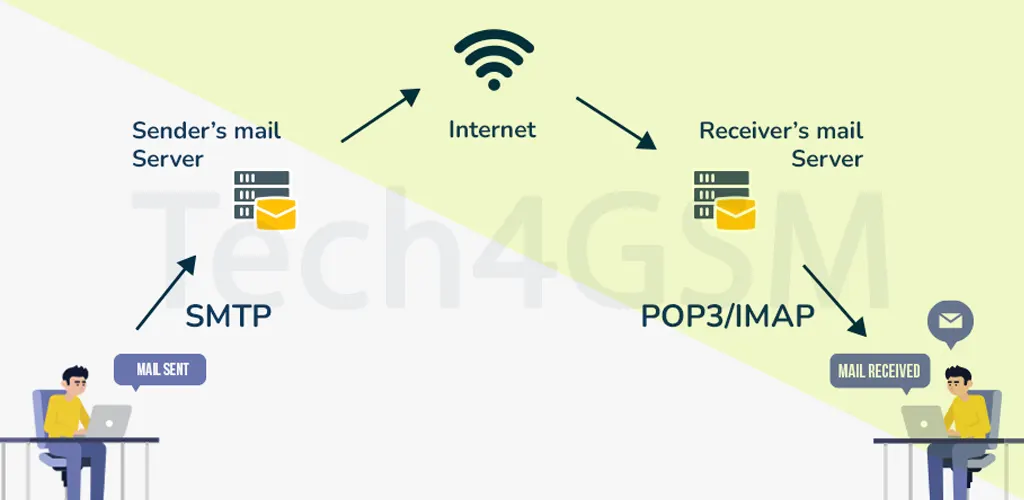
IMAP operates on a client-server model using TCP/IP for reliable communication. Here’s the workflow:
- Connection Setup: Your email client (e.g., Gmail, Outlook) connects to the IMAP server via port 143 (or port 993 for SSL/TLS encryption).
- Authentication: The server verifies your credentials.
- Synchronization: Headers and folder structures sync instantly.
- On-Demand Loading: Full emails and attachments download only when clicked.
Example:
- Open Outlook → Connect to Gmail’s IMAP server → Sync inbox → Click to read an email → Content loads.
IMAP Architecture: Client-Server Harmony
IMAP’s architecture ensures seamless interaction between your device and the server:
- IMAP Clients: Apps like Apple Mail or Mozilla Thunderbird that let you view/manage emails.
- IMAP Servers: Software like Dovecot or Microsoft Exchange that store and organize emails.
- Network Protocols: Uses TCP/IP for data transfer, with SSL/TLS adding security layers.
Pro Tip: Always use port 993 (IMAPS) for encrypted communication to protect sensitive data.
Advantages of IMAP
- Universal Access: Check emails from any device, anywhere.
- Centralized Storage: No risk of losing emails if your phone breaks.
- Efficient Storage: Save device space by keeping emails server-side.
- Real-Time Sync: Organize once, and changes reflect everywhere.
- Easy Migration: Switch devices effortlessly—your inbox follows you.
Disadvantages of IMAP
While powerful, IMAP has limitations:
- Internet Dependency: No offline access to new emails.
- Slower Performance: Syncing large folders can lag on slow connections.
- Complex Setup: Configuring advanced rules requires technical know-how.
- Storage Limits: Server mailbox quotas may restrict email volume.
IMAP vs. POP3: What’s the Difference?
| Feature | IMAP | POP3 |
|---|---|---|
| Email Storage | Stays on server | Downloaded to device |
| Multi-Device Sync | Yes | No (Single device only) |
| Ports | 143 (Unencrypted), 993 (SSL/TLS) | 110 (Unencrypted), 995 (SSL/TLS) |
| Partial Content Preview | Yes | No (Full download required) |
| Folder Management | Create/delete folders on the server | Limited to local device |
Why IMAP Wins in 2025: With remote work and multiple devices, IMAP’s sync capabilities are unmatched.
FAQs About IMAP
Q1: Is IMAP secure?
By default, IMAP sends login details in plain text. Always enable SSL/TLS encryption (IMAPS) via port 993 for security.
Q2: Can I use IMAP with any email provider?
Most providers (Gmail, Outlook, Yahoo) support IMAP.
Q3: Does IMAP work offline?
You can view previously synced emails offline, but new messages require internet.
Q4: How do I fix IMAP sync issues?
- Verify server settings.
- Ensure ports 993/143 aren’t blocked.
- Update your email client.
Final Thoughts
As we embrace 2025, IMAP remains the gold standard for email management, balancing accessibility, security, and efficiency. Whether you’re a remote worker, student, or casual user, understanding IMAP empowers you to take control of your digital communication.