Introduction
Imagine your phone, laptop, or TV shouting, “Plug in here!” – that’s what a port does! It’s the physical “handshake spot” where devices connect to share power, data, or even your favorite playlist. Let’s decode why ports are the unsung heroes of tech!
What is a Port?
A port is like a specialized dock on your device. It’s the slot, hole, or socket where you plug in cables, chargers, or accessories. Think of it as a universal translator that lets gadgets “talk” to each other.
- Also Called: Connector, jack, or socket.
- Example: Charging your phone? The USB-C port on your device docks with the cable’s plug.
How Do Ports Work?
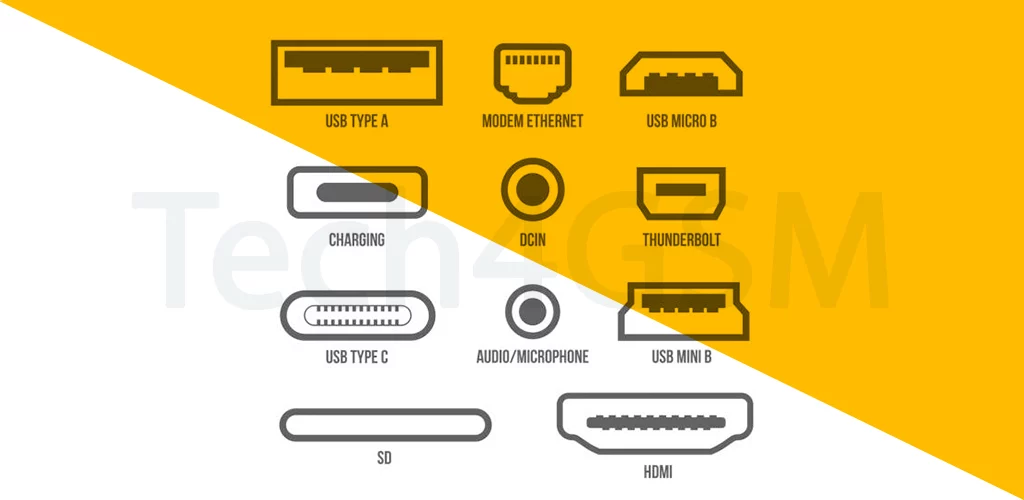
- Match Made in Tech: Each port has a unique shape and design (e.g., USB, HDMI, headphone jack).
- Plug & Play: Insert the right connector, and voilà – power flows, data transfers, or sound blasts!
- No Guesswork: Ports are designed to prevent wrong insertions (goodbye, frustrated flipping!).
Common Types of Ports
- USB Port: The MVP! Charges devices, transfers files, and connects peripherals (like keyboards).
- HDMI Port: Streams HD video/audio from laptops to TVs.
- Headphone Jack: The classic 3.5mm port for audio bliss.
- Power Port: Lets your gadget sip electricity from a charger.
Port vs. Connector: What’s the Difference?
- Port: The receiver (e.g., the USB slot on your laptop).
- Connector/Plug: The attacher (e.g., the USB end of your cable).
Together, they’re like a tech power couple!
Why Ports Matter
- Charge It Up: No port? No charging your devices!
- Data Superhighway: Transfer photos, videos, or documents in seconds.
- Expandability: Connect printers, speakers, or external drives to boost functionality.
Port Problems? Here’s the Fix!
- Dust Bunnies: Clean ports gently with a toothpick or compressed air.
- Loose Fit: Avoid wobbly connections – replace frayed cables.
- Wrong Shape? Use adapters (e.g., USB-C to HDMI).
Final Plug
Ports are the quiet bridge-builders of the tech world. Whether you’re jamming to music, projecting a presentation, or saving a dying battery, they make it happen. Next time you plug in, give a nod to that tiny, mighty port!