Introduction
In today’s digital world, emails are more than just text—they include images, videos, and documents. But have you ever wondered how these files travel smoothly through your inbox? The answer lies in MIME (Multipurpose Internet Mail Extensions). Let’s explore this unsung hero of email communication in simple terms!
What is MIME?
Proposed in 1991 by Bell Communications, MIME is a standard that revolutionized email by breaking the limitations of traditional protocols like SMTP (Simple Mail Transfer Protocol). Think of MIME as a “translator” that lets you send non-ASCII data—like emojis, audio clips, or PDFs—through systems designed only for plain text. Without MIME, emails would still be stuck in the 7-bit ASCII era!
Why Was MIME Created?
SMTP’s Limitations:
- Only Supports 7-bit ASCII: SMTP couldn’t handle languages like Chinese, Russian, or Hindi, nor symbols like emojis.
- No Support for Multimedia: Sending images, videos, or apps was impossible.
- Rigid Structure: SMTP lacked flexibility for modern needs.
MIME stepped in to make emails versatile, supporting multimedia and global languages.
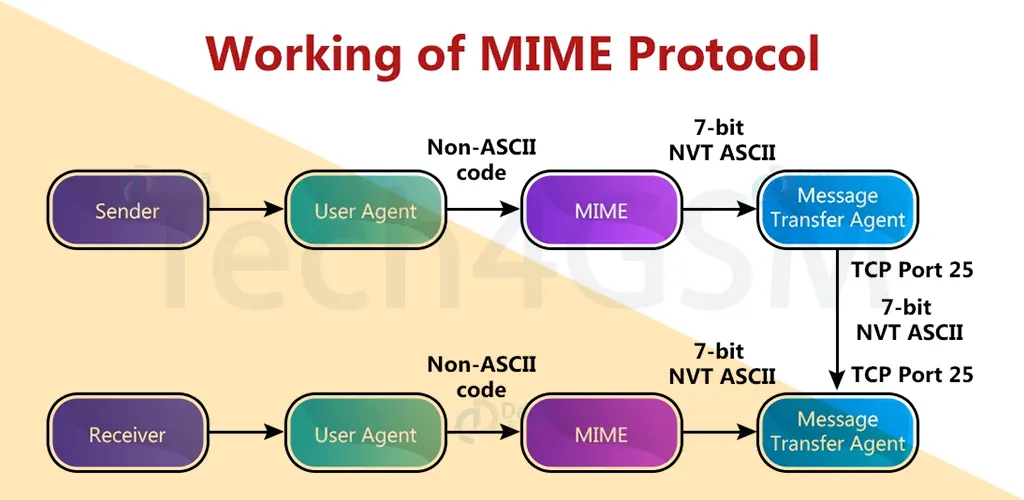
How Does MIME Work?
- Sender Side: MIME converts non-ASCII data (e.g., a JPEG image) into 7-bit ASCII format.
- Transmission: The converted data travels via SMTP.
- Receiver Side: MIME decodes it back to its original form (JPEG) for the recipient.
Imagine mailing a puzzle: MIME breaks it into pieces (ASCII), ships it, and reassembles it perfectly at the destination!
Key Features of MIME
- Multiple Attachments: Send images, invoices, and songs in one email.
- Unlimited Message Length: No more choppy texts!
- Binary File Support: Perfect for apps, ZIP files, or videos.
- Multi-Part Messages: Mix text, HTML, and attachments seamlessly.
MIME Headers: The Secret Sauce
MIME adds five headers to emails for smooth communication:
- MIME-Version (1.0): Identifies the MIME protocol used.
- Content-Type: Specifies data type (e.g., text/html, video/mp4).
- Content-Encoding: Details encoding method (7-bit, base64).
- Content-ID: Unique ID for tracking attachments.
- Content-Description: Explains what’s inside (e.g., “Summer Vacation Photo”).
Advantages of MIME
- Multimedia Support: Emails aren’t just text anymore!
- Language Flexibility: Send emails in French, Japanese, or Hindi.
- Customization: Style emails with HTML/CSS.
- No Length Limits: Write novels if you want!
- Unique IDs: Ensures attachments aren’t lost.
Disadvantages of MIME
- Compatibility Issues: Some systems misinterpret MIME types.
- Increased Overhead: Extra headers can slow transfers.
- User Confusion: Non-tech users might struggle with media types.
- System Limitations: Older servers may reject MIME content.
MIME + SMTP + POP: The Email Dream Team
- SMTP: Transfers ASCII-converted emails (thanks to MIME) to the receiver’s mailbox.
- POP (Post Office Protocol): Lets users download emails from servers to their devices.
- MIME’s Role: Acts as the middleman, ensuring SMTP and POP handle multimedia effortlessly.
As of 2025, this trio remains the backbone of email systems worldwide.
FAQs About MIME
Q1. Can I send videos without MIME?
No! MIME encodes videos into ASCII for SMTP to transmit them.
Q2. Is MIME only for emails?
Primarily, but it’s also used in web protocols (like HTTP) for similar purposes.
Q3. Why do some emails show “MIME-Version: 1.0”?
It confirms the email uses MIME standards for attachments or styling.
Q4. Does MIME affect email security?
MIME itself doesn’t encrypt data—use protocols like SSL/TLS for security.
Q5. How do I fix broken attachments?
Check if the receiver’s email client supports the MIME content type used.
Final Thoughts
MIME transformed emails from plain text to dynamic, multimedia-rich messages. Despite minor drawbacks, its role in global communication is irreplaceable. Whether you’re sharing memes or business reports, MIME works silently in the background to make it happen.