Introduction
In today’s connected world, the Network Interface Card (NIC) is the unsung hero that links your devices to the internet. Whether you’re browsing the web, streaming videos, or gaming online, NICs make it all possible. Let’s break down what NICs are, how they work, and why they matter—all in simple terms!
What is a NIC?
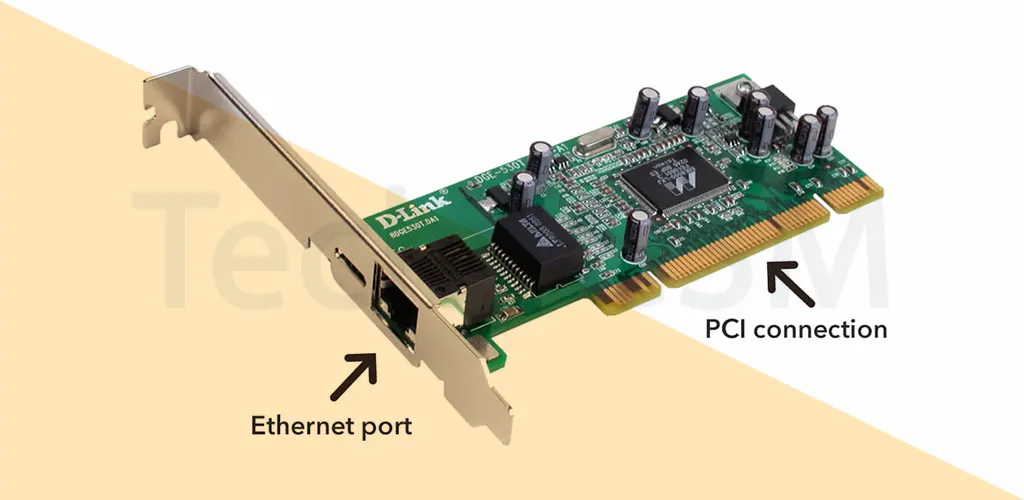
NIC stands for Network Interface Card. It’s also known as an Ethernet card, physical network card, or network adapter. Think of it as a bridge between your device (like a computer or smartphone) and a network. Without a NIC, your gadget can’t connect to the internet or communicate with other devices. Even your Wi-Fi router has a NIC to link to your home network!
This tiny circuit board or chip operates on Layer 2 of the OSI model (the data link layer) and uses a unique MAC address (more on this later) to identify your device. In simple terms, it converts data into signals—electrical for wired connections (like Ethernet) or radio waves for wireless ones (like Wi-Fi).
Key Features of a NIC
- MAC Address:
Every NIC has a unique Media Access Control (MAC) address assigned by the manufacturer. This 6-byte code (e.g.,00-00-86-47-F6-65) ensures no two devices have the same identity on a network. The first three bytes represent the manufacturer, while the last three are unique to the card. - Connection Port:
Wired NICs have ports for Ethernet cables, while wireless NICs use antennas. Some older cards support multiple cable types, but modern ones are built for specific connections. - Status Indicators:
Look for tiny LED lights on your NIC! A steady “link” light means a stable connection, while a flickering “activity” light shows data is being sent/received. No light? Check your cable or Wi-Fi!
Types of NICs
NICs come in two flavors:
1. Wired NIC (Ethernet Card)
- How it works: Uses Ethernet cables for a physical connection.
- Best for: High-speed, stable links (up to 1 Gbps or more).
- Use cases: Gaming, video calls, offices, and servers.
Pros:
- Faster speeds.
- Reliable with minimal interference.
- Secure (harder to hack than wireless).
2. Wireless NIC (Wi-Fi Adapter)
- How it works: Connects via radio signals (Wi-Fi).
- Best for: Portability and convenience.
- Use cases: Laptops, smartphones, smart home devices.
- Examples: Intel 3160 Dual-Band Adapter, USB Wi-Fi dongles.
Pros:
- No cables needed.
- Easy to add to older devices.
- Supports modern standards like Wi-Fi 6.
Wired vs. Wireless NICs: Quick Comparison
| Feature | Wired NIC | Wireless NIC |
|---|---|---|
| Connection | Ethernet cables | Radio signals (Wi-Fi) |
| Speed | Up to 1 Gbps (or higher) | Slower (depends on signal) |
| Stability | Consistent | Affected by interference |
| Example | TP-Link TG-3468 | Intel 3160 Wireless Adapter |
Pros and Cons of NICs
Advantages:
- Blazing-fast data transfer (gigabit speeds).
- Reliable connections for heavy-duty tasks.
- Multiple devices can connect via ports.
Disadvantages:
- Wired NICs aren’t portable.
- Requires proper setup for optimal performance.
- Wireless signals can be less secure.
Why NICs Matter in 2025
NICs are the backbone of modern networking. From smart homes to office servers, they ensure seamless communication between devices. As technology evolves, NICs will keep adapting—think faster Wi-Fi 7 adapters or 10 Gbps Ethernet cards!
FAQs
Q1: What is a NIC?
A NIC (Network Interface Card) connects devices to networks. It can be wired (Ethernet) or wireless (Wi-Fi).
Q2: What are examples of wireless NICs?
USB Wi-Fi adapters, internal laptop Wi-Fi cards, and smartphone NICs.
Q3: What’s a NIC address?
It’s the MAC address—a unique 6-byte code (e.g., 00-0A-95-9D-68-16) burned into the card by the manufacturer.