Introduction
Imagine your home address—a unique identifier that ensures mail reaches only you. Similarly, a MAC (Media Access Control) address acts as a hardware-specific identifier for devices on a network. This 48-bit code, etched into your device’s Network Interface Card (NIC), ensures data packets find their correct destinations. Unlike IP addresses (which change), MAC addresses are permanent, making them the unsung heroes of seamless networking.
History of MAC Addresses
The journey of MAC addresses began in the 1970s at Xerox PARC, where researchers developed Ethernet. To manage communication between devices, they introduced a unique numbering system—the MAC address. Over time, terms like Burned-In Address (BIA) and Ethernet Hardware Address emerged, but “MAC address” stuck.
Key Milestones:
- 1980: IEEE standardized MAC formats under the 802 project.
- 1990s: Surge in LANs made MAC addresses indispensable.
- 2025: With IoT expansion, MAC’s role evolves (more below).
Characteristics of MAC Addresses
1. Structure & Format
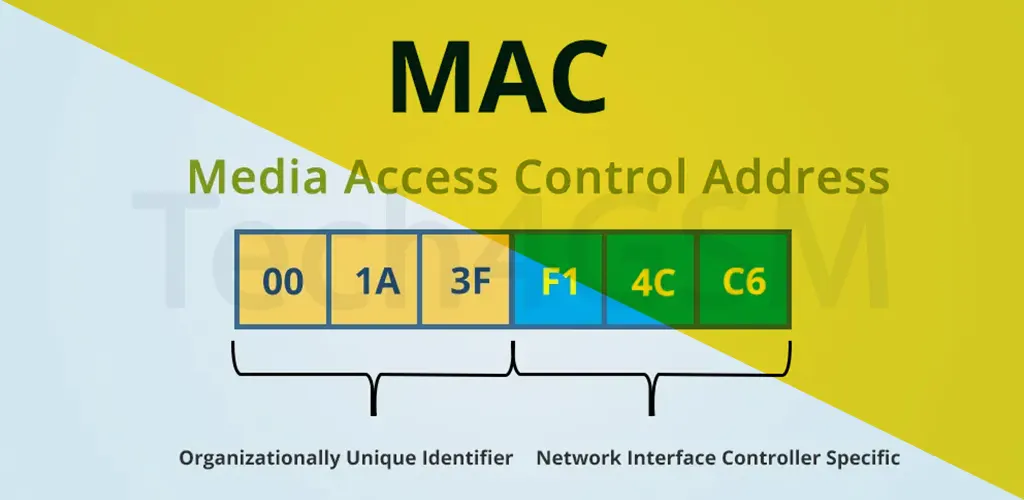
A MAC address is 6 bytes (48 bits) long, written in hexadecimal. Common formats include:
- Hyphens:
45-67-89-AB-CD-EF - Colons:
45:67:89:AB:CD:EF - Dots:
4567.89AB.CDEF
2. OUI & NIC Specifics
- First 3 bytes: OUI (Organizationally Unique Identifier) assigned by IEEE to manufacturers.
- Last 3 bytes: Unique to the device, set by the manufacturer.
Example: A MAC starting with 00:1A:3F belongs to Intel.
3. Layer in OSI Model
MAC operates at the Data Link Layer (Layer 2), ensuring error-free data transfer between devices on the same network.
How MAC Addresses Work
- Device Connection: When your device joins a network, it broadcasts its MAC.
- Data Transmission: Each data packet includes the sender’s and receiver’s MAC.
- Switches & Routers: Use MAC to direct traffic. Switches maintain a MAC table for port mapping.
ARP (Address Resolution Protocol): Translates IPs to MACs, acting as a network “phonebook.”
Advantages of MAC Addresses
- Unique Identification: No two devices share the same MAC, reducing conflicts.
- Network Security: MAC filtering restricts unauthorized access (though not foolproof).
- Simplified Troubleshooting: Admins trace devices faster using MAC.
- Plug-and-Play: No setup needed—devices connect instantly.
Disadvantages & Challenges
- Spoofing Risks: Hackers can mimic allowed MACs to breach networks.
- Limited Address Pool: Each manufacturer gets 16 million unique addresses (24 bits)—a concern with IoT growth.
- Privacy Issues: Public Wi-Fi can track devices via MAC.
MAC Addresses and Security
While MAC filtering adds a layer of control, it’s vulnerable:
- Spoofing Tools: Software like MAC Changer bypass filters.
- Dynamic MACs: iOS and Android now use randomized MACs on Wi-Fi to prevent tracking.
Tip: Combine MAC filtering with encryption (WPA3) for robust security.
The Future of MAC Addresses in 2025
As networks expand, MAC faces new challenges and innovations:
- IPv6 Integration: IPv6’s vast space reduces MAC reliance but coexistence continues.
- IoT Explosion: With 30 billion IoT devices expected by 2025, MAC management scales via NIC extensions.
- AI-Driven Networks: Machine learning detects MAC spoofing in real-time.
- Privacy Laws: Regulations may mandate MAC randomization globally.
Conclusion
MAC addresses remain the backbone of device communication, ensuring data reaches its rightful owner. While challenges like spoofing persist, advancements in AI and privacy tech promise a secure future. Understanding MAC is key to mastering networking—a skill crucial in our connected world.
FAQs
Q1: How long is a MAC address?
A: 48 bits (6 bytes), displayed as six hex pairs (e.g., 01:23:45:67:89:AB).
Q2: Can I change my MAC address?
A: Yes, via software (temporarily). The hardware MAC stays intact.
Q3: Are MAC addresses unique globally?
A: Ideally, yes. Manufacturers must assign unique NIC codes under their OUI.
Q4: Can two devices share a MAC?
A: If they do, network conflicts arise—packets may reach both or neither.
Q5: Is MAC filtering enough for security?
A: No—combine it with encryption, firewalls, and intrusion detection.
Q6: How does MAC differ from IP?
A: MAC is a fixed hardware ID; IP is a software-based network address.