Introduction
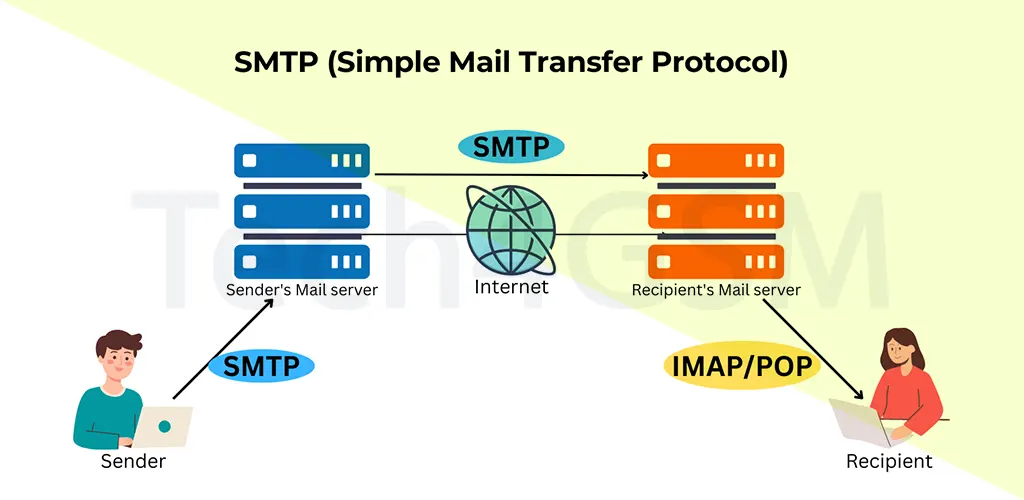
The Simple Mail Transfer Protocol (SMTP) is the backbone of email communication. It’s an application-layer protocol that enables servers to send, receive, and relay emails over the internet. Think of SMTP as the “postal worker” of the digital world—it picks up your email, verifies the address, and ensures it reaches the recipient’s inbox.
Key Facts About SMTP:
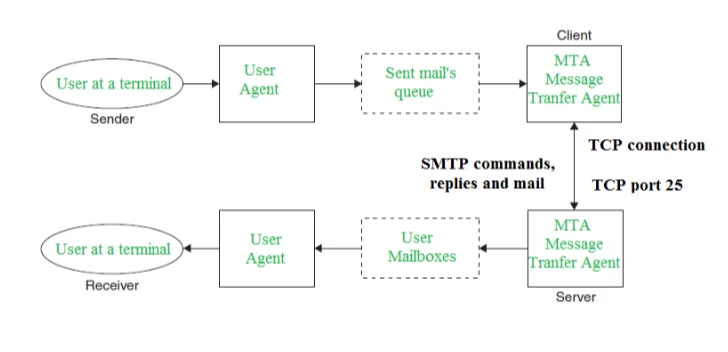
- Operates on TCP/IP at port 25 (default) or port 587 (secure).
- Uses text-based commands to communicate between servers.
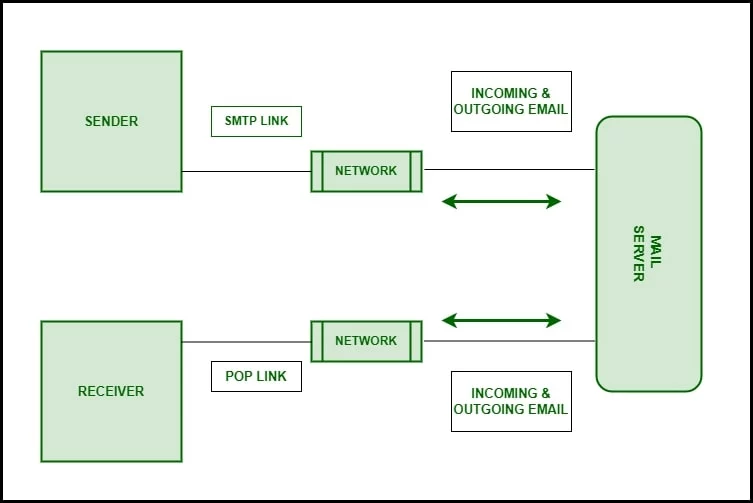
- Works alongside protocols like POP3 and IMAP for full email functionality.
How SMTP Works: A Step-by-Step Breakdown
SMTP follows a client-server model, where the sender’s server (client) communicates with the recipient’s server. Here’s how it works:
- Connection Setup:
- The sender’s email client (e.g., Outlook) connects to an SMTP server using TCP port 25 or 587.
- The server authenticates the sender (if configured).
- Email Submission:
- The client sends commands like MAIL FROM and RCPT TO to specify sender/recipient addresses.
- The DATA command transfers the email body.
- Relay and Delivery:
- The SMTP server routes the email to the recipient’s server.
- If the recipient’s server is unavailable, the email is queued for retry.
- Final Delivery:
- The recipient’s server (via MDA) places the email in the recipient’s mailbox.
SMTP Components Explained
For SMTP to function, four core components work together:
- Mail User Agent (MUA):
- Software like Gmail or Outlook that users interact with to compose emails.
- Mail Submission Agent (MSA):
- Validates and forwards emails from MUAs to MTAs.
- Mail Transfer Agent (MTA):
- Routes emails between servers (e.g., Exchange Server, Postfix).
- Mail Delivery Agent (MDA):
- Delivers emails to the recipient’s mailbox (e.g., Procmail).
SMTP Commands: The Language of Email
SMTP relies on text-based commands to transfer emails. Here’s a quick reference:
| No. | Command | Syntax | Purpose | Usage Frequency |
|---|---|---|---|---|
| 1. | HELO | HELO <domain><CRLF> | Initiates the session by identifying the sender’s domain. | Mandatory |
| 2. | MAIL FROM:<sender><CRLF> | Specifies the sender’s email address. | Mandatory | |
| 3. | RCPT | RCPT TO:<recipient><CRLF> | Defines the recipient’s email address. | Mandatory |
| 4. | DATA | DATA<CRLF> | Marks the start of the email body (headers + content). | Mandatory |
| 5. | QUIT | QUIT<CRLF> | Terminates the SMTP session and closes the TCP connection. | Mandatory |
| 6. | RSET | RSET<CRLF> | Resets the current email transaction without closing the connection. | Optional (Recommended) |
| 7. | VRFY | VRFY <username><CRLF> | Verifies if a recipient’s email address or username exists on the server. | Optional (Recommended) |
| 8. | NOOP | NOOP<CRLF> | A “no operation” command to keep the connection alive. | Optional (Recommended) |
| 9. | TURN | TURN<CRLF> | Swaps the roles of sender and receiver (rarely used today). | Rarely Used |
| 10. | EXPN | EXPN <mailing-list><CRLF> | Expands a mailing list to show all members. | Rarely Used |
| 11. | HELP | HELP <command><CRLF> | Requests documentation or support details from the server. | Rarely Used |
| 12. | SEND | SEND FROM:<sender><CRLF> | Sends email directly to a user’s terminal (outdated in modern systems). | Rarely Used |
| 13. | SOML | SOML FROM:<sender><CRLF> | Delivers email to the terminal if active; otherwise, to the mailbox. | Rarely Used |
| 14. | SAML | SAML FROM:<sender><CRLF> | Sends email to both the terminal and mailbox (obsolete in most systems). | Rarely Used |
Key Notes
- Mandatory Commands: Required for basic email transmission (HELO, MAIL, RCPT, DATA, QUIT).
- Recommended Commands: Enhance functionality (RSET, VRFY, NOOP) but not compulsory.
- Legacy Commands: Rarely supported in modern SMTP implementations (TURN, SEND, SAML).
Less common commands:
- VRFY: Verifies if a username exists.
- RSET: Aborts the current email transaction.
- EXPN: Expands mailing lists.
Difference Between SMTP and Extended SMTP
| Feature | SMTP | Extended SMTP (ESMTP) |
|---|---|---|
| Authentication | No built-in sender authentication. | Supports SMTP-AUTH for verified sender identity. |
| Attachments | Requires MIME encoding to send multimedia files. | Directly supports multimedia attachments via 8-bit MIME. |
| Data Transfer | Limited to 7-bit ASCII text format. | Supports 8-bit data, enabling binary/text files without encoding. |
| Session Initiation | Begins with HELO command. | Starts with EHLO (Extended Hello) to signal support for ESMTP features. |
| Security | No encryption (plaintext transmission). | Supports TLS/SSL encryption for secure communication. |
| Error Handling | Basic error codes and responses. | Enhanced error reporting with SMTP Service Extensions. |
| Message Size Limits | No built-in mechanism to optimize email size. | Supports SIZE extension to negotiate email size limits. |
| Command Flexibility | Limited to original SMTP commands. | Adds extended commands like STARTTLS for encryption. |
Key Takeaways
- ESMTP is backward-compatible with SMTP but adds modern features like encryption and authentication.
- The
EHLOcommand in ESMTP allows servers to advertise supported extensions (e.g., TLS, SIZE). - ESMTP’s 8-bit MIME support eliminates the need for encoding non-ASCII content.
Advantages of SMTP
- Reliability: Ensures emails reach their destination through retries.
- Simplicity: Easy to implement and configure.
- Scalability: Handles bulk email campaigns efficiently.
- Wide Adoption: Supported by all major email providers.
Disadvantages of SMTP
- Security Risks: Vulnerable to spoofing and phishing without extensions like SPF/DKIM.
- ASCII Limitation: Only supports 7-bit ASCII text (attachments need encoding).
- Firewall Blocking: Port 25 is often blocked to prevent spam.
SMTP vs. POP3 vs. IMAP
| Aspect | SMTP | POP3 | IMAP |
|---|---|---|---|
| Function | Sends emails | Retrieves emails | Retrieves & syncs emails |
| Port | 25, 587 | 110 | 143 |
| Storage | Doesn’t store emails | Downloads to device | Stores on server |
SMTP in 2025: Trends and Innovations
- AI-Powered Spam Filters: Advanced algorithms to combat phishing.
- Quantum-Safe Encryption: Preparing for post-quantum security threats.
- Green SMTP: Reducing carbon footprints via optimized routing.
FAQs About SMTP
1. What port does SMTP use in 2025?
- Port 587 (with TLS) is recommended for secure submissions.
2. What’s SMTP Relay?
- It’s the process of forwarding emails between servers (e.g., from your company to Gmail).
3. Why are my emails blocked?
- Common issues include blacklisted IPs, authentication failures, or content filters.
4. How to secure SMTP?
- Use SSL/TLS encryption, SPF/DKIM records, and SMTP-AUTH.
Conclusion
SMTP remains the cornerstone of email communication, even in 2025. While challenges like security persist, advancements like ESMTP and AI-driven tools are making email safer and more efficient.