Introduction
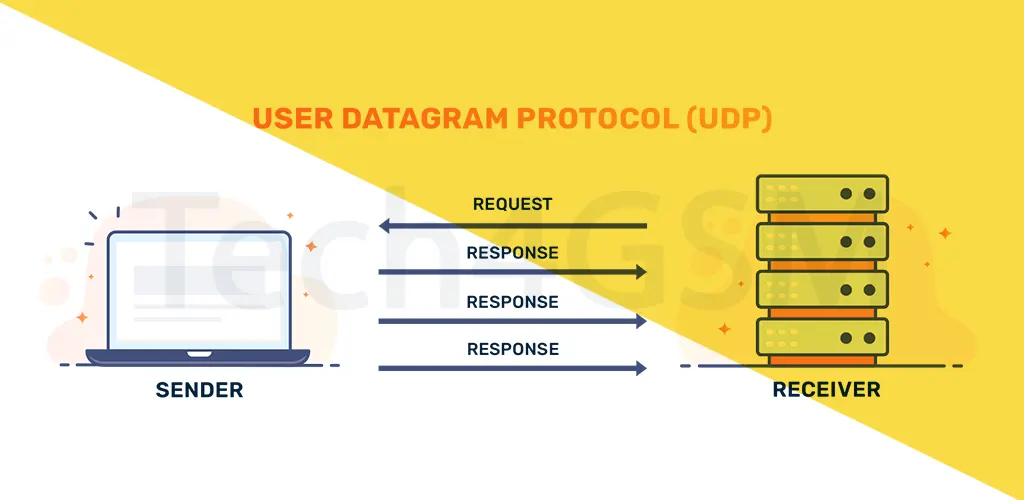
User Datagram Protocol (UDP) is a Transport Layer protocol that plays a vital role in the Internet Protocol (IP) suite. Unlike its sibling, TCP, UDP is connectionless, lightweight, and ultra-fast, making it ideal for applications where speed matters more than perfect accuracy. Let’s break down how UDP works, its benefits, and where you’ll see it in action in 2025!
What Is User Datagram Protocol (UDP)?
UDP is a core internet protocol designed for quick, low-latency data transfers. It doesn’t bother with handshakes, error-checking, or retransmitting lost packets. Think of it as a “fire-and-forget” method—perfect for live video streaming, online gaming, or DNS lookups, where delays ruin the experience.
Key Features of UDP:
- No connection setup: Data is sent immediately.
- Minimal header size: Only 8 bytes (vs. TCP’s 20-60 bytes).
- Supports multicast/broadcast: Send data to multiple devices at once.
- Zero congestion control: Faster speeds but risks network overload.
UDP Header: Simple & Efficient
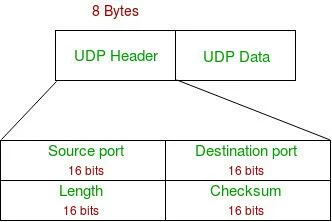
The UDP header is a tiny 8-byte package with just four fields:
- Source Port (2 Bytes): Identifies the sender’s port.
- Destination Port (2 Bytes): Specifies the receiver’s port.
- Length (2 Bytes): Total size of the UDP packet (header + data).
- Checksum (2 Bytes): Optional error-checking (unlike mandatory TCP checksums).
Fun Fact: UDP ports range from 0 to 65535, but port 0 is reserved.
Where Is UDP Used? Real-World Applications
UDP shines in scenarios where speed beats perfection:
- Live Streaming: Zoom calls, Netflix, or Twitch rely on UDP for real-time feeds.
- Online Gaming: Lose a packet? No problem—keep the game moving!
- DNS Queries: Quick domain-to-IP translations without delays.
- IoT Devices: Smart home gadgets use UDP for instant updates.
- VoIP Services: WhatsApp/Skype calls need UDP’s low latency.
TCP vs UDP: The Battle of Protocols
| Feature | TCP | UDP |
|---|---|---|
| Connection | Connection-oriented (handshakes) | Connectionless (no setup) |
| Reliability | Guaranteed delivery | No delivery guarantees |
| Speed | Slower (due to error-checking) | Blazing-fast |
| Error Checking | Extensive | Basic (checksum only) |
| Use Cases | Web browsing, emails, file transfers | Gaming, streaming, DNS, VoIP |
Advantages of UDP
- ⚡ Faster Transfers: No connection setup or complex checks.
- 🎮 Low Latency: Perfect for real-time apps.
- 📢 Multicast Support: Send data to multiple devices efficiently.
- 🛠️ Simplicity: Easy to implement and manage.
Disadvantages of UDP
- ❌ No Reliability: Lost packets? UDP won’t resend them.
- 🚦 No Congestion Control: Can overwhelm networks.
- 🛡️ Security Risks: Vulnerable to DDoS attacks (see below).
How Hackers Exploit UDP: DDoS Attacks
In a UDP flood attack, hackers bombard a target with fake UDP packets. The server, overwhelmed by requests, crashes. Here’s how it works:
- Attacker sends UDP packets to random ports on the target.
- Server checks ports, finds no apps, sends “unreachable” replies.
- Spoofed IP addresses trick the server into replying to innocent bystanders.
Mitigation: Use traffic monitoring tools and firewalls to block suspicious spikes.
UDP Pseudo Header: Ensuring Correct Delivery
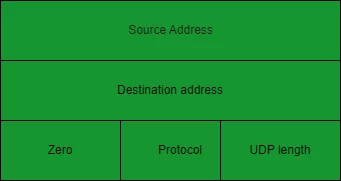
UDP uses a pseudo-header to confirm packets reach the right destination. It combines the UDP header, IP addresses, and protocol type for checksum calculations. If the checksum matches, the packet is valid!
Conclusion: Why UDP Matters in 2025
As we step into 2025, UDP remains critical for real-time communication and IoT innovations. While it’s not perfect for every job, its speed and simplicity make it irreplaceable for gaming, streaming, and more.
FAQ: Quick UDP Answers
1. Which apps use UDP?
- DNS, VoIP (Skype), DHCP, online games, and live streaming.
2. Is UDP faster than TCP?
- Yes! No handshakes or error recovery = lower latency.
3. Is UDP secure?
- It lacks built-in security. Use additional protocols (like DTLS) for safety.
4. What OSI layer is UDP on?
- Layer 4 (Transport Layer), like TCP.
5. Does UDP support broadcasting?
Yes! It can send data to multiple devices at once.