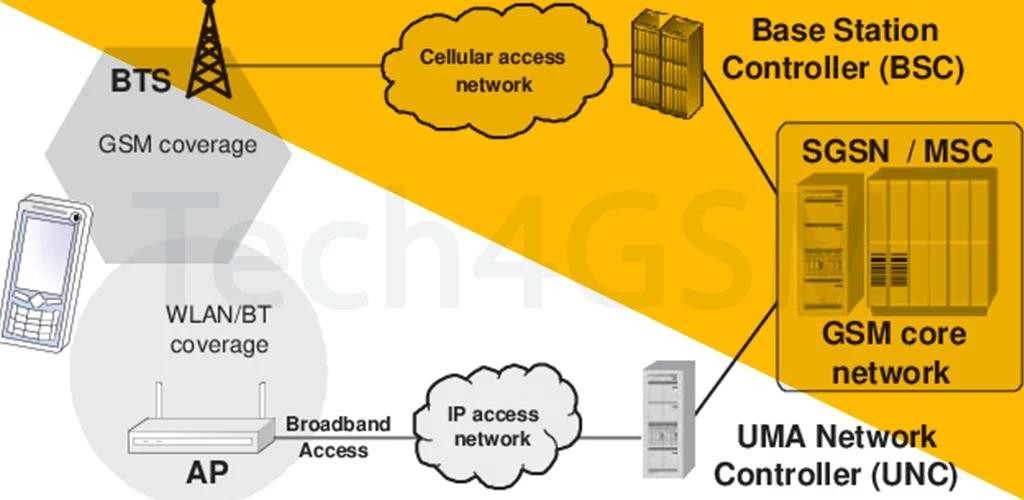
Introduction
Ever lost cell signal at home but had Wi-Fi? UMA lets you make calls and use data over Wi-Fi as if you’re on a cellular tower—no apps needed! Let’s uncover how this tech keeps you connected anywhere and why it’s smarter than regular VoIP.
What is UMA?
- Cellular Over Wi-Fi/Bluetooth: UMA turns your Wi-Fi into a virtual cell tower. Call, text, and browse like normal, even with zero bars!
- Seamless Switching: Walk from Wi-Fi to outside? UMA hands off your call to the cellular network without dropping it.
- Carrier Magic: Unlike Skype or WhatsApp, UMA uses your existing phone number and plan. No new app or login!
Fun Fact: T-Mobile’s Wi-Fi Calling is a modern version of UMA tech!
How UMA Works: A 3-Step Miracle
- Connect to Wi-Fi: Your UMA-enabled phone links to your home/router Wi-Fi.
- Bridge to Cellular: The Wi-Fi signal routes through the carrier’s UMA Network Controller to the mobile core.
- Behave Like Normal: Your call/data flows like it’s from a cell tower. The network can’t tell the difference!
Why UMA Beats Regular VoIP
| UMA | VoIP (e.g., WhatsApp) |
|---|---|
| Uses your phone number | Needs a separate app/account |
| Billed as normal calls/data | Uses internet data or Wi-Fi |
| No extra apps | Requires app installation |
| Carrier authentication | Third-party security risks |
UMA’s Big Benefits
- Dead Zone Savior: Perfect for basements, rural areas, or buildings with poor signal.
- Cost Saver: Make international calls via Wi-Fi, avoiding roaming fees.
- Battery Friendly: Wi-Fi often uses less power than searching for cellular signal.
What You Need to Use UMA
- UMA Phone: Older models (BlackBerry, Samsung Galaxy S4) or newer iPhones/Android phones with Wi-Fi Calling.
- Carrier Support: T-Mobile, Orange, and others offered UMA. Today, it’s often rebranded as Wi-Fi Calling.
- Wi-Fi Network: Any broadband connection (home, café, airport).
The Catch? UMA’s Limitations
- Device Compatibility: Not all phones support it. Check specs!
- Carrier Control: Your provider must enable it (often hidden behind “Wi-Fi Calling” settings).
- Wi-Fi Quality: Poor Wi-Fi = choppy calls.
Fun Fact: UMA’s 2004 Debut
UMA first launched on BlackBerry phones to help business users stay connected. It was way ahead of its time!
UMA vs. Modern Wi-Fi Calling
- Same Idea, New Name: Carriers now use VoWiFi (Voice over Wi-Fi), a 4G/5G version of UMA.
- Better Quality: Newer tech supports HD voice and faster handoffs.
- No Special Gear: Built into most smartphones today.
Final Thoughts
UMA was the quiet pioneer of seamless connectivity, letting Wi-Fi and cellular networks shake hands. While it’s evolved into Wi-Fi Calling, its legacy lives on in every dropped-call-free conversation you have at home. Next time your phone switches to Wi-Fi Calling, remember: UMA paved the way!
Your Turn!
Check your phone settings—your Wi-Fi might already be doubling as a cell tower! 🌐📶