Introduction
In the digital age, Input-Output (I/O) Interfaces act as the unsung heroes, seamlessly connecting humans and machines. Whether you’re typing on a keyboard, printing a document, or using a VR headset, I/O systems make it possible. Let’s break down how these interfaces work, why they matter, and what’s new in 2025!
What is an Input-Output (I/O) Interface?
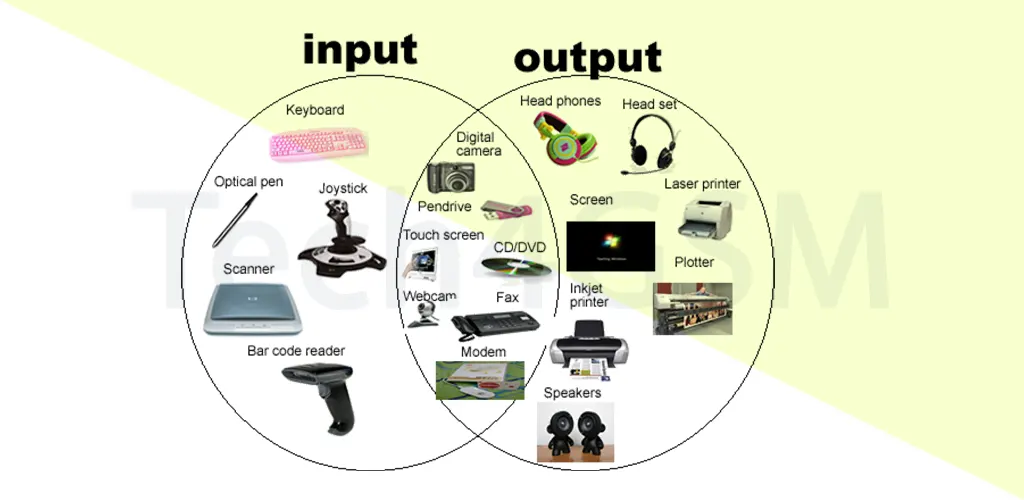
An I/O Interface is a bridge that transfers data between a computer’s internal memory (like RAM) and external devices (peripherals). These peripherals include:
- Input Devices: Keyboards, mice, scanners, microphones.
- Output Devices: Monitors, printers, speakers.
- Hybrid Devices: Touchscreens, external hard drives, USB-C docks (both input and output).
Without I/O interfaces, your CPU couldn’t communicate with the physical world.
Why Do We Need I/O Interfaces?
CPUs and peripherals are like two people speaking different languages. Here’s why they need a mediator:
- Different “Natures”:
- CPU: Electronic, processes data at lightning speed.
- Peripherals: Often electromechanical (e.g., a printer’s moving parts).
- Speed Mismatch:
A CPU can process billions of operations per second, while a keyboard input might take milliseconds. - Data Formats:
CPUs use binary (0s/1s), but peripherals like modems send analog signals. - Operating Modes:
Each device (e.g., a monitor vs. a webcam) operates differently.
The I/O interface resolves these gaps, ensuring smooth communication.
Key Functions of an I/O Interface
- Synchronization:
Matches the CPU’s speed with slower peripherals using buffers (temporary data storage). - Device Selection:
Identifies which device to communicate with (e.g., selecting a printer over a speaker). - Signal Conversion:
- Serial to Parallel: Converts data streams (e.g., USB signals).
- Digital to Analog: Vital for audio outputs or modem operations.
- Error Detection:
Flags issues like corrupted data during transfers. - Control & Timing:
Manages when and how data is sent (e.g., ensuring a document prints page-by-page).
2025 Trends in I/O Technology
- USB4 Dominance:
With speeds up to 40 Gbps, USB4 is becoming the universal standard for charging, data, and video. - Wireless I/O Expansion:
Bluetooth 5.3 and Wi-Fi 7 reduce reliance on physical ports. - AI-Optimized Interfaces:
Self-healing ports that detect and fix connection issues automatically. - Eco-Friendly Peripherals:
Solar-powered keyboards and low-energy monitors gain traction.
FAQs: Input-Output Simplified
Q1: What’s the difference between input and output devices?
- Input: Sends data to the computer (e.g., keyboard).
- Output: Receives data from the computer (e.g., monitor).
Q2: Why does my computer need a separate GPU?
A GPU is a specialized output device handler, rendering complex visuals faster than a CPU.
Q3: Can one port handle multiple I/O devices?
Yes! USB-C hubs let you connect monitors, drives, and chargers via one port.
Q4: How do wireless devices avoid interference?
Advanced protocols like Wi-Fi 7 use multiple frequencies to reduce signal clashes.
Q5: What’s the future of I/O in 2025?
Expect smarter, faster interfaces with AI integration and eco-conscious designs.
Why I/O Matters More Than Ever
From gaming to IoT smart homes, I/O interfaces enable every digital interaction. As tech evolves in 2025, these systems will prioritize speed, adaptability, and sustainability.
Final Tip: Always use high-quality cables and drivers to maximize your I/O performance.