
Introduction
Java Servlets are powerful server-side programs that extend the capabilities of web servers to create dynamic, interactive web applications. They form the foundation of Java-based web development, offering speed, scalability, and seamless integration with databases and other technologies. In 2025, Servlets remain a cornerstone for developers building enterprise-level applications, e-commerce platforms, and content management systems.
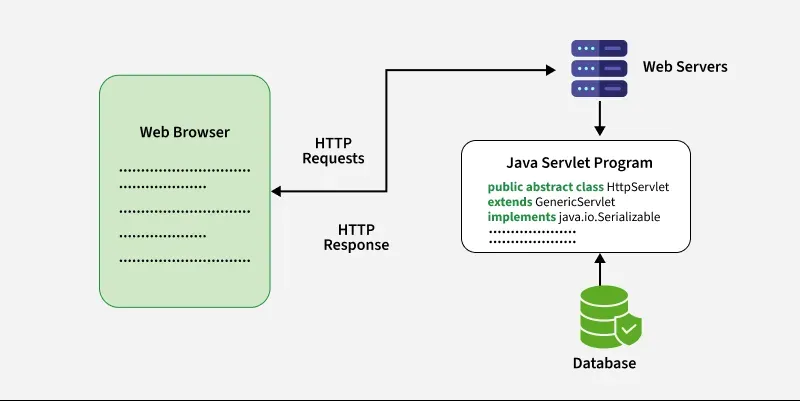
What Are Java Servlets?
A Java Servlet is a Java class that runs on a web server or application server. It processes client requests (like HTTP GET/POST) and generates dynamic responses. Unlike static HTML pages, Servlets adapt content based on user input, sessions, or real-time data.
Key Features of Java Servlets:
- Server-Side Execution: Operate on the server, not the client’s browser.
- Platform Independence: “Write once, run anywhere” with Java.
- Efficiency: Handle multiple requests using a single instance.
- Integration: Work with databases (JDBC), APIs, and frameworks like Spring.
Creating a Basic Servlet
Let’s build a simple Servlet to understand its structure.
// HelloWorldServlet.java
import java.io.*;
import javax.servlet.*;
import javax.servlet.http.*;

public class HelloWorldServlet extends HttpServlet {
    protected void doGet(HttpServletRequest request, HttpServletResponse response)
    throws ServletException, IOException {
        response.setContentType("text/html");
        PrintWriter out = response.getWriter();
        out.println("<html><body><h1>Hello, World!</h1></body></html>");
    }
}
Explanation:
- Import Packages: Use
javax.servletandjavax.servlet.httpfor Servlet functionality. - Extend HttpServlet: Override
doGet()ordoPost()to handle requests. - Set Response Type: Define content type (e.g., HTML, JSON).
- Write Output: Use
PrintWriterto send dynamic content to the client.
Configuring a Servlet
Servlets require configuration in the web.xml file (deployment descriptor) to map URLs.
<web-app xmlns="http://java.sun.com/xml/ns/javaee"
         version="3.0">
    <servlet>
        <servlet-name>HelloWorldServlet</servlet-name>
        <servlet-class>HelloWorldServlet</servlet-class>
    </servlet>
    <servlet-mapping>
        <servlet-name>HelloWorldServlet</servlet-name>
        <url-pattern>/hello</url-pattern>
    </servlet-mapping>
</web-app>
Modern Approach (Annotations):
@WebServlet(name = "HelloWorldServlet", urlPatterns = "/hello")
public class HelloWorldServlet extends HttpServlet { ... }
Why Annotations?
- Eliminates XML configuration.
- Simplifies deployment in frameworks like Spring Boot.
Why Choose Java Servlets Over CGI or PHP?
While PHP and CGI scripts are alternatives, Servlets excel in performance and scalability.
Limitations of CGI:
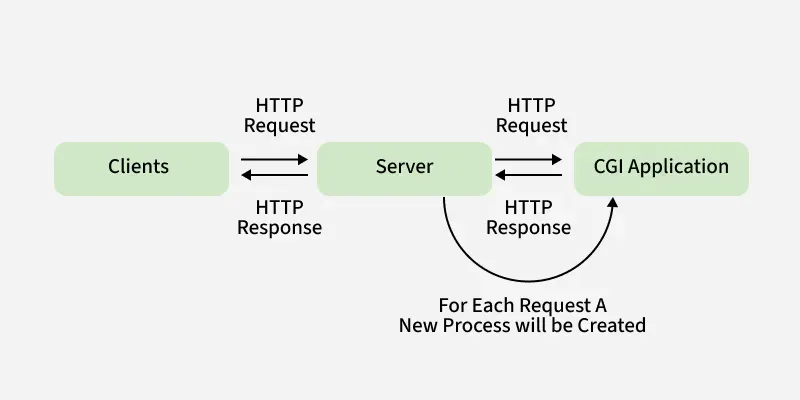
- High Overhead: Creates a new process for every request.
- Slow Performance: Struggles with heavy traffic.
- No Shared Memory: Cannot reuse data between requests.
Advantages of Servlets:
- Lightweight Threads: Handle multiple requests within a single process.
- Persistence: Maintain data across requests (e.g., user sessions).
- Security: Leverage Java’s built-in security features.
- Cost-Effective: Free servers like Apache Tomcat lower deployment costs.
Java Servlet Architecture
The Servlet architecture follows a streamlined workflow:
- Client Request: User sends a request via browser (e.g.,
https://tech4gsm.com/hello). - Web Server: Routes the request to the Servlet container.
- Servlet Processing:
init(): Initializes the Servlet (once).service(): Delegates todoGet()ordoPost().- Generates dynamic content (e.g., HTML, data from a database).
- Response: Servlet sends output back to the client.
Servlet Lifecycle Methods
Every Servlet follows three lifecycle stages:
- init():
- Called once during initialization.
- Load configurations (e.g., database credentials).
@Override
public void init() throws ServletException {
    System.out.println("Servlet initialized!");
}
- service():
- Handles incoming requests.
- Routes to appropriate methods (
doGet(),doPost()).
@Override
protected void service(HttpServletRequest request, HttpServletResponse response)
throws ServletException, IOException {
    super.service(request, response);
}
- destroy():
- Cleans up resources (e.g., closing database connections).
@Override
public void destroy() {
    System.out.println("Servlet destroyed!");
}
Servlet vs CGI: Key Differences
| Aspect | Java Servlets | CGI (Common Gateway Interface) |
|---|---|---|
| Execution Model | Thread-based: Handles requests using lightweight threads within a single JVM. | Process-based: Spawns a new OS process for each client request. |
| Performance | High efficiency: Reuses threads, reducing overhead and response time. | Slower: Process creation/destruction adds latency, especially under load. |
| Resource Management | Shared memory: Data persists across requests, optimizing resource usage. | Isolated memory: No data sharing between processes; higher resource consumption. |
| Portability | Platform-independent: Runs on any system with a JVM and Servlet container. | Language-dependent: Scripts may need adjustments for different OS environments. |
| Cost | Cost-effective: Free servers like Apache Tomcat reduce deployment expenses. | Potentially expensive: Licensing fees for certain tools/optimized servers. |
| Session Management | Built-in support: Tracks user sessions via cookies or URL rewriting. | Manual handling: Requires custom code (e.g., hidden form fields) for sessions. |
| Scalability | Highly scalable: Efficiently manages thousands of concurrent requests. | Limited scalability: Struggles with high traffic due to process overhead. |
| Security | Java security: Inherits JVM’s sandboxing, encryption, and access controls. | Varies by language: Security depends on scripting language (e.g., Perl/PHP). |
| Integration | Seamless: Directly connects with JDBC, JPA, and frameworks like Spring. | Complex: Requires external libraries or middleware for advanced features. |
| Use Case | Enterprise apps: Ideal for large-scale, dynamic applications (e.g., banking). | Simple tasks: Better suited for small scripts or legacy systems. |
Key Takeaways
- Servlets excel in performance, scalability, and modern web development, making them ideal for enterprise applications.
- CGI is simpler to implement for basic tasks but lacks efficiency for high-traffic or complex systems.
- Java’s thread reuse, shared memory, and ecosystem give Servlets a significant edge over CGI in 2025.
Essential Servlet Packages and Classes
Java Servets rely on two core packages:
- javax.servlet (Basic):
Servlet Interface: Core methods (init(),service(),destroy()).ServletRequest/ServletResponse: Handle client input/output.
- javax.servlet.http (Advanced):
HttpServlet: Base class for HTTP Servlets.HttpSession: Manages user sessions.Cookie: Handles browser cookies.
Key Classes and Interfaces
Various classes and interfaces present in these packages are:
| Component | Role / Type | Package |
|---|---|---|
| Servlet | Core interface for handling client-server logic. | javax.servlet.* |
| ServletRequest | Interface to capture client input (e.g., forms). | javax.servlet.* |
| ServletResponse | Interface to construct server output (e.g., HTML). | javax.servlet.* |
| GenericServlet | Base class for protocol-agnostic servlet logic. | javax.servlet.* |
| HttpServlet | Specialized class for HTTP request handling. | javax.servlet.http.* |
| HttpServletRequest | Extends ServletRequest with HTTP-specific data. | javax.servlet.http.* |
| HttpServletResponse | Extends ServletResponse for HTTP headers/cookies. | javax.servlet.http.* |
| Filter | Interface to intercept/modify requests/responses. | javax.servlet.* |
| ServletConfig | Interface to access servlet configuration parameters. | javax.servlet.* |
Key Roles Explained
- Servlet: Foundation interface defining lifecycle methods (
init(),service(),destroy()). - ServletRequest/ServletResponse: Manage data flow between client and server.
- GenericServlet: Simplifies servlet creation for non-HTTP protocols (rarely used directly).
- HttpServlet: Overrides
doGet(),doPost()for RESTful APIs or web apps. - HttpServletRequest/Response: Add HTTP-specific features (e.g., cookies, sessions).
- Filter: Enables tasks like authentication, logging, or compression.
- ServletConfig: Retrieves initialization parameters from
web.xmlor annotations.
Package Breakdown
javax.servlet: Core components for generic servlet operations.javax.servlet.http: Specialized classes/interfaces for HTTP-based apps.
Servlet Containers: The Runtime Engine
A Servlet Container (e.g., Apache Tomcat, Jetty) provides the runtime environment for Servlets.
Key Responsibilities:
- Lifecycle Management: Invokes
init(),service(), anddestroy(). - Resource Pooling: Reuses threads and database connections.
- Security: Enforces authentication and encryption (HTTPS).
- Session Tracking: Uses cookies or URL rewriting to maintain user state.
Popular Containers in 2025:
- Apache Tomcat 11: Lightweight and widely adopted.
- WildFly: Ideal for Jakarta EE applications.
- IBM WebSphere: Enterprise-grade features.
Real-World Use Cases of Java Servlets
- E-Commerce Platforms:
- Generate dynamic product catalogs.
- Process payments securely using JDBC and SSL.
- Banking Apps:
- Manage user sessions for secure transactions.
- Integrate with REST APIs for real-time data.
- Content Management Systems (CMS):
- Handle file uploads and user authentication.
- Deliver personalized content based on user roles.
FAQs About Java Servlets
Q1: What’s the difference between Servlets and JSP?
- Servlets: Java code with HTML snippets.
- JSP: HTML pages with embedded Java (easier for UI design).
Q2: How do Servlet Filters work?
Filters preprocess requests (e.g., logging, authentication) before they reach a Servlet.
@WebFilter("/secure/*")
public class AuthFilter implements Filter {
    public void doFilter(ServletRequest request, ServletResponse response, FilterChain chain)
    throws IOException, ServletException {
        // Check user login
        chain.doFilter(request, response);
    }
}
Q3: Are Servlets still relevant in 2025?
Yes! They power frameworks like Spring MVC and microservices.
Conclusion
Java Servlets remain indispensable for building scalable, secure web applications in 2025. By mastering Servlets, you unlock the potential to work with advanced frameworks, cloud platforms, and enterprise systems. Whether you’re developing a blog or a banking app, Servlets provide the flexibility and performance needed for modern web development.